
Reliable Internet for Commercial Fleets and Vessels on the Move
Fleet Wi-Fi works best when each truck, van or vessel uses more than one internet connection at the same time: 4G/5G cellular on land, Starlink at sea and on remote routes, and shore Wi-Fi in port. Any single internet connection drops somewhere along the route. A delivery truck losing its tracking for ten minutes is annoying. A vessel losing its only internet connection mid-voyage cuts off tracking, crew calls and safety systems until land or a cell tower is back in range.
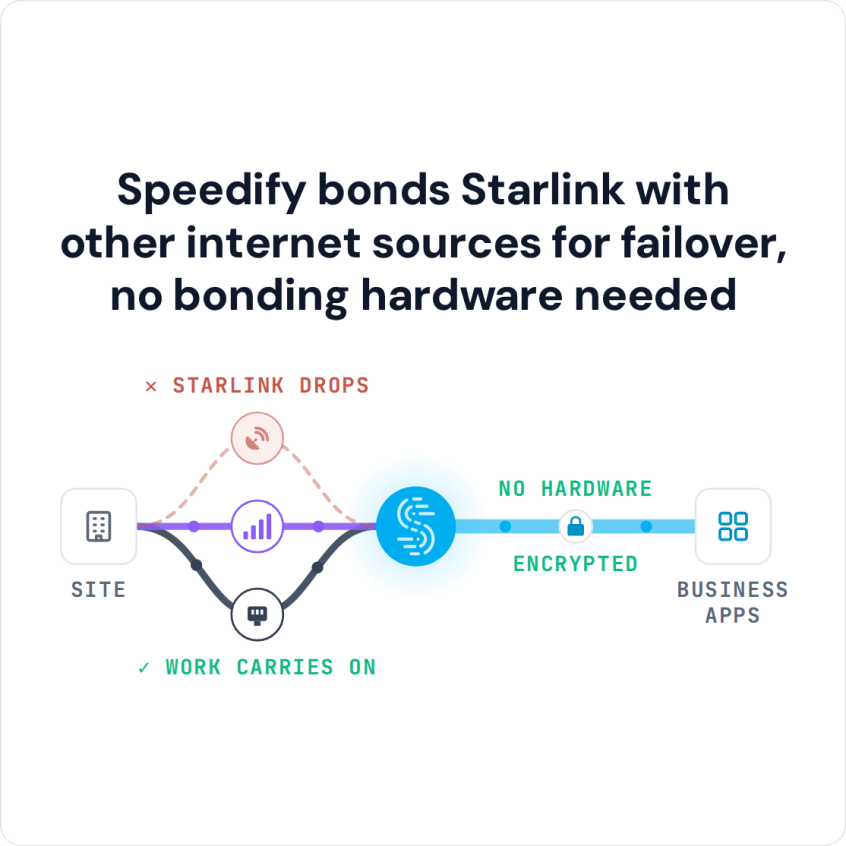
Speedify, an app that runs on routers, computers and phones, uses every internet connection on a vehicle or vessel together: Wi-Fi, 4G/5G cellular, Ethernet, Starlink and other satellite internet. Speedify combines them for close to their combined speed and moves traffic to whichever internet connection works best at each moment, so fleet internet stays up when one of them drops. With only one internet connection on board, Speedify works as an encrypted VPN and cannot stop it from dropping.
Watch now
How Speedify combines internet connections on any hardware
Get started with Speedify for your business
Speedify offers three commercial paths. They work together, and most enterprise customers use two or more.
01
Speedify Teams
Speedify on every supported OS for every team member
Centralized dashboard for billing, user provisioning, and usage analytics
CSV import/export and a RESTful management API
02
Speedify for Routers
License for supported OpenWrt routers
Powered by Speedify hardware lineup ready to deploy out of the box
Miri, GL.iNet and other partner models
Covers every device on the network, with no per-device install
03
Embed Speedify into your product
A · DIY
Build it yourself with the Speedify SDK.
Integrate Speedify into your iOS, Android, Windows, macOS, Linux or QNX product. Full developer documentation, sample code and supported integration paths. Your team owns the build, and the Speedify SDK handles combining the internet connections.
B · CUSTOM ENGINEERING
Have the Speedify team build it for you.
Why Internet for Fleets and Commercial Vessels Keeps Dropping
Fleet and ship operators hit the same problems as vehicles and vessels move through changing conditions:
- Coverage that changes by the hour. A truck or ship moves in and out of cellular range all day, unlike an office that stays put.
- One provider, one point of failure. A vehicle that depends on one satellite provider or one cellular carrier goes offline whenever that provider does.
- Coming into port. Vessels near port need to move cleanly between satellite internet and shore Wi-Fi or cellular.
- Mixed fleets. Trucks, vans and vessels each have different internet connections available, so one identical setup rarely fits all of them.
Satellite speeds at sea vary with the service and plan. For Starlink, the Priority plans, made for use on the move, get 135 to 310 Mbps download and 20 to 44 Mbps upload, according to Starlink.
Use Starlink, Cellular and Shore Wi-Fi Together on Each Vehicle or Vessel with Speedify
Every vehicle or vessel has its own mix of internet connections, and Speedify uses whatever is there, so the fleet doesn’t need identical hardware everywhere. A long-haul truck might use two cellular carriers together, while a vessel uses Starlink together with shore Wi-Fi when docked and cellular near the coast. The same approach is covered in using Starlink and 5G together for business, and Speedify for business extends it across a whole fleet instead of one vehicle at a time.
Speedify can’t create signal in open water or a dead zone. Speedify needs at least two working internet connections on a vehicle or vessel, so a unit with one Starlink dish and no cellular connection still depends on that one internet connection.
How Tracking, Calls and Cloud Apps Stay Online While Moving
Vehicle tracking reports, driver and crew calls, and cloud logistics apps all need to stay connected as conditions change, not reconnect every time a vehicle passes through a coverage gap. When one internet connection weakens, Speedify moves its traffic to one that works right away, so a call in progress or a tracking upload carries on instead of dropping and starting over.
How Fleet Managers Handle Every Vehicle and Vessel from One Dashboard
Fleet managers looking after dozens or hundreds of vehicles and vessels need one place to manage every unit, not a separate account and setup on each one.
Speedify Teams gives admins one web dashboard to add and remove users, handle billing and monitor usage statistics. The Speedify Teams API lists the devices enrolled under each team member and shows which users are actively using Speedify, so your fleet software can check from one place which vehicles and vessels are running Speedify. Routers in the field can also be activated through the API, without storing an account password on any router.
Static IP Addresses and Data Location Rules for Fleet Internet Traffic
Fleets carrying regulated cargo, or working across several countries, often need their traffic to leave the internet from one known place instead of from whatever address each internet connection happens to have. Speedify Dedicated Servers give a fleet static IP addresses (fixed internet addresses), in a server location you choose from Speedify’s network, so each vehicle’s internet looks the same to your systems whichever internet connection carries the traffic. When fleet data must stay on equipment you control, Speedify Self-Hosted Servers run the traffic through your own servers.
How to Roll Speedify Out Across a Mixed Fleet of Vehicles and Vessels
Rolling Speedify out across a mixed fleet of trucks and vessels usually goes like this:
- List the internet connections on each vehicle or vessel type: cellular carriers, satellite dishes and shore Wi-Fi.
- Install a Powered by Speedify router on the vehicles and vessels that need every device covered.
- Enroll every unit in Speedify Teams to manage them all from one dashboard and the Speedify Teams API.
- Add Speedify Dedicated Servers where you need static IP addresses, or Self-Hosted Servers where data must stay on your own servers.
- Test on a few units first: unplug one internet connection during a call, check the call stays up, then roll out to the whole fleet.
To plan Speedify for your fleet, from a few test vehicles to every truck and vessel, Contact Us.
Speedify Is Used on Millions of Devices Worldwide
Speedify has made internet connections faster and more reliable for businesses and individuals since 2014.
15M+
Speedify downloads worldwide75K+
5-star reviews for Speedify on iOS and Android82
Speedify server points of presence in 50+ cities on 6 continents500TB+
Of internet traffic carried by Speedify every weekSpeedify Partners
Speedify works with these companies to bring faster, more reliable internet and networking technology to their customers and employees.


Speedify Business Solutions
Speedify Teams
Speedify for Routers

Speedify Embedded Solutions and Integrations
Add Speedify to your own app or hardware with the Speedify SDK. Your product then combines internet connections, fails over automatically when one drops, and encrypts the traffic, using the same technology as the Speedify app.