
Reliable Internet for Digital Signage Networks Starts With Redundant Connections
A blank screen at a mall entrance or a frozen menu board at a drive-thru sends the wrong message before a single ad ever plays. Digital signage networks depend on a steady stream of content updates, and when one internet connection drops for even a few seconds, a screen either freezes on stale creative or goes dark entirely. Most digital signage deployments still run on a single wired line per location, so one outage, one loose cable, or one ISP hiccup takes the whole screen offline until someone notices.
Speedify solves this by bonding every available internet connection at a signage location into one resilient link. Through Speedify’s channel bonding technology, Speedify combines Wi-Fi, 4G/5G cellular, Ethernet, Starlink and other satellite connections into a single stream, using up to 95% of the combined capacity and routing traffic around any path that stalls. Speedify never waits for one connection to time out before trying another; it moves data across whichever paths are healthy at that moment.
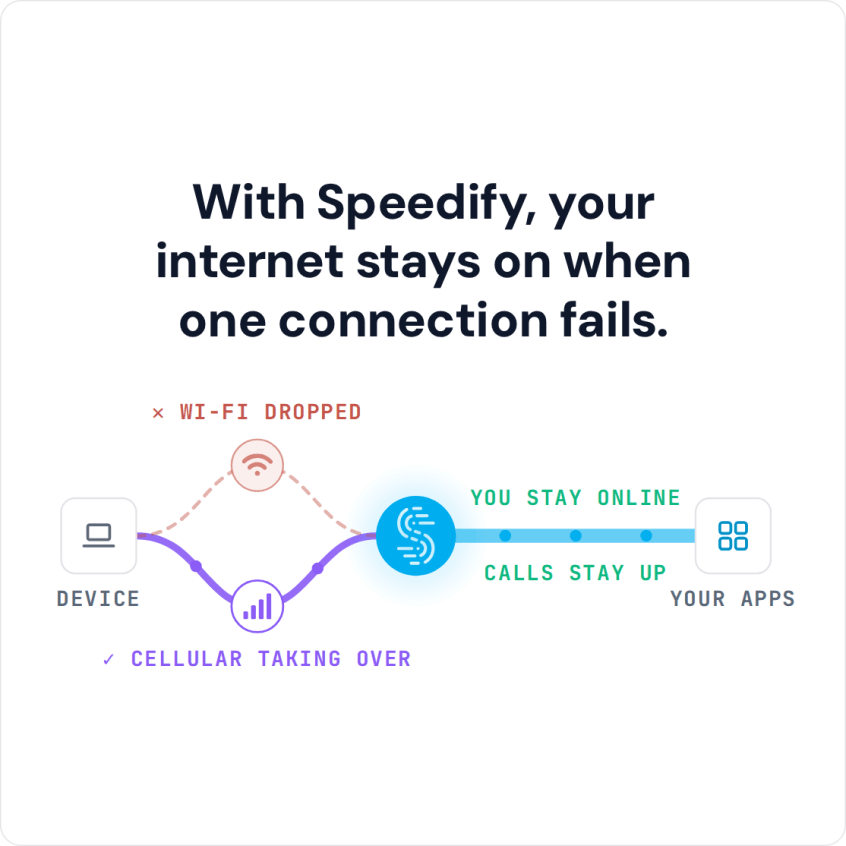
With Speedify, your internet stays on when one connection fails.
Watch now
How Speedify combines internet connections on any hardware
Get started with Speedify for your business
Speedify offers three commercial paths. They work together, and most enterprise customers use two or more.
01
Speedify Teams
Speedify on every supported OS for every team member
Centralized dashboard for billing, user provisioning, and usage analytics
CSV import/export and a RESTful management API
02
Speedify for Routers
License for supported OpenWrt routers
Powered by Speedify hardware lineup ready to deploy out of the box
Miri, GL.iNet and other partner models
Covers every device on the network, with no per-device install
03
Embed Speedify into your product
A · DIY
Build it yourself with the Speedify SDK.
Integrate Speedify into your iOS, Android, Windows, macOS, Linux or QNX product. Full developer documentation, sample code and supported integration paths. Your team owns the build, and the Speedify SDK handles combining the internet connections.
B · CUSTOM ENGINEERING
Have the Speedify team build it for you.
Why signage screens go blank: connectivity blips
Digital signage networks rarely fail dramatically. The causes are usually small and easy to miss until a screen is already dark:
- Single point of failure. One Ethernet drop or ISP outage takes the screen offline with no backup path in place.
- Congested shared Wi-Fi. Screens sharing bandwidth with guest network traffic buffer or freeze during peak hours.
- Silent packet loss. A degraded line keeps passing some traffic while dropping just enough packets to corrupt a content sync, leaving a blank or outdated frame.
- Weak signal at remote sites. Rural billboards and drive-thru lanes often sit at the edge of cellular coverage, where a single carrier connection cannot be trusted on its own.
Bonding wired and 4G/5G cellular for always-on displays
Speedify treats every network path as an asset rather than a single point of failure. At each display location, Speedify bonds the Ethernet drop with a 4G/5G cellular connection, so if the wired line drops, cellular is already carrying traffic, with failover completing in under a second.
For multi-location retail chains and digital-out-of-home networks, Speedify’s enterprise channel bonding extends this same approach across dozens or hundreds of screens, each with its own bonded connection reporting back to a central dashboard.
Sites that pair cellular with satellite backhaul benefit from the same approach used when bonding Starlink and 5G for business connectivity, giving a signage network two genuinely independent paths instead of two connections riding the same congested tower.
How Speedify keeps content syncing across locations
Signage players pull new creative, playlists, and proof-of-play logs on a schedule, and Speedify keeps that traffic moving even when one path degrades. Encryption runs under a strict no-logs policy, so content updates and analytics traveling between the media player and the content management system stay private across every connection in the bond. Because Speedify balances traffic dynamically, a large video asset downloading in the background does not block the small heartbeat pings that tell head office a screen is alive and current.
Central management with Speedify Teams
Operators managing signage across many sites need to know which screens are online and which connections are struggling before a customer ever notices a blank display. Speedify Teams gives administrators a single dashboard showing connection status, data usage, and bonded link health across every deployed location. Configuration changes, uptime reviews, and troubleshooting happen from that dashboard, without a technician driving out to each site.
Deployment and monitoring: what a Speedify rollout looks like
Rolling Speedify out across a signage fleet follows a repeatable pattern rather than a custom project at every site:
- Confirm each location has at least two independent connections, such as Ethernet plus a cellular modem.
- Install Speedify on the media player, or deploy a Speedify-powered router in front of it.
- Enroll the device in Speedify Teams for central visibility.
- Set the bonding mode based on priority, speed and reliability for most screens, redundant mode for locations tied to point-of-sale or safety messaging.
- Download Speedify to any additional locations as the rollout expands.
Bonding is not magic bandwidth. Speedify needs at least two working connections at a location to bond, and does not invent capacity that isn’t there. What Speedify does is make sure a screen keeps drawing on whatever capacity is available across every connection, shifting away from any single path the moment it degrades.
Speedify Is Used on Millions of Devices Worldwide
Speedify has made internet connections faster and more reliable for businesses and individuals since 2014.
15M+
Speedify downloads worldwide75K+
5-star reviews for Speedify on iOS and Android82
Speedify server points of presence in 50+ cities on 6 continents500TB+
Of internet traffic carried by Speedify every weekSpeedify Partners
Speedify works with these companies to bring faster, more reliable internet and networking technology to their customers and employees.


Digital Signage Internet Connectivity: FAQ
Does Speedify work with existing signage media players?
Speedify runs directly on Windows and Linux media players, or sits ahead of them in a Speedify-powered router, so the digital signage software already scheduling content needs no changes.
How many internet connections can Speedify bond at one signage location?
Speedify bonds as many connections as the hardware supports, typically an Ethernet line plus one or two cellular modems, combining them into a single resilient link.
Does Speedify guarantee a screen never goes offline?
Speedify keeps a screen online as long as at least one internet connection in the bond is working, and fails over in under a second when a path drops, but a location with only one working connection has no backup left to fall back on.
Can Speedify manage screens across many locations from one place?
Speedify Teams gives administrators a central dashboard to monitor connection status, data usage, and bonded link health across every signage location without an on-site visit.
Speedify Business Solutions
Speedify Teams
Speedify for Routers

Speedify Embedded Solutions and Integrations
Add Speedify to your own app or hardware with the Speedify SDK. Your product then combines internet connections, fails over automatically when one drops, and encrypts the traffic, using the same technology as the Speedify app.