
Unbreakable VPN Connection for Free Hotspots by Combining Starlink, Wi-Fi, 4G, 5G, and DSL with Speedify
Free hotspots are everywhere now, and plenty of them are overcrowded, throttled or barely working, which bothers people long before they worry about who else is watching. Both problems are real.
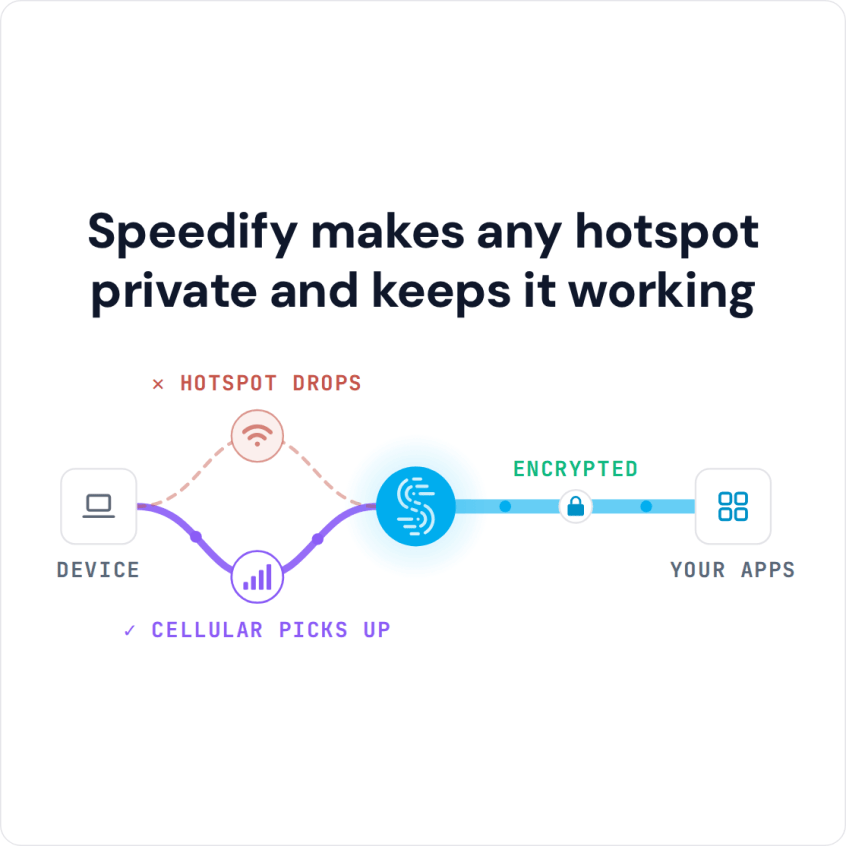
Speedify handles both: it encrypts your internet traffic the way a VPN does, and it adds your phone’s 4G/5G cellular connection alongside the free Wi-Fi, so a weak hotspot still streams and calls still connect. Speedify is free to try: a free Speedify account includes 5 GB per month on Windows, macOS, iOS and Android (Linux needs a paid plan).
Speedify makes any hotspot private and keeps it working
Below: whether free hotspots are safe, how to cover several devices at once, and how to set Speedify up as a hotspot VPN in five steps. The speed and failover gains need two or more internet connections, such as the hotspot Wi-Fi plus your phone’s 4G/5G cellular; on a single connection, Speedify works as an encrypted VPN and can be a little slower.
Set Up Speedify as a Free Hotspot VPN in Five Steps
- Download Speedify on your laptop or phone before you join the hotspot. Speedify runs on Windows, macOS, iOS, Android and Linux.
- Open Speedify and create a free account (the free tier includes 5 GB per month; Linux needs a paid plan), or sign in.
- On a phone, tap Allow when your phone asks to add a VPN configuration.
- Join the free Wi-Fi hotspot and accept its sign-in page if one appears. On a phone, keep 4G/5G cellular turned on so Speedify can use it as a second internet connection.
- Speedify connects to a Speedify server automatically. People on the hotspot, and the hotspot’s owner, now see only an encrypted connection to that server, not the sites and apps you use.
How Safe Free Wi-Fi Hotspots Are
Symantec surveyed thousands of people who use public Wi-Fi hotspots in 15 countries. You might expect them to worry about identity theft and spying, but most did not.
Instead, it showed that people are addicted to free Wi-Fi hotspots and don’t think twice about connecting to any network that can get them online in most cases. Getting Wi-Fi in a hotel, on an airplane, even in a restaurant or bar drives decision-making on where to go and stay. Half said the most important thing to access is GPS information. And 40 percent said they have used public Wi-Fi in hotels and rentals to watch adult content, and not the kind on HBO GO. Plenty of people do the same on trains, buses, in airports and even at work.
One of the most common attacks on free hotspots is the man-in-the-middle: a criminal sets up a free hotspot with a name you know (for example “StarbucksWiFi”). When you connect to it, or your phone joins it automatically, all your traffic passes through the attacker’s equipment, and anything not encrypted can be read.
Free Hotspot VPN Makes the Internet Safer
A virtual private network (VPN) encrypts the traffic between your device and the VPN provider’s server, so other people on the same hotspot, and the hotspot’s owner, see only scrambled data going to one server. Speedify, for example, encrypts your traffic with DTLS 1.2 and AES-256-GCM or ChaCha20-Poly1305 encryption before it leaves your device.
Share One Encrypted Connection with Several Devices on a Free Hotspot
If you have several devices, you can run all of them through one encrypted connection. Connectify Hotspot is Windows software that turns your computer into a Wi-Fi hotspot, so your phone, tablet and other devices connect through the computer and share its VPN protection.
Run Connectify Hotspot and Speedify on the same Windows computer, and every device on that hotspot uses Speedify’s encrypted connection. The free version of Connectify Hotspot runs 60-minute sessions you can restart; Hotspot PRO removes the time limit, adds a custom hotspot name and can share over Ethernet. If you use a Linux computer or a Raspberry Pi, you can turn that into a router to share the VPN connection over Wi-Fi with Speedify (Speedify on Linux needs a paid plan). A smart TV or game console can also get the VPN through an Ethernet cable.
Speedify as a Free Hotspot VPN: Encryption Plus 4G/5G Cellular Failover
Speedify works differently from a standard VPN. Speedify encrypts your traffic, splits it into packets and sends them across every internet connection you have, such as the hotspot Wi-Fi and your phone’s 4G/5G cellular; Speedify’s servers put the packets back together. With two or more connections, combining internet connections this way offsets the slowdown other VPNs cause by squeezing everything through one connection.
With Speedify on two or more connections, you do not have to choose between security, speed and stability: you can stream movies, hold video calls and play online video games over a free hotspot.
Speedify can combine multiple Internet connections at once, so downloads and uploads use the speed of the hotspot and your 4G/5G cellular together while your traffic stays encrypted.
With Speedify, an Internet connection dropping does not end your call or download: Speedify keeps you connected automatically by moving your traffic to the connections that still work.
Speedify Free Plan: What a Free Account Includes
To use Speedify for free, create a free Speedify account: it includes 5 GB per month on Windows, macOS, iOS and Android. Linux and routers need a paid plan, and free accounts get a smaller set of servers than paid plans. The Individual plan costs $89.99 a year ($7.49 a month billed yearly) or $14.99 month to month, and purchases made directly from Speedify come with a 30-day money-back guarantee.
Speedify
Get started with Speedify today.
Speedify combines Wi-Fi, 4G/5G cellular, Ethernet, Starlink and satellite into one faster, more reliable internet connection. Free to try: 5 GB a month with a free account. No credit card required.
🚀 Speed
Faster uploads and downloads, because Speedify uses all your internet connections at once.
📶 Stability
If one internet connection drops, Speedify moves your traffic to the others in milliseconds.
🔒 Security
AES-256 encryption on every internet connection, on any network you join.



15M+ downloads worldwide. 75K+ five-star reviews on iOS and Android.