
How to Stop Kodi Buffering Issues on Mac, PC, Android and iPhone
Kodi buffering means the video stops to reload part-way through, and that happens on a Mac, a Windows PC, an Android phone and an iPhone alike. Clearing the cache or freeing memory rarely helps, because what runs short is data arriving over your internet connection, not space on the device.
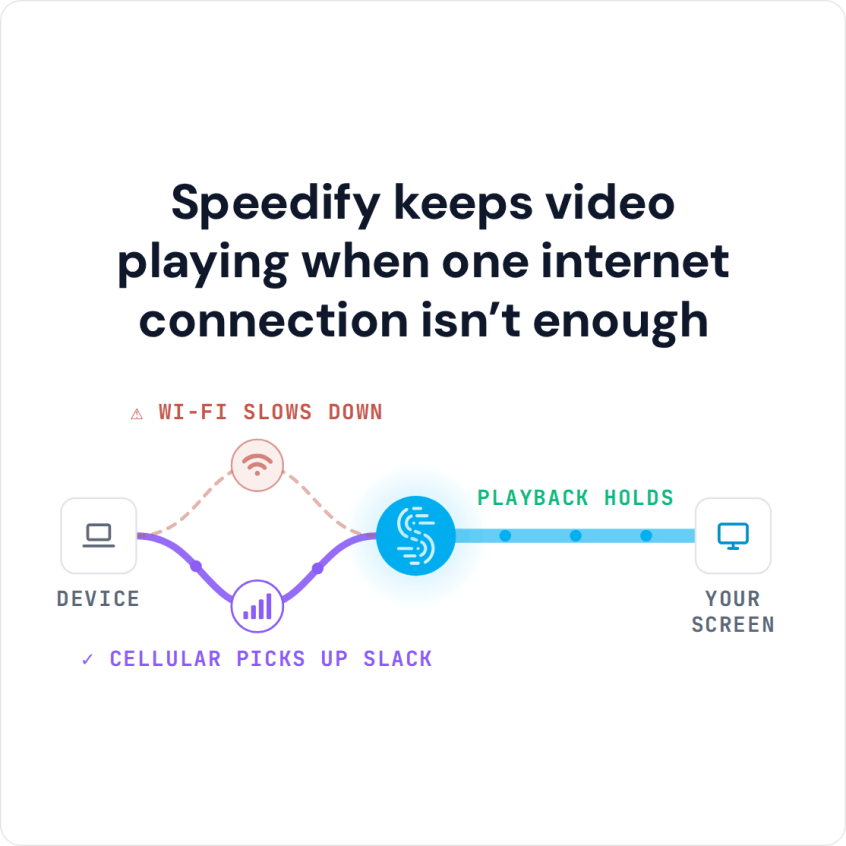
Speedify is an app that runs one internet session over Wi-Fi, 4G/5G cellular, wired Ethernet, Starlink and other internet connections together, so Kodi has a second source of data to lean on. With only one connection, Speedify works as an encrypted VPN and cannot add speed or stop that connection from dropping. Below: why Kodi buffers, and what using Speedify does to cut Kodi buffering.
How to Stop Kodi Buffering with Speedify
- Download Speedify on the computer or phone you run Kodi on (Windows, macOS, iOS or Android).
- Open Speedify and create a free account (the free tier includes 5 GB per month), or sign in.
- Give Speedify a second internet connection: on a phone, keep Wi-Fi on and turn on 4G/5G cellular. On a computer on Wi-Fi, add Ethernet or a phone tethered over USB (on a Mac, an iPhone or a supported Android phone); on a computer on Ethernet, you can also join your phone’s Personal Hotspot over Wi-Fi.
- Connect. Speedify uses both connections at once and moves your traffic to the working one when one drops.
- Open Kodi and play the video again.
Why Kodi Keeps Buffering and What to Check First
If it seems like every time you want to watch a streaming video with Kodi, you first have to endure several minutes of buffering, you are not alone. But, it isn’t Kodi’s fault that your video is buffering, nor your phone’s or laptop’s.
The real culprit is your Internet connection. Streaming videos with Kodi requires a lot of data; many Internet connections just don’t have enough bandwidth to handle the request. Another possibility is that your ISP may be throttling video streaming traffic.
Before you change anything else, try the quick checks: connect the Kodi device to the router with an Ethernet cable if you can, restart the router, update Kodi and the add-on you stream from, and pick a lower quality stream when the source offers one. If Kodi still buffers, your internet connection cannot keep up, and that is where a second internet connection helps.
Fix Kodi Buffering with Speedify
You can download Speedify on the device you use to stream videos with Kodi: Windows, macOS, iOS, Android or Linux.
When you download Speedify to your iPhone, iPad or Android smartphone, it will allow you to combine your device’s 4G/5G cellular and Wi-Fi connection into a single, faster pipe.
Because you can use the bandwidth from both Wi-Fi and 4G/5G cellular, Kodi gets more data to work with and buffers far less. As mentioned above, Speedify also works for desktop and laptop computers, so there are a lot more connections you can toss into the mix, such as DSL, cable, satellite, etc.
Speedify not only works for Kodi, but also for any website or Internet dependent app. With Speedify, watching videos with Kodi gets closer to watching TV: you click what you want to see and it starts with less waiting.
Speedify Is Fast, Secure and Reliable Internet
Speedify goes beyond just increasing your bandwidth by combining multiple internet connections in order to stop Kodi buffering. It also works to make sure you stay connected and that your connection is secure.
Often when you are using a mobile device your cell signal or your Wi-Fi connection fluctuate. This can cause buffering, or even a total loss of connection.
Speedify monitors the quality of your connections in the background. If one of your connections becomes unstable, Speedify automatically reroutes all of your data so that you stay connected and the video keeps playing in Kodi. Once the lost connection is available again, Speedify starts to use it. You don’t have to do anything.
Speedify also works to encrypt all of your data. This keeps you safe from hackers and snoops. It means that you are protected from compromised Wi-Fi networks and that not even your ISP will know what online activities you’re doing.
Speedify is a next-generation mobile VPN service. While older VPNs can slow down your Internet connection by as much as 50%, Speedify keeps your data safe and, with two or more connections combined, adds speed; on a single connection, Speedify can be a little slower.
You deserve to watch streaming videos without putting up with Kodi buffering. Check out Speedify and experience the difference today. Get started for FREE: the free tier includes 5 GB per month with a free account.
Speedify
Get started with Speedify today.
Speedify combines Wi-Fi, 4G/5G cellular, Ethernet, Starlink and satellite into one faster, more reliable internet connection. Free to try: 5 GB a month with a free account. No credit card required.
🚀 Speed
Faster uploads and downloads, because Speedify uses all your internet connections at once.
📶 Stability
If one internet connection drops, Speedify moves your traffic to the others in milliseconds.
🔒 Security
AES-256 encryption on every internet connection, on any network you join.



15M+ downloads worldwide. 75K+ five-star reviews on iOS and Android.