
Is YouTube Buffering for You? Combine Multiple Internet Connections Together – Like Starlink, Wi-Fi, 4G, 5G, and DSL – with Speedify
When YouTube keeps buffering but your internet is fine, the problem is usually how steady the connection is, not how fast, and you are not the only one: people on fast fiber see it too. Buffering nearly always strikes at the worst moment, in the middle of a tutorial or the last minute of something you are watching with someone else.
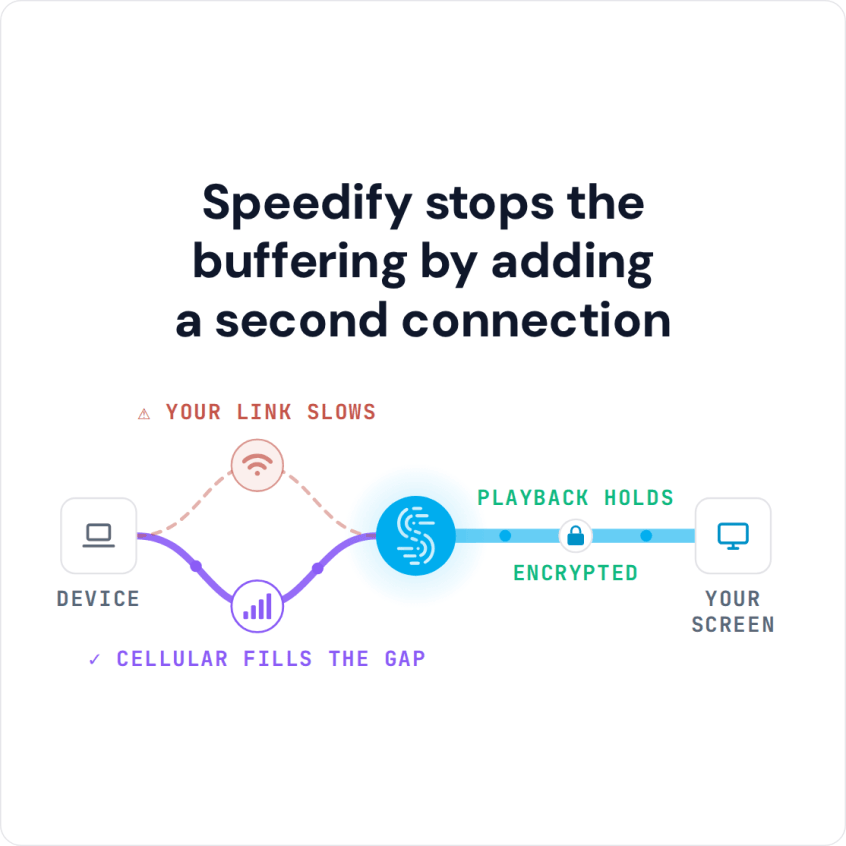
Speedify is an app that runs the stream over more than one internet connection at the same time, so a dip on one is covered by the other and playback keeps going. Speedify needs that second internet connection to help: on a single connection it works as an encrypted VPN, does not make that connection faster and can be a little slower.
Speedify stops the buffering by adding a second connection
This post covers why YouTube buffers, how to troubleshoot it, and how combining internet connections keeps playback going.
Why YouTube Is Buffering So Much, Even on Fast Internet
The reason for your slow YouTube experience is most likely your Internet connection. This doesn’t necessarily mean that your Internet is too slow. People with fast fiber optic connections also experience YouTube buffering. It’s all about your Internet connection to the YouTube servers.
If you see YouTube buffering while traveling or on the move, the cause is most likely your Internet connection, specifically the signal quality of Wi-Fi or cellular networks you connect to on your iPhone, Android smartphone or laptop.
Here are some other common causes for YouTube buffering:
- not enough bandwidth for your connection when watching HD videos
- browser issues on Mac and PC (cache, add-ons), and app issues on iPhone and Android smartphones
- slow YouTube server
Troubleshooting YouTube Buffering Issues
Due to the high number of potential causes, there is no universal fix for YouTube buffering. It’s a try-and-see troubleshoot process. Below are some suggestions:
- Test your Internet speed. Even if you’ve got a fast connection, it’s possible your ISP has some temporary technical issues. Don’t worry: you can choose a lower video quality if you want to watch videos till they fix it.
- Check if your ISP is throttling YouTube: if other streaming video sites work fine, throttling is a likely cause.
- Restart your router and make sure it has the latest firmware. Go to the manufacturer’s website to find out or contact your ISP.
- Restart your computer or mobile device. This will get rid of any potential app or cache related issues.
- On your computer, try a different browser, or open YouTube in a private window with add-ons turned off.
- Use Speedify to combine multiple internet sources (for example Wi-Fi and 4G/5G cellular) into one connection, so a dip on one does not stall the video. If your ISP is throttling YouTube, Speedify’s encryption also hides which service the traffic is going to, so the ISP cannot single it out.
How Speedify Encrypts Your Traffic and Keeps YouTube Playing
Besides combining connections (see how combining differs from load balancing), Speedify encrypts your traffic like a VPN. Encryption keeps your data safe from hackers and snoops, even on compromised Wi-Fi networks. Any VPN adds some overhead to a single connection, some by as much as 50%, and Speedify can be a little slower on one connection too; the speed gain comes from the second internet connection.
On a phone, your cell signal or Wi-Fi connection often fluctuates, which causes buffering or a total loss of connection. Speedify monitors the quality of each connection in the background. If one becomes unstable, Speedify moves your data to the other so the video keeps playing, and starts using the first connection again once it recovers.
To watch YouTube without the constant buffering, give your phone or computer a second internet connection with Speedify.
Speedify
Get started with Speedify today.
Speedify combines Wi-Fi, 4G/5G cellular, Ethernet, Starlink and satellite into one faster, more reliable internet connection. Free to try: 5 GB a month with a free account. No credit card required.
🚀 Speed
Faster uploads and downloads, because Speedify uses all your internet connections at once.
📶 Stability
If one internet connection drops, Speedify moves your traffic to the others in milliseconds.
🔒 Security
AES-256 encryption on every internet connection, on any network you join.



15M+ downloads worldwide. 75K+ five-star reviews on iOS and Android.