
You Can Combine Multiple Internet Connections Together – Like Starlink, Wi-Fi, 4G, 5G, and DSL – with Speedify, to Fix TikTok Network Errors
The TikTok network error, shown as “Network error” or the newer “Network is out of reach”, is the app telling you it could not reach TikTok’s servers. Usually your internet connection dropped for a second, a Wi-Fi signal that faded or a cellular bar that vanished, though a network that blocks TikTok can cause it as well. If it happens in the middle of a broadcast, see what to do when TikTok Live keeps dropping.
Speedify is an app that combines Wi-Fi, 4G/5G cellular, Ethernet, Starlink and satellite internet connections and encrypts your traffic like a VPN. On a phone it uses Wi-Fi and 4G/5G cellular at once, so a momentary loss on one does not reach TikTok. On a single connection, Speedify works as an encrypted VPN and cannot stop that connection from dropping. Everything below deals with why the error appears, when a restricted network is the real blocker, and how Speedify helps.
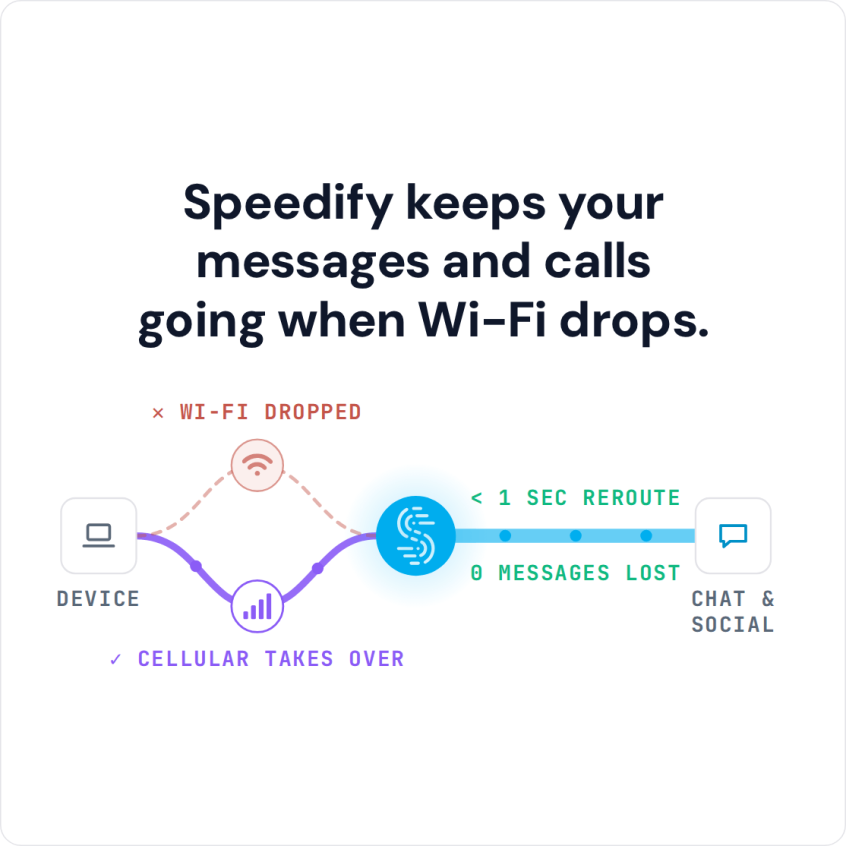
Speedify keeps your messages and calls going when Wi-Fi drops.
How to Stop TikTok Network Errors with Speedify
- Download Speedify on your iPhone or Android phone.
- Open Speedify and create a free account (the free tier includes 5 GB per month), or sign in.
- Keep Wi-Fi on and turn on 4G/5G cellular too, so Speedify has two internet connections to work with.
- Connect. Speedify uses both connections at once and moves your traffic to the working one when one drops.
- Open TikTok and use it as usual.
Why TikTok Shows a Network Error or “Network Is Out of Reach”
Seeing the TikTok “network error”, “no network connection” or “network issue, please try again” message? First check that TikTok itself is up: TikTok posts service issues on its support account on X, and status sites such as Downdetector show outage reports.
If TikTok is up, the cause is almost always a poor internet connection, slow and unreliable. When you watch or post on TikTok, your device is exchanging data with TikTok’s servers. If your internet signal fluctuates or suddenly cuts out, the data is not sent or delivered, which triggers the TikTok “network error” message.
The solution here: troubleshoot your Internet connection. Here’s an extensive guide on that.
TikTok Network Error Due to Restrictions
Another cause of TikTok not working is a network that blocks it. Your school, college or company can decide that TikTok is restricted on its Wi-Fi, usually to save bandwidth and keep people focused. Some governments ban TikTok outright: India banned TikTok in 2020.
On a school or work network, a VPN, which encrypts all traffic to and from your phone, keeps the network from seeing which apps you use. Check your school’s or employer’s rules first. A VPN is not a way around a country’s ban, and Speedify does not unblock geo-restricted content.
Speedify adds something a plain VPN does not: a second internet connection.
Speedify Helps You Avoid TikTok Network Errors
Speedify fixes TikTok network errors that come from slow, unreliable internet by giving TikTok two internet connections instead of one.
By default, iPhones and Android phones connect to the internet through one connection at a time, cellular or Wi-Fi. Speedify lets your phone connect to the internet using Wi-Fi and 4G/5G cellular simultaneously, which adds the bandwidth you have to upload videos and stream content.
Speedify works on iPhone and Android and takes a few minutes to set up. Once it is running, Speedify monitors the quality of your internet connections in the background. You can set cellular to Secondary priority so Speedify tries to use Wi-Fi whenever possible and adds 4G/5G cellular when Wi-Fi is not enough.
Speedify also has automatic failover: when Speedify detects a signal is weak or spotty, it moves the data to the remaining connection, in milliseconds according to Speedify, and goes back once the other connection recovers.
When the TikTok network error comes from a dropping connection, Speedify with Wi-Fi and 4G/5G cellular together keeps TikTok online. Try out Speedify for free: the free tier includes 5 GB per month with a free account.
Speedify
Get started with Speedify today.
Combine Wi-Fi, 4G/5G cellular, Ethernet, Starlink, and more into one faster, steadier connection. Free to try — no credit card required.
🚀 Speed
Faster uploads and downloads by bonding all your connections at once.
📶 Stability
Automatic failover in under a second when any connection drops.
🔒 Security
AES-256 encryption on every connection, on every network you join.



15M+ downloads worldwide. 75K+ five-star reviews on iOS and Android.