
Why is the Internet Continuously Connecting and Disconnecting?
An uninterrupted internet connection is hard to get on a phone or laptop, because they use only one internet connection at a time, and the switch between connections is where your internet disappears. A phone clings to a Wi-Fi network long after you have walked out of range, then takes seconds to attach to the next one.
Speedify is an app that uses Wi-Fi, 4G/5G cellular, Ethernet, Starlink and satellite internet connections at the same time, handing traffic to whichever ones work. That takes two or more internet connections: on a single connection, Speedify works as an encrypted VPN and cannot keep that connection from dropping. Further down, this guide explains why the internet keeps connecting and disconnecting, why monitoring tools do not help, and how Speedify keeps you online while you move around.
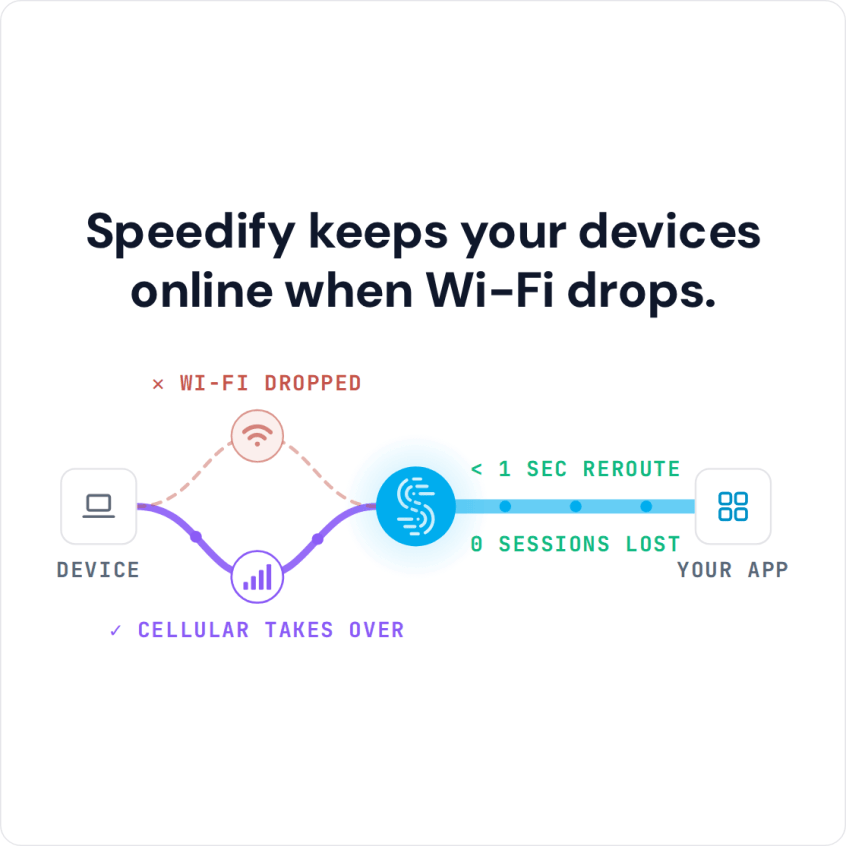
Speedify keeps your devices online when Wi-Fi drops.
How to Keep an Uninterrupted Internet Connection with Speedify
- Download Speedify on your phone or computer (Windows, macOS, iOS, Android).
- Open Speedify and create a free account (the free tier includes 5 GB per month), or sign in.
- Give it a second internet connection: on a phone, keep Wi-Fi on and turn on cellular data; on a computer, add Ethernet or a phone connected by USB.
- Connect. Speedify uses both connections at once and moves your traffic to the working one when one drops.
- Move around as usual; when one connection drops, Speedify carries on over the other.
Why Phones and Laptops Can’t Keep an Always-On Internet Connection
Phones are not designed for an always-on internet connection. By default, a phone sends all internet traffic over either the cellular network or a Wi-Fi connection, and laptops and computers also use one connection at a time. If you rely on the cellular signal and lose coverage, you lose your internet connection. The same happens on Wi-Fi when you move out of range.
Speedify changes that. Speedify lets your phone connect to Wi-Fi and the cell network simultaneously and use both.
If something happens with one connection, your web traffic is automatically routed through the other connection, and your public IP address stays the same, so calls and logged-in apps carry on. When you move out of a Wi-Fi network’s range, cellular carries your traffic until your phone joins the next Wi-Fi network.
The Speedify app manages your connections in the background. Here is what Speedify does to your battery.
Continuous Internet Connectivity with Speedify
With two internet connections in use, Speedify keeps you connected when one drops and combines their speed when both work. Speedify cannot create a signal in a dead zone, but where one connection is weak and the other is not, painfully slow public Wi-Fi stops holding you back. Speedify can also prioritize your traffic: if you want, set Speedify to use Wi-Fi whenever possible, so you keep your cellular data for when you need it.
Walk around the city, hop on a train, take an Uber: with Wi-Fi and 4G/5G cellular combined, Speedify keeps your stream or call going while your phone moves between networks, instead of dealing with lag or losing your connection at every handoff. Speedify keeps you online as long as one of your connections has a signal.
Secure and Continuous Internet Connectivity at Your Fingertips
Public Wi-Fi can leave you open to cyberattacks. Speedify encrypts your web traffic and keeps your data safe from the prying eyes of ISPs and hackers. Speedify doesn’t keep any browsing logs: there is no record of the sites you visit, though Speedify does record connection details such as your IP address and the data you use. On a single connection, Speedify works as an encrypted VPN and can be a little slower; here is why VPNs can slow down your phone.
You can download Speedify from the Speedify website, Google Play or the App Store, and try it with the free tier: 5 GB per month with a free account.
Speedify
Get started with Speedify today.
Speedify combines Wi-Fi, 4G/5G cellular, Ethernet, Starlink and satellite into one faster, more reliable internet connection. Free to try: 5 GB a month with a free account. No credit card required.
🚀 Speed
Faster uploads and downloads, because Speedify uses all your internet connections at once.
📶 Stability
If one internet connection drops, Speedify moves your traffic to the others in milliseconds.
🔒 Security
AES-256 encryption on every internet connection, on any network you join.



15M+ downloads worldwide. 75K+ five-star reviews on iOS and Android.