
Is Orbitz Down or Are You Having Connection Issues?
A booking that will not go through is the worst moment for a connection to stall: the price you were holding can be gone by the time the page reloads.
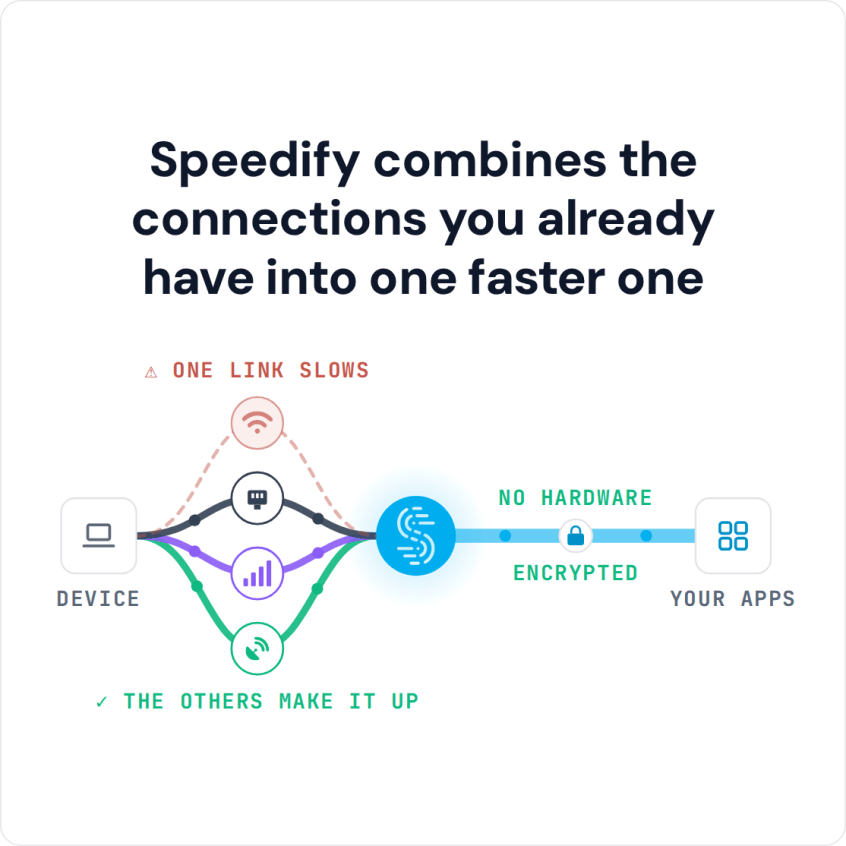
Speedify is an app that carries the booking over more than one internet connection at once, so a two-second drop does not become a failed transaction. That needs two connections at once, such as Wi-Fi and 4G/5G cellular: on one connection, Speedify works as an encrypted VPN and can be a little slower.
Speedify combines the connections you already have into one faster one
Find out how to tell whether Orbitz is actually down or your connection is the problem, why the errors happen, and how a steadier connection helps when the problem is on your side.
Check Whether Orbitz Is Down or the Connection Is the Problem
Orbitz itself can have technical issues. To check whether Orbitz is down, look at an outage tracker or Orbitz’s social media accounts, and try the site on another device or network.
If you’re using Orbitz from your smartphone, make sure you update the app. Also try restarting the mobile device.
Still not working? A common cause is your own connection to the Internet. When you have a slow or unreliable connection, Orbitz may not be able to work properly, and you may not notice the connection problem until you try to book.
How Speedify Keeps an Orbitz Booking Going on a Weak Connection
Can’t reach the Orbitz website or app while other sites are slow too? Then the connection is the problem, and a second internet connection used at the same time helps.
The Speedify app monitors the quality of your Internet connections in the background. It can combine your Wi-Fi and cellular connection simultaneously in a single “pipe” on your mobile device, or combine any number of connections on a computer.
Speedify also moves your data when something happens to one of your connections. When you stumble upon a bad Wi-Fi hotspot, or your connection suddenly goes out, Speedify automatically reroutes your data through the other available connection until both networks are back, so the booking page stays connected.
Speedify is available for iOS, Android, macOS, Windows and Linux devices.
Speedify Also Encrypts Your Booking Traffic
Speedify also works as a VPN that combines internet connections. It encrypts all of the data you send and receive from your device, which keeps your private information and payment details secure from digital eavesdroppers on public Wi-Fi.
Speedify makes the connection under the Orbitz app steadier and encrypts it, so a dropped Wi-Fi signal does not cost you the booking.
Most VPNs slow down your Internet connection. On one connection, Speedify can be a little slower too; with two or more connections combined, Speedify adds their speed while keeping the encryption.
Fix Orbitz website problems related to your Internet connection easily with Speedify!
Speedify
Get started with Speedify today.
Speedify combines Wi-Fi, 4G/5G cellular, Ethernet, Starlink and satellite into one faster, more reliable internet connection. Free to try: 5 GB a month with a free account. No credit card required.
🚀 Speed
Faster uploads and downloads, because Speedify uses all your internet connections at once.
📶 Stability
If one internet connection drops, Speedify moves your traffic to the others in milliseconds.
🔒 Security
AES-256 encryption on every internet connection, on any network you join.



15M+ downloads worldwide. 75K+ five-star reviews on iOS and Android.