
How to Fix VPN Disconnecting Intermittently on iPhone – Use Speedify for Unbreakable VPN Connections by Combining Wi-Fi and 4G / 5G Cellular Data at the Same Time
An iPhone VPN usually loses connection, or stops internet access altogether, at the moment the phone switches between Wi-Fi and 4G/5G cellular, because the VPN was pinned to one of those internet connections and not the other. The other common trigger is sleep; see why an iPhone VPN disconnects in sleep.
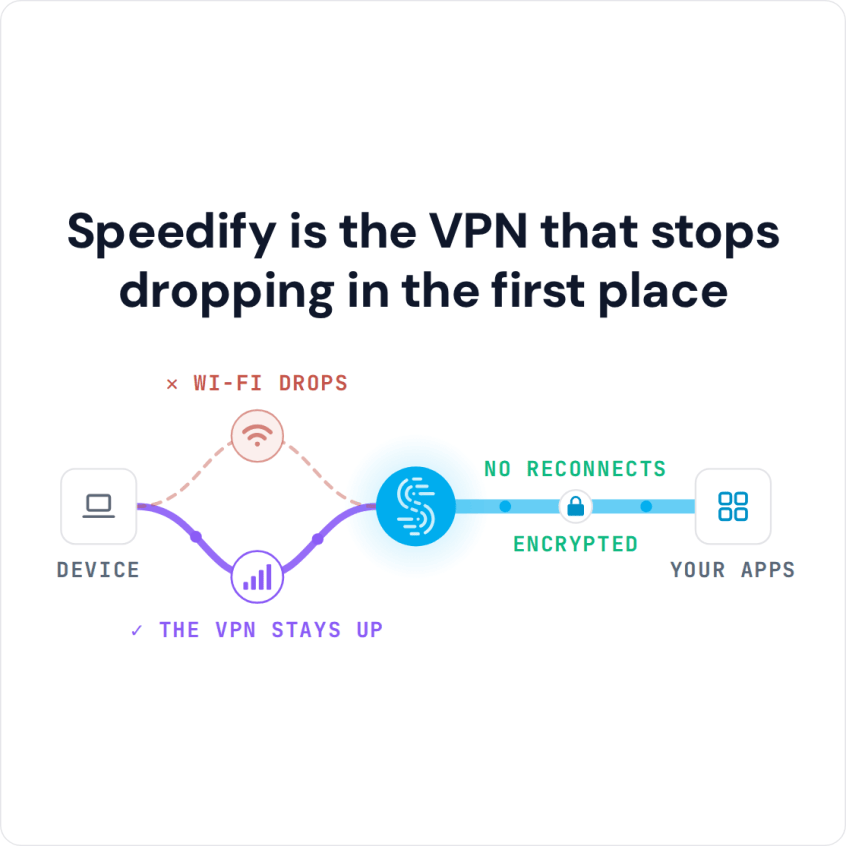
Speedify is an app that encrypts your traffic like a VPN and keeps it running on Wi-Fi and 4G/5G cellular together, so that switch happens underneath and the VPN stays up: no reconnecting by hand, no call cut off mid-sentence. That needs both Wi-Fi and Cellular Data turned on; on one connection, Speedify works as an encrypted VPN and can be a little slower.
Speedify is the VPN that stops dropping in the first place
You are not the only one whose VPN cuts the internet on the way out the door. Inside: why an iPhone or iPad keeps losing the VPN, what to do when the VPN stops internet access, and how Speedify holds the connection steady as you move around the house or the city.
Why an iPhone or iPad VPN Keeps Dropping the Internet Connection
Almost all VPN services work the same way. They rely on a single Internet connection and a single socket with the VPN server to route all the data to and from your device. If anything goes wrong with that socket or with your Internet connection, the VPN is immediately disconnected.
That means a simple fluctuation in your cell signal or a momentary interruption to your Wi-Fi signal and you lose your VPN connection on your iPhone. And then you have to manually reconnect the VPN, which assumes you’re constantly watching your phone to see if the little VPN icon is still there.
Why Single-Connection VPNs Lose the Connection on iPhone
People use a VPN for security, but the way most VPN apps are built costs them speed and stability on a phone.
Your iPhone or iPad can connect to the Internet over 4G/5G cellular and Wi-Fi at the same time, but standard VPN apps use only one of them. The app encrypts all your traffic on the phone and sends it to the VPN server over that one connection, so when the connection weakens or the phone switches networks, the tunnel breaks and the VPN has to reconnect.
What to Do When the VPN Stops Internet Access on iPhone
If the iPhone has no internet as soon as the VPN is on, the VPN usually cannot reach its server. Check these in order:
Finish any Wi-Fi sign-in page first: hotel, airport and cafe Wi-Fi often show a sign-in page, and the VPN cannot connect until you accept it. Turn the VPN off, sign in, then turn the VPN back on.
Reconnect or switch servers: open the VPN app, disconnect and connect again, or pick a different server. If the internet works on 4G/5G cellular but not on the Wi-Fi, that network may block VPNs, as some school, work and public networks do.
Reinstall the VPN profile: in Settings > General > VPN & Device Management > VPN, delete the VPN’s profile, then open the VPN app so it adds a fresh one.
Check the kill switch: a kill switch blocks all traffic while the VPN is disconnected, on purpose. Speedify’s mobile app has one (Internet Kill Switch, under Settings > Privacy); with it on, traffic returns as soon as Speedify reconnects.
To turn a VPN off completely, disconnect it in the VPN app, or switch its status off under Settings > General > VPN & Device Management > VPN.
Speedify Stops an iPhone VPN from Losing Connection
Speedify was designed to solve the VPN disconnect problem and the slow connection issues. Speedify is a VPN that combines internet connections: with Wi-Fi and 4G/5G cellular together, it adds their speed and keeps the connection up when one of them drops.
The Speedify protocol uses multiple parallel sockets to connect with the Speedify server, where the data is reassembled and decrypted before it goes on to the internet. Speedify’s technology for combining internet connections uses your iPhone’s Wi-Fi and 4G/5G cellular connections at the same time.
With both connections in use, apps get more bandwidth. Speedify runs in the background on your iPhone, monitoring the quality of each connection, and its automatic failover moves all traffic to the remaining connection if one goes down, until the lost connection is back. Your public IP address stays the same through the switch, so logins and calls carry on without you doing anything.
How to Stop an iPhone VPN from Losing Connection with Speedify
- Download Speedify from the App Store on your iPhone or iPad (iOS 17 or later).
- Open Speedify and create a free account (the free tier includes 5 GB per month), or sign in.
- Tap Allow when your iPhone asks to add a VPN configuration.
- Keep Wi-Fi and Cellular Data both turned on in Settings. Speedify uses both at once, so when the Wi-Fi drops, your traffic keeps flowing over 4G/5G cellular.
- Leave Speedify connected. Speedify connects to a Speedify server automatically, and you do not need to reconnect the VPN by hand when one connection drops.
Speedify encrypts your traffic like any VPN, and with Wi-Fi and 4G/5G cellular both turned on, it adds speed and reliability instead of costing them. Speedify runs on iPhones and iPads with iOS 17 or later; check the current system requirements on the download page.
Why keep using a VPN that disconnects without warning or loses connection on your iPhone or iPad? Get started with Speedify today for FREE: create a free account and get 5 GB per month.
Speedify
Get started with Speedify today.
Speedify combines Wi-Fi, 4G/5G cellular, Ethernet, Starlink and satellite into one faster, more reliable internet connection. Free to try: 5 GB a month with a free account. No credit card required.
🚀 Speed
Faster uploads and downloads, because Speedify uses all your internet connections at once.
📶 Stability
If one internet connection drops, Speedify moves your traffic to the others in milliseconds.
🔒 Security
AES-256 encryption on every internet connection, on any network you join.



15M+ downloads worldwide. 75K+ five-star reviews on iOS and Android.