
Unbreakable VPN Connection to Fix iPhone Disconnects by Combining Wi-Fi and 4G / 5G Cellular with Speedify
Sleep mode is the culprit on iPhone. When the screen auto-locks, most VPN apps let their single internet connection close, which leaves your traffic unprotected until you open the VPN app again.
Speedify was built for phones that move around. Speedify is an app that encrypts your traffic like a VPN and sends it over Wi-Fi and 4G/5G cellular together, and Speedify stays connected while the iPhone is in standby, so the VPN is still on when the screen wakes. If one connection drops, Speedify reconnects it on its own. The extra reliability needs both Wi-Fi and Cellular Data turned on; on one connection, Speedify works as an encrypted VPN and can be a little slower.
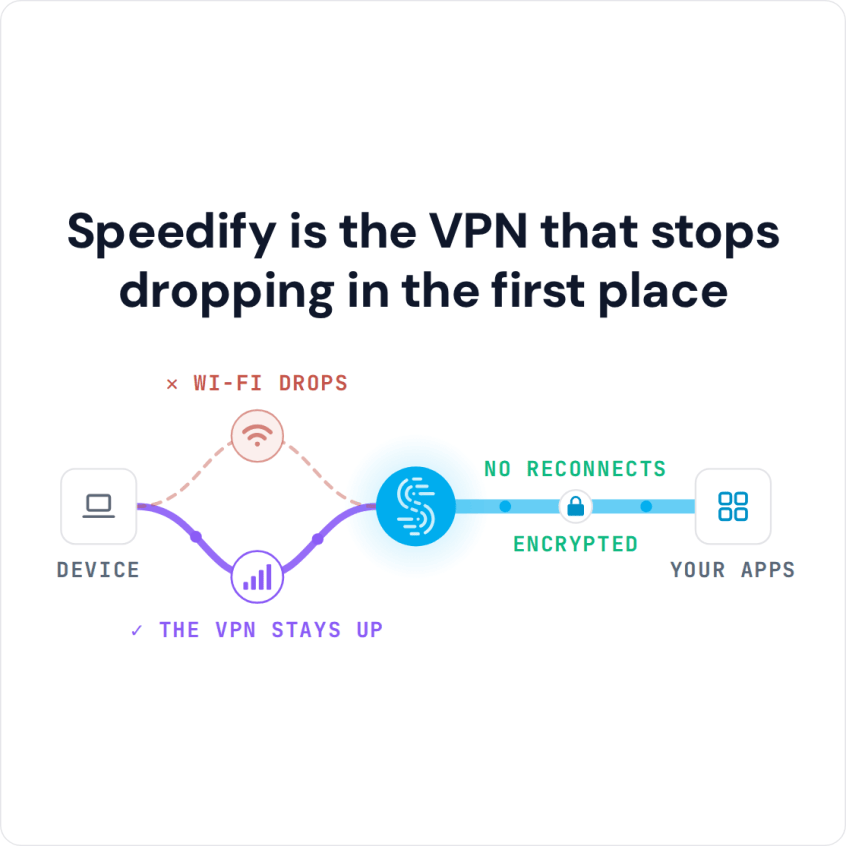
Speedify is the VPN that stops dropping in the first place
You are not the only one who unlocks the phone to find the VPN off. The sections that follow show why iPhone VPN apps drop at auto-lock, the iPhone settings to check, and what Speedify changes: private browsing, email and messaging that stay protected without you checking.
The Design of Most VPN Apps Causes Frequent Disconnects on iPhone
Almost all VPN apps are designed the same way. They create a single, secure connection between you and a VPN server. All of the data going to and from your device is sent through that single connection.
That single-connection design has three consequences:
- The VPN slows down the speed of your Internet connection, so pages load slower and videos don’t stream as well.
- If there are any issues with your Internet connection, even just momentary fluctuations in a cell signal or Wi-Fi signal, the VPN becomes disconnected.
- Most VPNs are not designed specifically for mobile. When a phone goes into sleep mode, they automatically disconnect from the VPN, even if it has only been two or three minutes. For Android specifically, see why an Android VPN drops in sleep mode.
VPN connections are secure, but they are also fragile: a small dip in signal is enough to break one. Each break is frustrating, and it can leave your data vulnerable to hackers and snoops if apps keep using the Internet while the VPN is off.
iPhone Settings That Stop a VPN from Disconnecting in Sleep Mode
Before changing apps, check three things. First, update iOS and the VPN app, since VPN bugs are often fixed in updates. Second, turn off Low Power Mode (Settings > Battery), which cuts back background activity and can interrupt VPN apps. Third, open Settings > General > VPN & Device Management > VPN, tap the info button next to your VPN and turn on Connect On Demand if the app offers it, so iOS reconnects the VPN by itself when the phone wakes.
A VPN that drops on a fixed schedule, such as every hour, usually points to a session timer on the VPN service itself (common with work VPNs), so ask the provider or your IT team about it.
To turn a VPN off on an iPhone, disconnect it in the VPN app, or switch its status off under Settings > General > VPN & Device Management > VPN. If the iPhone keeps connecting to a VPN by itself, Connect On Demand is the usual reason: turn it off on the same screen, behind the info button next to the VPN.
Speedify Solves VPN Disconnects on iPhone
The key to solving frequent iPhone VPN disconnects when your iPhone goes into auto-lock or sleep mode is using a VPN designed from the start to work in a mobile environment.
Speedify is a VPN for mobility: an app built for phones that change networks all day, from home Wi-Fi to 4G/5G cellular and back. Speedify combines Wi-Fi, 4G/5G cellular, Ethernet, Starlink and satellite internet connections into one faster, more reliable connection.
Speedify encrypts your traffic with AES-256-GCM or ChaCha20-Poly1305, but it works differently from traditional VPN apps: Speedify opens multiple sockets to the Speedify server and lets your iPhone connect to the Internet using Wi-Fi and 4G/5G cellular at the same time.
With both connections in use, apps get the bandwidth of Wi-Fi and 4G/5G cellular combined, and you stay connected even if one of them has a problem. Because traffic leaves from the Speedify server, your public IP address stays the same when one connection drops, so logins and calls do not notice the switch.
Speedify’s mobile app (version 6.1 and later) also has an Internet Kill Switch under Settings > Privacy. With it on, all internet traffic is blocked whenever Speedify is disconnected, so no app sends data outside the VPN while Speedify reconnects.
Speedify: Secure and Reliable VPN Whenever You Need It
You should not have to give up speed or reliability for security. With Wi-Fi and 4G/5G cellular both turned on, Speedify keeps the VPN up as your iPhone moves between networks.
If you are tired of troubleshooting your iPhone VPN when it keeps disconnecting, switch to Speedify. You can download Speedify from the App Store; setup takes a few minutes and needs no technical skills. The free tier gives you 5 GB per month with a free account.
Most importantly, Speedify keeps your iPhone connected through Wi-Fi drops, so your data stays protected while you use the Internet.
Speedify
Get started with Speedify today.
Speedify combines Wi-Fi, 4G/5G cellular, Ethernet, Starlink and satellite into one faster, more reliable internet connection. Free to try: 5 GB a month with a free account. No credit card required.
🚀 Speed
Faster uploads and downloads, because Speedify uses all your internet connections at once.
📶 Stability
If one internet connection drops, Speedify moves your traffic to the others in milliseconds.
🔒 Security
AES-256 encryption on every internet connection, on any network you join.



15M+ downloads worldwide. 75K+ five-star reviews on iOS and Android.