
You Can Join Multiple Internet Connections Together – Like Starlink, Wi-Fi, 4G, 5G, and DSL – with Speedify, to Fix Zoom Not Connecting
Zoom sits there spinning and never joins the meeting, or drops you straight back out again. When Zoom will not connect at all, the internet connection underneath it is usually the reason: network gear that needs restarting, a signal too weak to finish setting up the call, or an internet provider having a bad hour.
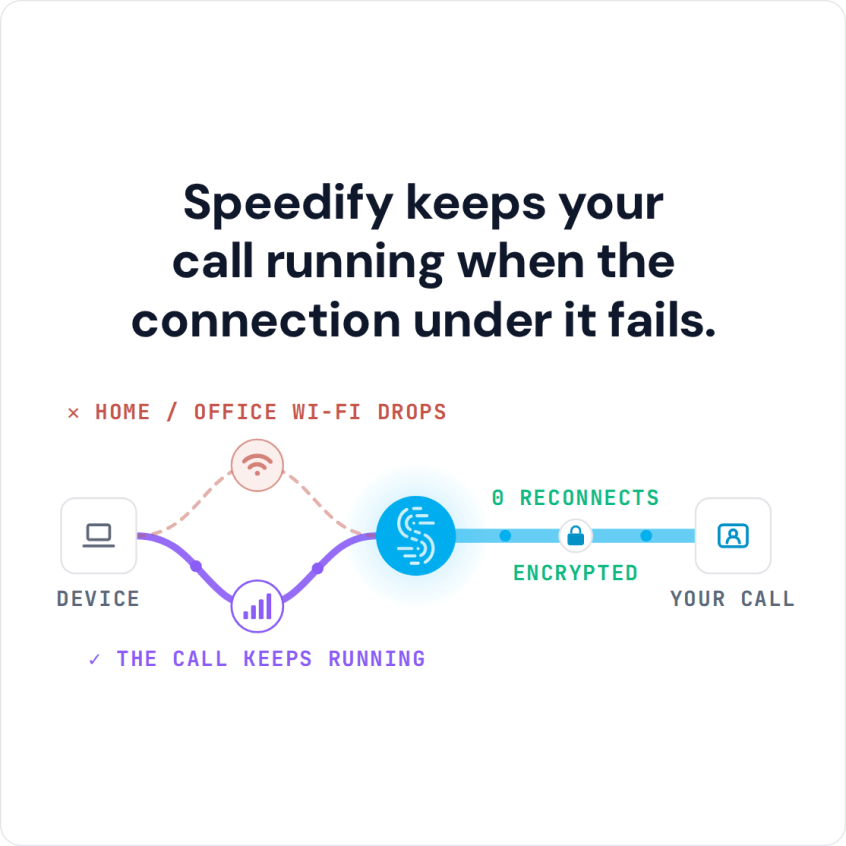
Speedify is an app that reaches the internet through Wi-Fi, 4G/5G cellular, Ethernet, Starlink and satellite internet connections together, giving Zoom more than one route in. Speedify can only keep you online through a drop when it has two or more internet connections to work with, for example Wi-Fi plus your phone’s 4G/5G cellular. On a single connection, Speedify works as an encrypted VPN and cannot stop that connection from dropping. You will see the five checks that get Zoom connecting again, and what using Speedify does to keep it connected after that.
Why Zoom Is Not Connecting: The Most Common Problems
The symptoms of an unstable connection in the context of using Zoom include one or more of the following:
- latency
- frozen screen
- poor quality audio and video
- meeting getting disconnected
Is Zoom fully functional? Check out their service status page to confirm.
If Zoom is stuck on connecting and the status page shows no outage, quit Zoom completely and open it again, update the app, and try joining from a web browser or from another network. A school, office or hotel network that blocks Zoom, or a firewall on the computer, can also stop Zoom from connecting.
The message “Not connected to Zoom Phone server” comes from Zoom Phone, Zoom’s calling service, not from meetings. The same connection checks apply; if they pass, sign out of Zoom and back in, and ask your Zoom admin to confirm Zoom Phone is set up on your account.
If you’re connecting to Zoom from work on an enterprise Internet connection, most probably the tech support team is already scrambling to fix it. It doesn’t hurt to give them a nudge anyway.
When you have issues like Zoom not connecting while at home or on the go, then you’ll have to refer to your Internet infrastructure and your ISP. Here are the most popular causes:
- You’re too far away from the Wi-Fi router
- You have poor / slow cellular coverage
- Your network hardware needs an update or a restart
- There are temporary ISP infrastructure issues
- There are peering issues with Zoom servers
5 Steps to Fix Zoom Not Connecting Issues
First, test your online speed. Is it fast enough for Zoom video conferencing? You’ll need at least 2 Mbps upload and 2 Mbps download. If your speed is fine but the picture is not, see how to get sharper Zoom video.
Assuming that nothing is wrong with the Zoom service itself, here’s the quickest way to troubleshoot and fix Zoom not connecting errors:
- Move closer to the Wi-Fi router or, better yet, use a wired Ethernet connection if possible.
- Move around till you get better cellular coverage, if no other connections are available.
- Restart your modem, router and the device you’re running Zoom on (computer, smartphone). You may also update your router’s firmware, if that’s available.
- Check if your ISP is having temporary issues. They should have a status page or at least a social media account to communicate that.
- If you have 2 or more Internet connections available, use them at once. Most likely, you have 4G/5G cellular available on your smartphone, so you can combine that with your home Internet. Speedify can combine multiple internet sources into one faster, more reliable connection for live streaming, video calling and web browsing.
Speedify Improves the Zoom Meetings Experience
The Speedify team tested Zoom on a laptop and on a smartphone while running Speedify, simulating bad Internet conditions. The results showed that Speedify was able to keep the average Zoom video call bandwidth on both devices in good range around the target bandwidth. And this happened both in situations where the connections were good and when one of them went bad.
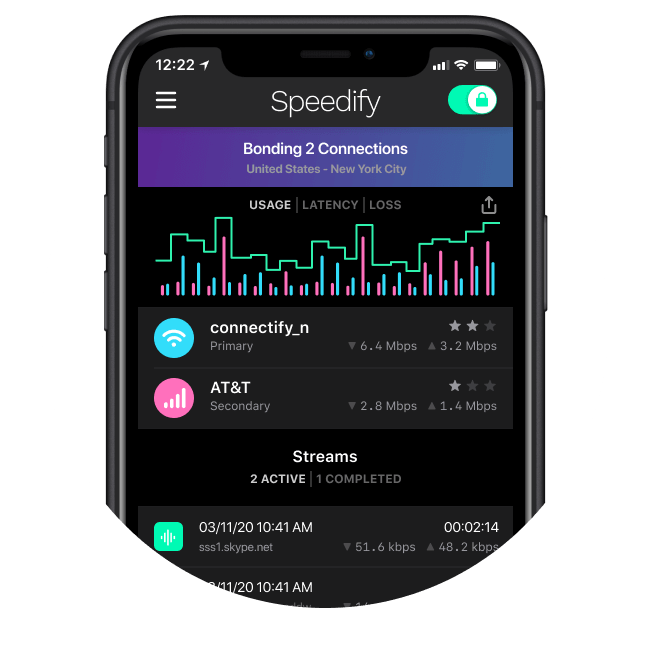
So how does Speedify achieve that? Speedify combines internet connections. On your smartphone, Speedify combines Wi-Fi and 4G/5G cellular. On a computer, there’s more flexibility about the number and type of connections.
Speedify also reroutes data when something happens to one of your connections. When you stumble upon a bad Wi-Fi hotspot, or one connection suddenly goes out, Speedify intelligently and automatically reroutes your data through the other available connection(s) in milliseconds and keeps the same public IP address, so the Zoom call keeps going.
The beauty of it is that Speedify does more than just manage your Internet connections. Speedify also encrypts all of the data you send and receive from your device, like a VPN. This helps keep your private information and conversations secure from digital eavesdroppers and cyber thieves.
Plan Two Internet Connections for Remote Work Calls
If you want to be more productive, plan for a reliable internet setup, ideally with two internet connections, and find the right devices, equipment and tools that will help you collaborate, video conference and take work anywhere.
Speedify’s Next Normal blog series will help you do that, with tips, tricks and technologies that help you optimize your remote work experience.
Speedify
Get started with Speedify today.
Speedify combines Wi-Fi, 4G/5G cellular, Ethernet, Starlink and satellite into one faster, more reliable internet connection. Free to try: 5 GB a month with a free account. No credit card required.
🚀 Speed
Faster uploads and downloads, because Speedify uses all your internet connections at once.
📶 Stability
If one internet connection drops, Speedify moves your traffic to the others in milliseconds.
🔒 Security
AES-256 encryption on every internet connection, on any network you join.



15M+ downloads worldwide. 75K+ five-star reviews on iOS and Android.