
You Can Combine Multiple Internet Connections Together – Like Starlink, Wi-Fi, 4G, 5G, and DSL – with Speedify, to Fix WhatsApp Calls Not Working
You tap the call button in WhatsApp and nothing happens, or the screen sits on Call on Hold and never connects. A voice or video call needs a steady two-way internet connection for its whole length, and a Wi-Fi network that keeps cutting out for a second at a time can stop the call from ever starting.
Speedify is an app that carries your internet over Wi-Fi and 4G/5G cellular data at once, so a gap in one internet connection does not end the call. What follows covers the reasons WhatsApp calls fail and how using Speedify gets them connecting again.
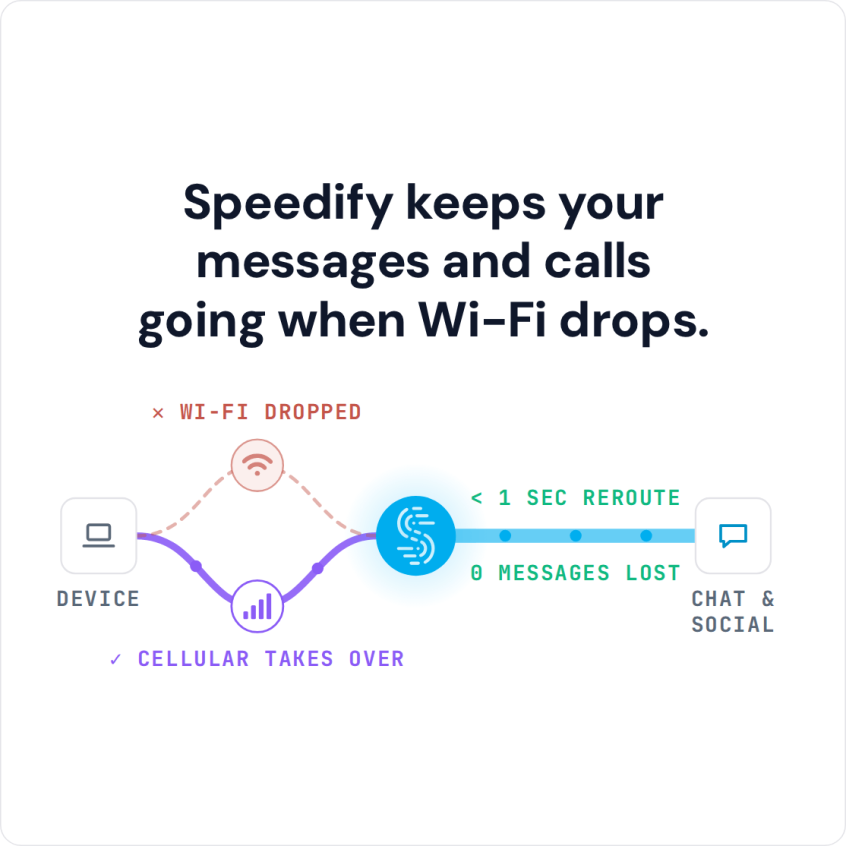
Speedify keeps your messages and calls going when Wi-Fi drops.
Why Is WhatsApp Not Working on Calls?
The short answer: because you’re probably on a poor Wi-Fi network or out of cellular data coverage. To troubleshoot this objectively, your WhatsApp calls are not working because of these 3 main reasons:
- Wi-Fi or cellular Internet connection that is not reliable – keeps on disconnecting or is very slow
- router security / firewall settings
- out of date app installed on your smartphone.
And most probably it’s your Internet! WhatsApp calls require a good amount of bandwidth from your Internet connection to work properly.
Here are some solutions to get WhatsApp calls working again:
- check your Internet connection and speed
- restart your router / Internet source
- check your router’s security settings and firewall configurations for any blocked protocols or ports
- make sure your ISP allows WhatsApp traffic – e.g. campus networks may block it
- see if the WhatsApp service is down or not
- restart WhatsApp
- update WhatsApp and your operating system
- clear the WhatsApp cache
- reinstall WhatsApp
- restart your smartphone
When your Internet connection is too slow, you don’t have enough bandwidth for a VoIP HD audio call. Also, if the connection is flaky, you may be experiencing excessive packet loss. What’s worse, is that both of these issues are often amplified when you are on the move. Mobile devices can not seamlessly transition between different Wi-Fi networks or cell towers. When this happens, it will interrupt apps and drop Internet VoIP calls, such as the ones on WhatsApp.
WhatsApp Calls Not Working / Can’t Initiate Call? Get Faster and More Reliable Internet with Speedify
By default, mobile devices are designed to only use one Internet connection at a time – Wi-Fi or cellular data. This happens even though both connections are active. What if you could use BOTH connections at once, for their combined speed and reliability?
Speedify is a channel bonding service that changes the way your mobile device connects to the Internet. It is the only app available on the market for combining multiple Internet connections at the same time. Instead of just using one connection at a time, Speedify allows your smartphone or tablet to connect to the Internet over both Wi-Fi and mobile data simultaneously. This instantly increases your connection bandwidth and reliability and provides a better and uninterrupted VoIP call experience. You won’t see any WhatsApp calls not working issues.
Speedify also monitors the quality of your Internet connections with its automatic failover protection capabilities. When it detects that a signal is weak or that the network is too slow, it will automatically and seamlessly reroute the data through the other working connection. Best of all, when the other connection is back online and reliable, it begins using it again – automatically and in the background. Say goodbye to frequent WhatsApp freezing!
The app is also smart enough to try and send as much data as possible through Wi-Fi instead of over more expensive mobile data connections – saving you from potential overage fees from your carrier!
Speedify Helps You Avoid WhatsApp Call Issues and Also Protects Your Online Privacy
In addition to delivering a faster Internet experience to your mobile device, Speedify uses advanced technology to quickly encrypt all the data sent to and from your device. Speedify keeps you safe from compromised Wi-Fi networks, snooping ISPs, and other threats.
You need to make sure WhatsApp calls work whenever you need them to work. That means having a fast and stable Internet connection. Hence, get started with Speedify as soon as possible!
How Good Is Speedify when Dealing with WhatsApp Video Call Issues?
Unless they’re having issues, we all know WhatsApp performs well when you’re backed by a fast and stable Internet. But what about the real world, where most likely you don’t get that luxury?
The testing procedure consists of 2 series of tests for WhatsApp video calls:
- Without Speedify;
- Speedify on with Enhanced Streaming enabled.
In terms of devices and operating systems, we tested it on an Android smartphone and an iPhone. We combined Wi-Fi and cellular on both devices.
The evaluation is done both subjectively and objectively as follows:
- We screen capture and analyze the WhatsApp video call quality;
- We walk towards the edge of the Wi-Fi network. This helps us simulate:
- insufficient bandwidth conditions, as we get away from the Wi-Fi router;
- unreliable connectivity at the edge of Wi-Fi with dead spots and packet loss;
- disconnecting Wi-Fi internet and how quick it switches to cellular.
For the Speedify tests, we looked at the bandwidth, latency and packet loss. And, of course, how they are affected by our “course” away from Wi-Fi.
Testing Enhanced Streaming Mode on a WhatsApp Call on iPhone
So we tested WhatsApp on an iPhone while on a video call, running Speedify with Enhanced Streaming Mode. The video itself didn’t even stutter for one bit. Here’s how the bandwidth distribution looks like:
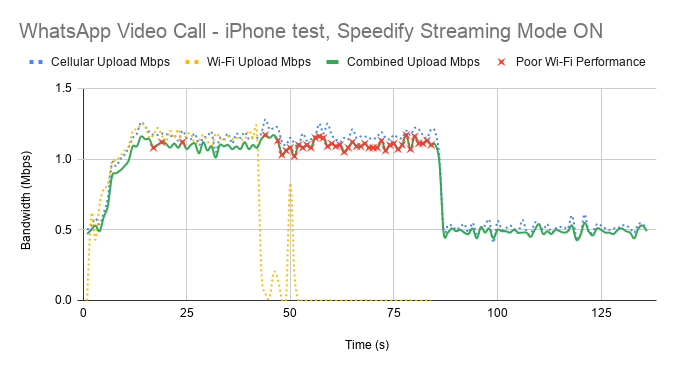
First of all, Speedify makes it possible to use both Wi-Fi and cellular at the same time. That’s why you see both connections being used together on the graph above. When Wi-Fi start failing, you notice that with the help of Speedify cellular takes over. The general bandwidth is constant, switching from 1.2 Mbps to around 500 kbps when only cellular is used.
The little red x-es above symbolize the moments when packet loss over the Wi-Fi connection was very high – over 5%. If Speedify would not have been running, then you would have ended up like in the first case – buffering and automatically ending broadcast.
What about WhatsApp with Speedify in Enhanced Streaming Mode on Android?
The Android test with Speedify Enhanced Streaming Mode was similar to the iPhone one – video was good in the sense that quality was good and it didn’t break.

As you can see, when Wi-Fi is good and strong enough, cellular stops being used. However, cellular kicks back in as soon as Speedify detects that Wi-Fi is flaky. Notice the steady bandwidth around 1 Mbps while there’s a “hint” of Wi-Fi. Then, it drops to 0.5 Mbps, as in the case of the iPhone. And Speedify keeps that fairly constant. Again – the red x-es symbolize the high Wi-Fi packet loss rate.
Here’s the raw average data from testing:
|
iOS |
Android |
|||||
|
Bandwidth (Mbps) |
Average |
Minimum |
Maximum |
Average |
Minimum |
Maximum |
|
Overall |
0.89 |
0.39 |
1.24 |
0.70 |
0.16 |
1.31 |
After looking at this table and the results above, we can conclude that Speedify was able to prevent the WhatsApp video call to drop or encounter any issues. Thanks to the intelligent dynamic traffic prioritization of its new Streaming Mode.
Speedify
Get started with Speedify today.
Combine Wi-Fi, 4G/5G cellular, Ethernet, Starlink, and more into one faster, steadier connection. Free to try — no credit card required.
🚀 Speed
Faster uploads and downloads by bonding all your connections at once.
📶 Stability
Automatic failover in under a second when any connection drops.
🔒 Security
AES-256 encryption on every connection, on every network you join.



15M+ downloads worldwide. 75K+ five-star reviews on iOS and Android.