
Unbreakable VPN Connection for Online Poker by Combining Starlink, Wi-Fi, 4G, 5G, and DSL with Speedify
A GGPoker VPN has a job beyond encryption: losing your internet connection halfway through a hand costs real money, and a tournament seat can go with it.
Speedify guards against that in two ways: Speedify encrypts your internet traffic the way a VPN does, and Speedify sends that traffic over Wi-Fi, 4G/5G cellular, wired Ethernet, Starlink and other internet connections at the same time. If one internet connection dies mid-hand, the others carry the table. That failover needs two or more internet connections, such as Wi-Fi plus a phone’s 4G/5G cellular; on a single connection, Speedify works as an encrypted VPN, can be a little slower, and cannot stop that connection from dropping. GGPoker’s rules ban VPNs and proxies that hide your location, so keep Speedify on a server in the country you are actually in. The sections below cover those rules and what Speedify adds at the table: a private session that survives a dropout on one internet connection.
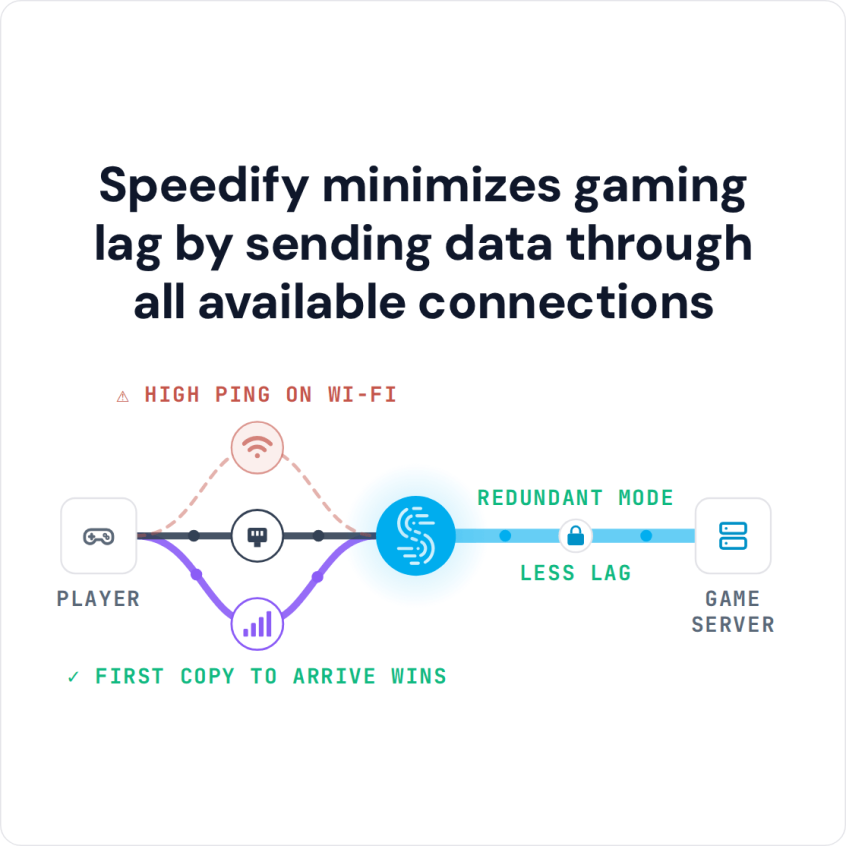
Speedify minimizes gaming lag by sending data through all available connections
Three Reasons to Use a VPN for GGPoker
The first reason is security when you play for cash on GGPoker. A VPN encrypts all your traffic between you and GGPoker, so the communication is safe from hackers who use tools such as packet sniffers or man-in-the-middle attacks.
Another reason is a network that blocks poker sites, such as an office or campus network. A VPN encrypts all traffic, so the network admins cannot see which websites you open, and you can unblock restricted content on that network. A VPN is not a way around a country-level ban, though: GGPoker only lets you play from countries where it accepts players.
Traveling abroad is not a reason to use a VPN with GGPoker. When you travel, GGPoker may block the connection or suspend your account pending proof of where you are, because GGPoker sees an IP address from another country. Do not connect to a VPN server back home to hide where you are: GGPoker treats using a VPN from a restricted country as grounds to close the account and keep the funds. Contact GGPoker support before you travel and check whether you can play from the country you are visiting.
The third reason is a more stable connection. Most VPNs cannot help with this. You need a VPN that combines internet connections, so it can use Wi-Fi, 4G/5G cellular and Ethernet at the same time. If one connection drops, you do not lose the current hand or get ejected while holding four kings, because Speedify moves the traffic to the other working connections and keeps the session open.
How To Improve Your Online Privacy And Stabilize Your Internet Connection
If your internet connection tends to drop at the worst moment in a GGPoker hand, Speedify can combine all of your available connections into one faster, more reliable connection.
On the security part, Speedify provides protection against DDoS attacks that target poker players. If you have been targeted before, you might also think about getting your own dedicated server for online games.
If you think you don’t have any other connections available, here are a few ideas:
- on your smartphone you can combine Wi-Fi and cellular together.
- on your computer you can use the Ethernet or Wi-Fi from the home network with a USB cellular dongle and/or your tethered smartphone.
Speedify detects every active internet connection on your device and uses them together while maintaining the session. If one connection drops, Speedify moves the traffic to the others, so the hand carries on without a reconnect.
GGPoker Rules on VPNs and Three Tips for Playing Safely
GGPoker’s Security and Ecology Policy bans VPNs, proxies and other tools that hide your location, and GGPoker warns that using a VPN to play from a restricted country leads to account closure and possible loss of funds. So keep any VPN, Speedify included, on a server in the country you are actually in, never use one to play from a country where GGPoker does not accept players. With that in mind, these three tips help you play online poker securely on the best connection you have:
- Use a dedicated server. You get a dedicated IP (static IP address) in the country you play from, so the address GGPoker sees stays the same every session instead of changing with the server.
- For security reasons, deposit only the amount you need and cash out as often as you can. This way, even if somebody hacks your GGPoker account, you won’t lose (a lot of) funds.
- Use a VPN with a kill switch. If the VPN connection drops, a kill switch stops all traffic until the VPN reconnects, so nothing leaves your device unencrypted on a public network. Speedify’s mobile app (version 6.1 or later) has one, the Internet Kill Switch under Settings > Privacy; Speedify does not document a kill switch for its desktop apps.
That’s how easy it is to improve your online protection and privacy with Speedify!
Speedify
Get started with Speedify today.
Speedify combines Wi-Fi, 4G/5G cellular, Ethernet, Starlink and satellite into one faster, more reliable internet connection. Free to try: 5 GB a month with a free account. No credit card required.
🚀 Speed
Faster uploads and downloads, because Speedify uses all your internet connections at once.
📶 Stability
If one internet connection drops, Speedify moves your traffic to the others in milliseconds.
🔒 Security
AES-256 encryption on every internet connection, on any network you join.



15M+ downloads worldwide. 75K+ five-star reviews on iOS and Android.