
Unblock Websites and Bypass Internet Restrictions Anywhere
School and workplace networks block sites at the network level, which is why a different browser or a private window makes no difference. The usual workaround is a VPN, and the usual complaint about VPNs is that everything then loads slowly.
Speedify is an app that encrypts your traffic to get around the restriction and combines Wi-Fi, 4G/5G cellular, Ethernet, Starlink and satellite internet connections at the same time. With two or more internet connections the result gets faster rather than slower; on a single connection, Speedify works as an encrypted VPN and can be a little slower.
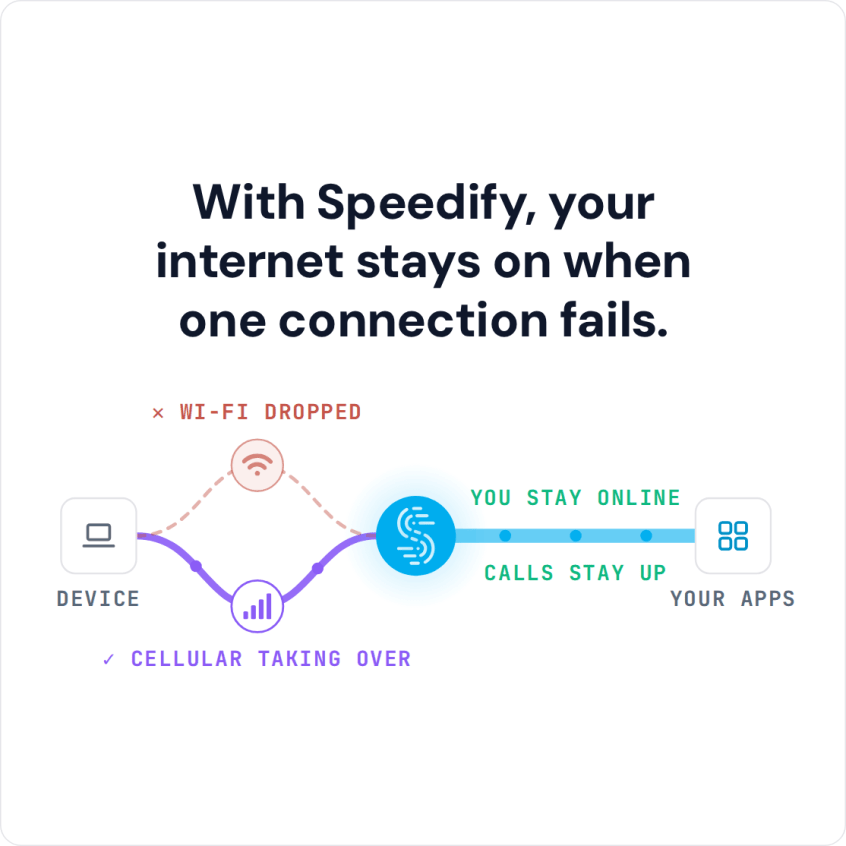
With Speedify, your internet stays on when one connection fails.
Below are the steps to bypass blocked websites with Speedify, how networks block sites in the first place, and why ordinary VPNs and proxies slow you down when they unblock. Check your school’s or employer’s internet rules before you get around a block, because doing so may break them.
How Companies and Schools Restrict Internet Access and Block Websites
The Internet is made up of millions of different “addresses”. Your browser converts things like YouTube.com into a series of numbers that identifies the server where the files that make YouTube work are stored. All the IT department at your work or school, or your government, has to do is block or blacklist the URLs for all the sites they don’t want you visiting. Learn more about how Internet censorship works.
A stricter network can go the other way: allow only a short list of approved sites and block the rest of the internet.
How to Bypass Blocked Websites with Speedify in Five Steps
- Download Speedify on the phone or computer you use at school or work. Speedify runs on Windows, macOS, iOS, Android and Linux.
- Open Speedify and create a free account (the free tier includes 5 GB per month), or sign in.
- On a phone, tap Allow when your phone asks to add a VPN configuration.
- Speedify connects to a Speedify server automatically. The school or work network now sees only an encrypted connection to that server, not the apps and sites you open.
- Open the blocked website in your browser as usual.
Four Other Ways to Unblock a Website
If the network blocks sites only by name, one of these may get you through without installing anything:
Type the site’s IP address instead of its name. Look up the domain on any IP lookup site, then enter the IP address in the browser’s address bar. Some sites refuse visits by IP address, and some open on a different page than the homepage.
Open an archived copy. The Internet Archive’s Wayback Machine (web.archive.org) keeps saved copies of public pages, which works best for pages that do not change often. Google no longer shows cached pages in its search results.
Change the DNS server on a device you control. A network that filters sites through its own DNS server stops filtering them when the device asks a different DNS server, such as Cloudflare or Quad9.
Use Google Translate as a proxy. Paste the site’s address into Google Translate, pick a language other than the site’s own, and open the translated link: Google fetches the page on your behalf.
These tricks fail on networks that block by IP address or inspect traffic, and many school and work networks block web.archive.org and Google Translate too. Speedify encrypts all of your traffic, so the network cannot see which sites you open. A network that blocks VPN connections can block Speedify as well.
Regular VPNs and Proxy Services Can Slow You Down When Unblocking Websites
A VPN allows you to get around these restrictions by making your web traffic appear like it is going to and coming from somewhere else. A VPN hides your browsing from the Wi-Fi network and encrypts all of your traffic, making sure your private information stays private. But this security comes at a cost. Regular VPNs can make browsing the internet horribly slow.
With a slow VPN, downloading files, streaming videos or even loading a web page can drag. You end up trading internet speed for freedom and security when you bypass internet restrictions to unblock websites.
How Speedify Unblocks Websites Without Slowing Down Your Internet Connection
Speedify is a VPN that combines internet connections, built with speed as a top priority. Once you install and run it, you can usually get around restrictive school and work networks, as well as wider Internet censorship, and with two or more internet connections the encryption does not slow you down.
Speedify does more than an ordinary VPN. Besides encrypting your traffic, Speedify increases your internet bandwidth by using every connection your device has.
By default your laptop, phone or tablet uses only one internet connection at a time. With a regular VPN, all of the encrypted traffic goes through that one Wi-Fi or 4G/5G cellular connection. Speedify allows your device to use two or more connections simultaneously, and if one connection drops, your traffic moves to the others.
You can reach the sites the network blocks without choosing between speed and security.
Modern websites load more video, images and scripts than ever, so they need more bandwidth. Speedify not only helps you get around school and work restrictions, it also gives you a smoother, more reliable connection wherever you are, while also securing your online privacy.
Some sites are blocked by country rather than by the network you are on. Speedify is not designed to unblock geo-restricted content, but it can route your traffic through a Speedify server in another country, so some location-restricted sites may open depending on the server you pick; switch servers if one is blocked. Streaming services such as Netflix still show the library for your own region.
Bypass blocked websites on school and work networks without giving up speed. Get started with Speedify.
Speedify
Get started with Speedify today.
Speedify combines Wi-Fi, 4G/5G cellular, Ethernet, Starlink and satellite into one faster, more reliable internet connection. Free to try: 5 GB a month with a free account. No credit card required.
🚀 Speed
Faster uploads and downloads, because Speedify uses all your internet connections at once.
📶 Stability
If one internet connection drops, Speedify moves your traffic to the others in milliseconds.
🔒 Security
AES-256 encryption on every internet connection, on any network you join.



15M+ downloads worldwide. 75K+ five-star reviews on iOS and Android.