
Can You Combine 2 or More Internet Connections on Mac?
Want faster upload and download speeds and more reliable internet on your Mac? Run several internet connections at the same time, such as Wi-Fi, Ethernet, 4G/5G cellular and Starlink.
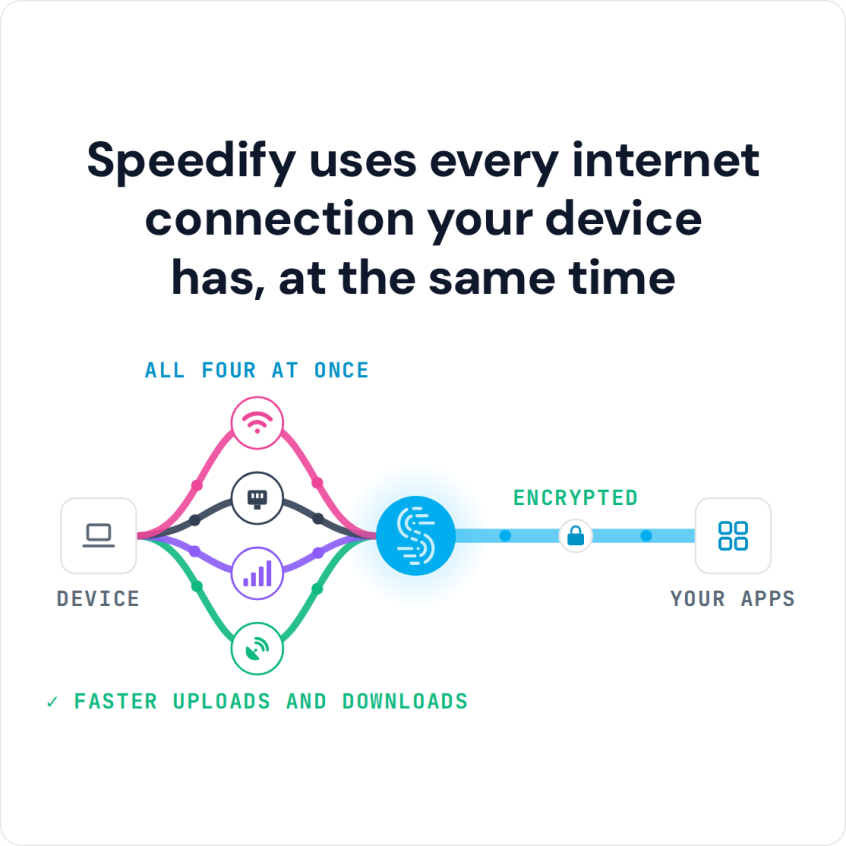
Speedify is an app that combines two or more internet connections at once, such as Wi-Fi and a tethered phone’s 4G/5G cellular connection, so you get faster uploads and downloads and stay online if one connection drops out.
Speedify uses every internet connection your device has, at the same time
How do I use WiFi and 4G/5G cellular at the same time with Speedify?

Pick your two internet connections and your device below and we'll take you to the step-by-step setup guide.


Why Combine Internet Connections on a Mac: Faster Downloads and Fewer Dropouts
Combining internet connections gives your Mac two things: more speed and more reliability. If you already have access to more than one internet connection, Speedify can use them all. For example:
- your home Internet is wired Ethernet or Wi-Fi
- you can tether your cell phone to your Mac for a cellular connection
- you can also connect to a public Wi-Fi network nearby, such as one at a restaurant or a free city network.
A Starlink dish, a USB 4G/5G cellular adapter or a second Ethernet line from a different provider work too.
When you combine all of your available connections on your Mac and use them at the same time, you get faster uploads and downloads and a connection that stays up if one drops. That helps bandwidth-hungry apps like live streaming, video calls, online gaming and remote learning.
3 Steps to Get Started: How to Combine Connections on Mac
To use several internet connections at once on your Mac, you need software that combines them, because macOS sends traffic over one connection at a time. Speedify is a connection-combining app for Mac: it splits your traffic across all of your connections at the same time and encrypts it like a VPN, so you do not have to choose between privacy and speed.
Here’s what you have to do to combine connections on your Mac:
- Get Speedify from the App Store or directly from speedify.com.
- Connect your Mac to every internet connection you have: wired Ethernet, Wi-Fi, tethered phones or USB 4G/5G cellular adapters. Speedify’s support guides explain how to connect each one.
For best results, use connections that come from different networks upstream. For example, do not connect to both wired Ethernet and Wi-Fi from the same router. - Run Speedify. As long as your Mac recognizes the connections, you will be able to combine them and get faster and more stable Internet. That includes two 4G/5G cellular adapters at once.
Speedify Also Encrypts Your Mac’s Traffic Like a VPN
Speedify encrypts your traffic like a VPN, so prying eyes, such as your ISP, and cyber criminals cannot read what you send and receive.
Speedify’s advanced encryption algorithms are fast and secure, so encryption does not slow down your internet connections.
On top of that, Speedify keeps a strict no log policy about what you do while using the service.
Speedify works on Mac computers running macOS 11.5 or later, including MacBook, MacBook Air, MacBook Pro, iMac, iMac Pro, Mac mini and Mac Pro. Check the current system requirements on the download page.
Combine every internet connection your Mac can reach for faster uploads and downloads. Get started with Speedify for FREE today!
Speedify
Get started with Speedify today.
Speedify combines Wi-Fi, 4G/5G cellular, Ethernet, Starlink and satellite into one faster, more reliable internet connection. Free to try: 5 GB a month with a free account. No credit card required.
🚀 Speed
Faster uploads and downloads, because Speedify uses all your internet connections at once.
📶 Stability
If one internet connection drops, Speedify moves your traffic to the others in milliseconds.
🔒 Security
AES-256 encryption on every internet connection, on any network you join.



15M+ downloads worldwide. 75K+ five-star reviews on iOS and Android.