
Takeaways on IRL Live Streaming from Dracula’s Castle
Streaming live from a remote spot (a mountain, a stone building with thick walls, a crowded festival) means broadcasting where one cellular signal barely holds, and where a few seconds of weak upload ends the stream.
Speedify is an app that splits your outgoing video across two or more internet connections at once (Wi-Fi, 4G/5G cellular, Ethernet, Starlink and satellite), so patchy coverage from a single carrier is no longer the whole story. Speedify needs at least two internet connections for that; with one, Speedify works as an encrypted VPN and cannot stop that connection from dropping. The gear list that made a broadcast from a medieval fortress work is below, along with six takeaways you can reuse anywhere you point a camera with Speedify running.
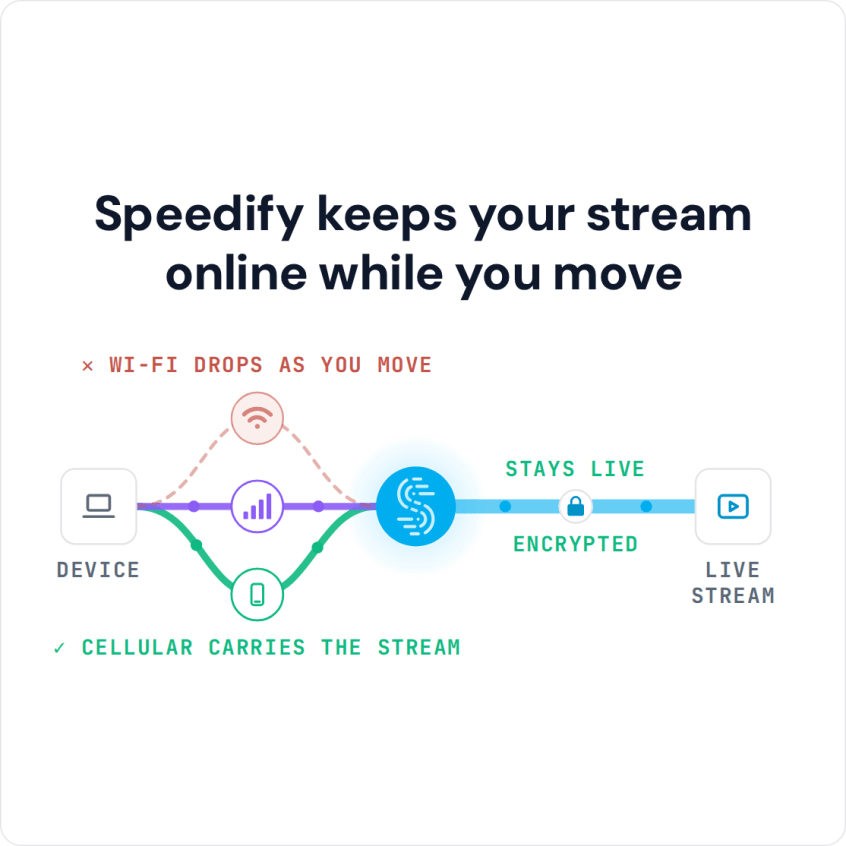
Speedify keeps your stream online while you move
Essential IRL Streaming Gear to Live Stream from Anywhere
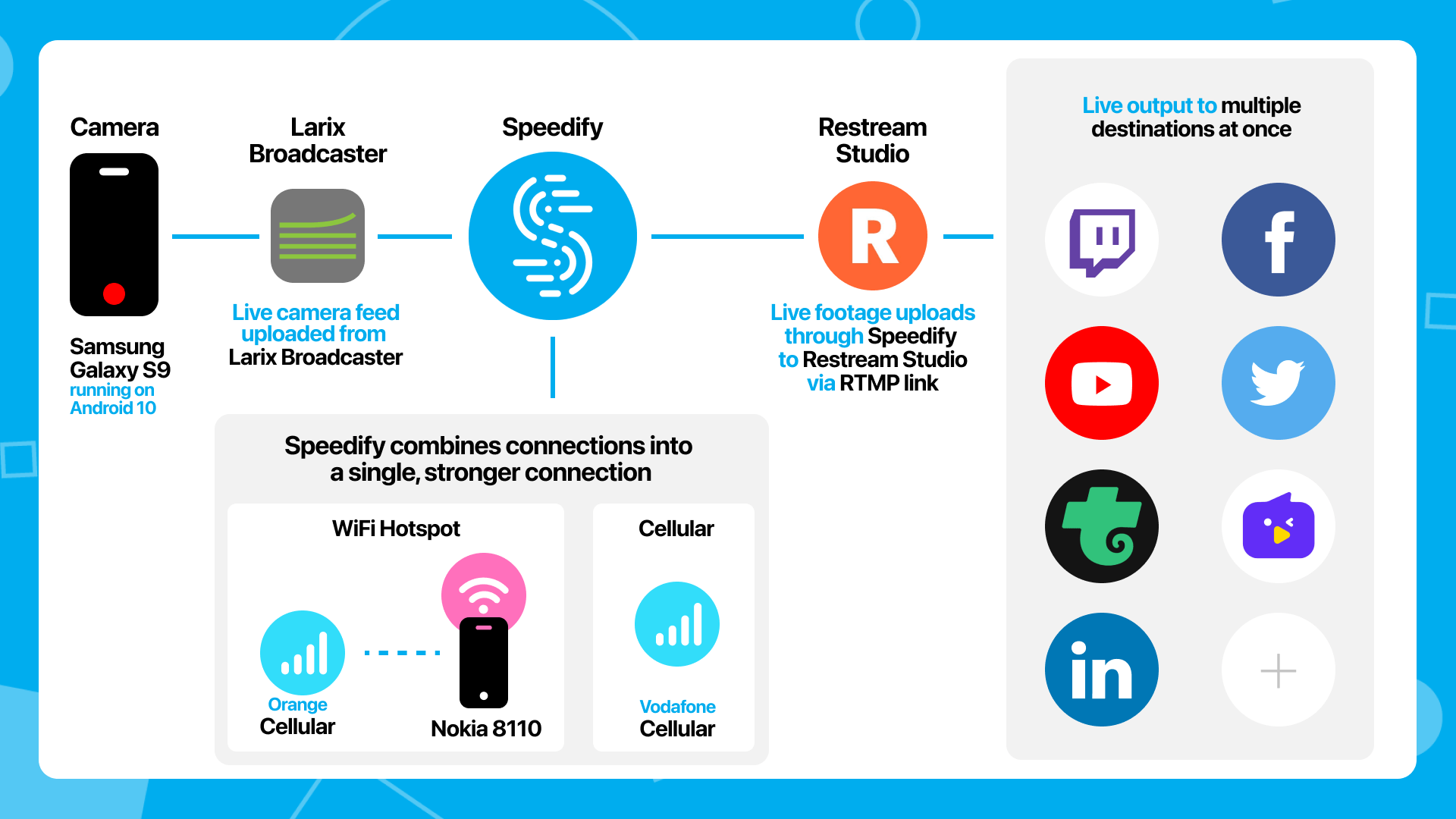
The Speedify team used a typical IRL setup. The only difference: instead of keeping a second internet connection on standby, the phone used both connections at the same time through Speedify, an app that can combine multiple internet sources into one connection for more stable and secure live streaming, video calling and web browsing.
Here’s what the team used:
- Streaming device: Samsung Galaxy S9 phone running Android 10, connected to the Vodafone Romania network
- Streaming software: Larix Broadcaster on the phone, streaming via RTMP
- Streaming platform in the cloud: Restream
- Connectivity:
- a cellular connection from Vodafone Romania on the streaming device,
- a cellular connection from Orange Romania via Wi-Fi tethering from a Nokia 8110 4G phone.
- Software that combines connections: Speedify combines the two cellular connections, packet by packet, into a single more reliable internet connection.
- Accessories: selfie stick, external battery pack (10,000 mAh), additional lighting via flashlight
- Audio for communication with the Restream studio: via local number dial-in on a Google Meet.
The way that guests work on most cloud based video studios is that the guests join a WebRTC session in the browser. But WebRTC in the browser on a phone has very poor image quality. It often appears to be 320×240 for no reason. The difference between what the web clients send on the same hardware vs what a native app like Larix, streaming RTMP, can send is shocking.
That limited the choice of cloud video software. Restream Studio was the only one the team found that takes in an RTMP stream as a live guest.
A handy diagram of this setup is below.
Watch the live stream below to see for yourself how it went.
Six Takeaways on How to IRL Live Stream from Anywhere
Here are the takeaways on streaming live IRL:
- Be at the place you’ll be live streaming from some time before you start. You can check for bad signal areas so you know how to avoid them. Or get some last minute accessories, in case you need them. As you become more familiar with the surroundings, you won’t have to do that the next time you live stream from there.
- Good connectivity is key. You can use the latest GoPro, professional camera or iPhone; if your internet is bad, the video quality will be poor. There are multiple solutions for combining connections, and when you’re IRL streaming from your phone, Speedify does it in an app on the phone itself, with no extra hardware.
- Use a live streaming app that can use your phone’s hardware directly. As mentioned earlier, live streaming with Larix Broadcaster (using RTMP) looked far better than live streaming from the browser window (via WebRTC) on the phone, which makes sense given the differences between the two technologies.
- If your live stream is a “studio” type show (as Speedify Live is), make sure you have a way to talk with the others in the studio. The team joined a Google Meet via a local dial-in number for audio. There was quite a bit of latency, so the team ended up talking via Slack, as Larix keeps streaming even when the app is in the background. Using Restream in the browser window would have given near real-time interaction with the studio.
- Start with as much as 100% battery on your streaming device and keep the battery pack permanently connected to it. With a 3 year old phone and a non-removable internal battery, this was the biggest concern. After 80 minutes of continuous live streaming at about 10 degrees Celsius, the phone still had 82% battery and the external battery pack showed 3 of 4 lines, so about 4 hours of streaming should have been possible.
- When you’re using your smartphone as your live streaming device, don’t forget to disable the notifications sounds. It can make the experience more authentic to the viewers, but they’re not there to be happy that you have a new meeting coming up… or a new DM. Unless it’s part of your show of course.
Speedify
Get started with Speedify today.
Speedify combines Wi-Fi, 4G/5G cellular, Ethernet, Starlink and satellite into one faster, more reliable internet connection. Free to try: 5 GB a month with a free account. No credit card required.
🚀 Speed
Faster uploads and downloads, because Speedify uses all your internet connections at once.
📶 Stability
If one internet connection drops, Speedify moves your traffic to the others in milliseconds.
🔒 Security
AES-256 encryption on every internet connection, on any network you join.



15M+ downloads worldwide. 75K+ five-star reviews on iOS and Android.