
Why TikTok Live Drops, and How Speedify Fixes It
TikTok Live keeps disconnecting because going live is one long, unbroken upload from your phone, and a phone normally sends that upload over a single internet connection, usually 4G/5G cellular. Walk into a weak signal spot or share a crowded tower, and that internet connection stumbles, so the broadcast stutters and ends. The same happens on any livestream from your phone.
Speedify is an app that combines Wi-Fi, 4G/5G cellular, Ethernet, Starlink and satellite internet connections and encrypts your traffic like a VPN. With two connections, such as venue Wi-Fi plus your phone’s 4G/5G cellular, a dip in one does not stall the upload, and your public IP address stays the same, so the stream does not see a new address. On a single connection, Speedify works as an encrypted VPN and cannot stop that connection from dropping. This article covers why a single internet connection cuts a TikTok Live short, and how going live with Speedify keeps you on air.
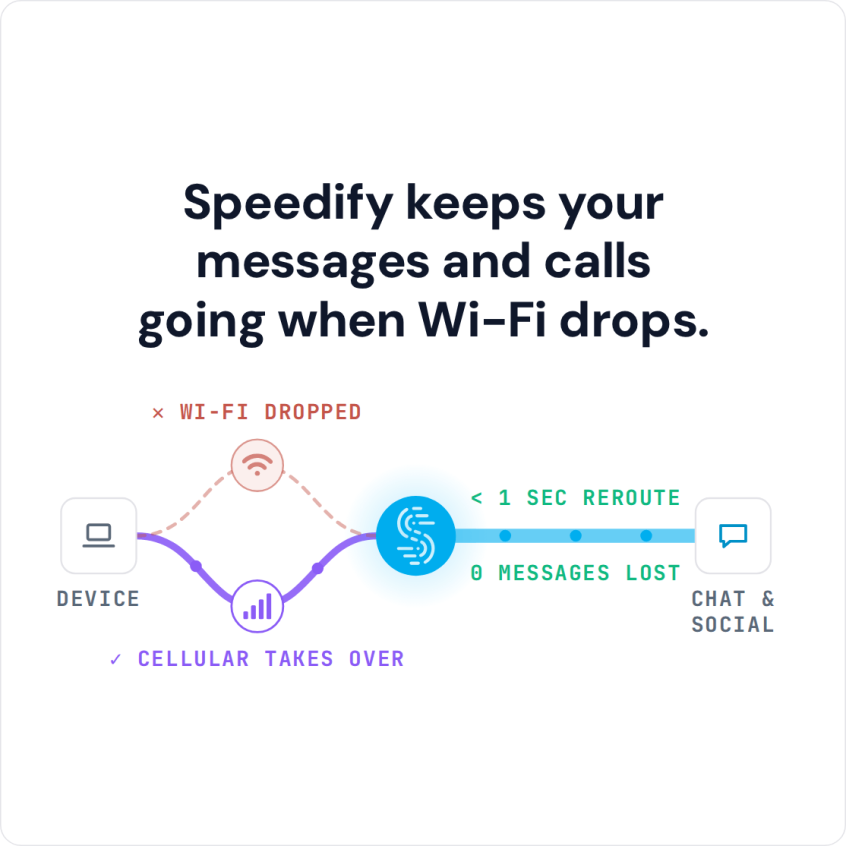
Speedify keeps your messages and calls going when Wi-Fi drops.
Why a Single Internet Connection Drops Your TikTok Live
A live broadcast is an upload that never stops for as long as you are on air, and uploads are where weak connections show their cracks first. On one connection, every one of these is enough to drop the stream:
- Signal dips as you move. Walking through a venue, a building, or a crowd changes your cellular signal second by second.
- Tower congestion. At a busy event, the cell tower runs out of capacity even when your bars look full, and your upload is first to suffer.
- Wi-Fi that fades or logs out. Cafe or venue Wi-Fi drops you mid-broadcast, and the stream goes with it.
If TikTok is throwing errors before you even go live, start with Speedify’s guides to fixing slow TikTok and lag and the TikTok network error.
How Speedify Keeps Your TikTok Live Online
Speedify combines Wi-Fi, 4G/5G cellular, Ethernet, Starlink and satellite internet connections into one connection, then sends your live upload across whichever connections have room. That changes a live broadcast in a few ways.
- Combine Wi-Fi with cellular. Speedify uses the Wi-Fi and your 4G/5G at the same time, so the broadcast leans on both instead of one shaky link.
- Real-time priority. Speedify’s Streaming Mode, on by default, spots a live stream and protects it, switching between combining connections for speed and duplicating packets for reliability based on what the network is doing.
- Cellular sharing for more signal. Speedify’s cellular sharing feature lets a friend’s phone running Speedify share its 4G/5G cellular with yours over the same Wi-Fi network, or over a Personal Hotspot on one of the phones, so a friend on a different carrier adds another tower to your broadcast.
- Failover in milliseconds. If one connection drops mid-stream, Speedify moves the stream to the others in milliseconds, according to Speedify, so you stay on air.
How to Go Live on TikTok with Speedify
- Download Speedify on your phone. Speedify runs on iOS and Android.
- Open Speedify and create a free account (the free tier includes 5 GB per month), or sign in. Encryption is on by default, so the broadcast is protected.
- Leave both Wi-Fi and 4G/5G cellular on so Speedify has two connections to combine. For more, add a friend’s phone with cellular sharing (both phones run Speedify on the same Wi-Fi network).
- Open TikTok and go live as usual. Speedify combines the connections in the background and keeps the stream steady.
One honest note: combining only helps when there is capacity to combine. If the only signal you can reach is a single jammed tower, no app can manufacture bandwidth that is not there. The win comes from having a second connection in the mix, usually venue Wi-Fi or a friend’s phone on another carrier.
TikTok Live Dropping: FAQ
Why does my TikTok Live keep dropping?
A live broadcast is a constant upload over one connection, usually cellular, and any dip, congestion, or Wi-Fi drop ends it. Speedify combines Wi-Fi and cellular so the stream survives a weak connection.
Does Speedify work for going live, not just watching?
Yes. Speedify protects the upload, which is exactly what a live broadcast depends on, and its Streaming Mode prioritizes that traffic automatically.
Can I use my friends’ phones to make my stream more stable?
Yes. Speedify’s cellular sharing feature lets nearby phones running Speedify share their 4G/5G cellular with yours over the same Wi-Fi network, so a group on a mix of carriers gives your broadcast several towers to lean on.
Will Speedify fix a stream if every connection is jammed?
No app can create bandwidth that is not there. Speedify helps when there is at least one connection with capacity to combine, which is often the case once you add venue Wi-Fi or a second phone.
Speedify
Get started with Speedify today.
Speedify combines Wi-Fi, 4G/5G cellular, Ethernet, Starlink and satellite into one faster, more reliable internet connection. Free to try: 5 GB a month with a free account. No credit card required.
🚀 Speed
Faster uploads and downloads, because Speedify uses all your internet connections at once.
📶 Stability
If one internet connection drops, Speedify moves your traffic to the others in milliseconds.
🔒 Security
AES-256 encryption on every internet connection, on any network you join.



15M+ downloads worldwide. 75K+ five-star reviews on iOS and Android.