
Unbreakable Turbo VPN Connection for PC by Combining Starlink, Wi-Fi, 4G, 5G, and DSL with Speedify
If you searched for a turbo VPN for PC, you want a VPN for Windows that does not slow the computer down. Turbo VPN itself is a separate app made by another company; this post is about Speedify, a different VPN app for Windows. Speedify runs on more than one internet connection at the same time (Wi-Fi plus a phone’s 4G/5G cellular, or wired Ethernet), so privacy on your Windows PC can come with more speed rather than less. Those gains need two or more internet connections; on a single connection, Speedify works as an encrypted VPN and can be a little slower.
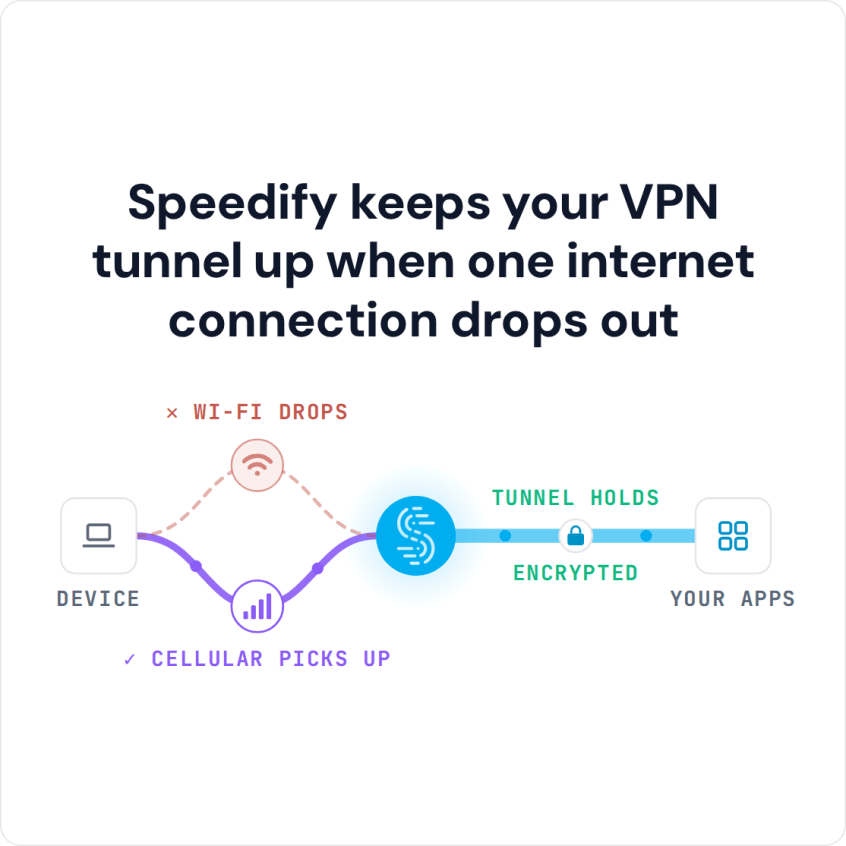
Speedify keeps your VPN tunnel up when one internet connection drops out
Below: how to set Speedify up on Windows, why most VPNs slow a PC down, and what happened in Speedify’s own test when the Wi-Fi dropped.
How to Set Up Speedify on a Windows PC
- Download Speedify for Windows (Windows 10 or later) and install it.
- Open Speedify and create a free account (the free tier includes 5 GB per month), or sign in.
- Give the PC a second internet connection next to its Wi-Fi: plug in Ethernet, or connect your phone by USB tethering (an iPhone needs Apple’s drivers, which come with iTunes or Apple Devices).
- Speedify connects to a Speedify server on its own and uses both internet connections at once; if one drops, your traffic moves to the other.
What a VPN on a Windows PC Does for Your Privacy
A VPN on your PC protects you even on a compromised Wi-Fi network: the VPN will encrypt all traffic to and from your PC, which stops anyone else snooping on your Internet activity. The Wi-Fi owner and your internet provider cannot see which websites you visit or what you send and receive. A VPN can also help against throttling that targets specific services, because the internet provider can no longer tell which service the traffic belongs to.
However, the biggest problem with a traditional VPN for PC is that it slows down your Internet connection; VPN services differ mainly in how much. Sometimes a VPN makes it almost impossible to stream a movie or hold a smooth video call.
Most of the slowdown comes from the detour: every packet travels to the VPN server and back over one internet connection, and encryption adds a little overhead on top.
Speedify’s Wi-Fi Dropout Test: How Speedify Differs from Other VPNs on a PC
Most VPN apps for PCs, iPhone, Android smartphones and other devices are built on older protocols such as OpenVPN, IKEv2 or IPsec, which use one internet connection at a time. Speedify compared these VPNs in its own VPN comparison test.
The test checked what each VPN did when the Wi-Fi hotspot dropped:
- Whether the VPN moved from Wi-Fi to 4G/5G cellular on its own, without changing IP address and cutting off everything in progress.
- Or whether the VPN stopped working when the Wi-Fi failed and stayed stuck until the user turned off Wi-Fi or disconnected and reconnected the VPN.
The result: in that test, Speedify kept the connection up and protected when the Wi-Fi dropped. The other VPNs depended on one internet connection, so the same design that makes them slow down your connection also left them stuck when it failed. Speedify is built differently: its technology for combining internet connections lets phones and computers combine multiple Internet connections at the same time, for faster downloads and uploads, reliability and security.
How Speedify Helps on a Windows PC: Streaming, Video Calls and Gaming
With Speedify on a Windows PC and two or more internet connections, you do not have to choose between security, speed and stability. Speedify helps when you:
- stream movies,
- get into video conference calls,
- play online video games.
Speedify does this while acting as a fast VPN: Speedify combines different internet connections, such as Wi-Fi and a phone’s 4G/5G cellular, into one connection with faster downloads and uploads.
When one of your internet connections drops, Speedify moves your traffic to the others and keeps the same public IP address, so calls, games and logged-in sessions carry on.
Download Speedify for Windows and try it with a free account: the free tier includes 5 GB per month.
Speedify
Get started with Speedify today.
Speedify combines Wi-Fi, 4G/5G cellular, Ethernet, Starlink and satellite into one faster, more reliable internet connection. Free to try: 5 GB a month with a free account. No credit card required.
🚀 Speed
Faster uploads and downloads, because Speedify uses all your internet connections at once.
📶 Stability
If one internet connection drops, Speedify moves your traffic to the others in milliseconds.
🔒 Security
AES-256 encryption on every internet connection, on any network you join.



15M+ downloads worldwide. 75K+ five-star reviews on iOS and Android.