
Unbreakable VPN Connection for Android by Combining Wi-Fi and 4G / 5G Cellular with Speedify
A VPN on Android is an app that encrypts everything your phone sends and receives and routes it through a VPN server, so the Wi-Fi network, your mobile carrier and anyone listening in cannot read it. The usual catch is speed: you want the privacy a VPN gives your Android phone without paying for that privacy in speed.
Speedify is a VPN app that manages that by spreading your traffic across the Wi-Fi and the 4G/5G cellular your Android phone already has, encrypting all of it on the way out. Two internet connections sharing the load make up for what the VPN costs, so browsing and uploads stay quick.
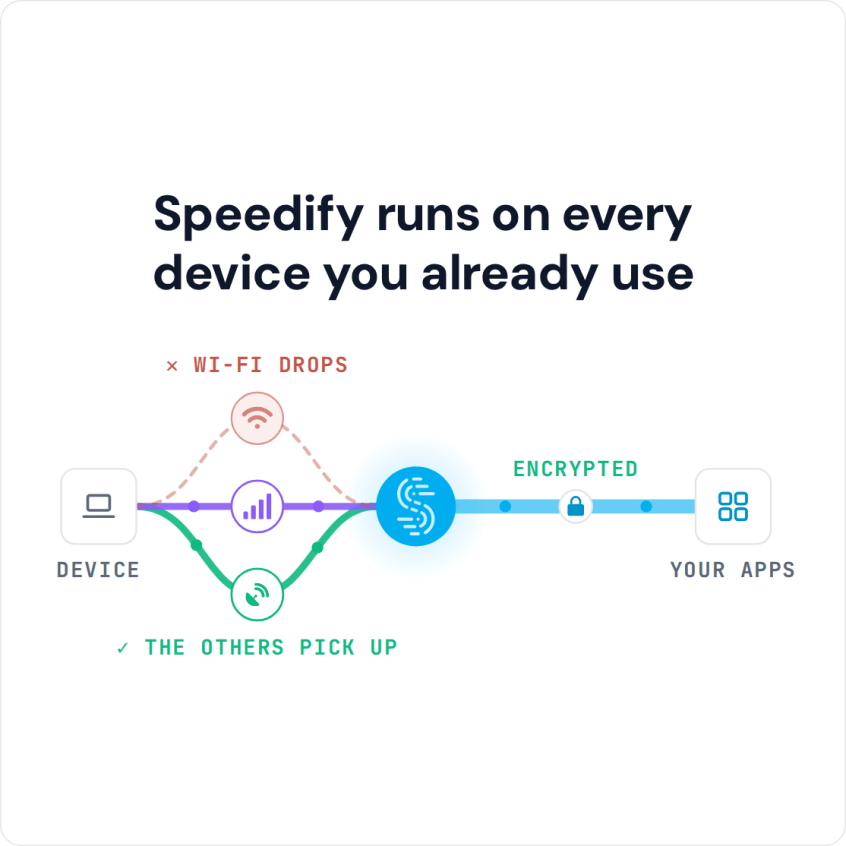
Speedify runs on every device you already use
Below: who is after your Android phone’s data, what a VPN app should do about it, how to set up Speedify, and how it keeps your browsing private while the internet connection on your phone gets faster and steadier. The speed gain needs both Wi-Fi and 4G/5G cellular turned on; on one connection alone, Speedify works as an encrypted VPN and can be a little slower.
How to Set Up Speedify on an Android Phone in Four Steps
- Download Speedify from the Google Play Store on your Android phone (Android 9 or later).
- Open Speedify and create a free account (the free tier includes 5 GB per month), or sign in.
- Tap OK when Android asks to set up a VPN connection for Speedify.
- Keep both Wi-Fi and the “Mobile data” switch (your 4G/5G cellular) turned on. Speedify connects to a Speedify server automatically and uses both connections at once.
Everyone Wants Data From Your Android Smartphone
Data is big money. Everyone from identity thieves to your own ISP wants to know more about you, whether to serve you ads or to steal your identity. The most dangerous online places your Android phone can access are public Wi-Fi networks. Even if you secure your phone with a password, your data is still vulnerable as it travels in the open to and from your Android smartphone. If you use a VPN on your Android phone, all anyone listening in will get is scrambled pieces of data.
A VPN works by rerouting all of your internet traffic through a VPN server over an encrypted connection. Snoops and hackers on the network can’t read your passwords or see which sites you are browsing. A VPN on Android protects 4G/5G cellular (what Android calls “Mobile data”) the same way it protects Wi-Fi, so your mobile carrier sees only an encrypted connection to the VPN server.
What the Best VPN for Android Should Do
VPNs should allow you the freedom to use the Internet the way you want to, without having to worry about having your data intercepted. But, most VPNs have a problem.
VPN apps are great at securing your data, but because of the way VPN technology works, most VPNs slow down your Internet connection, making it tough to watch movies or even share large photos.
VPN connections can become unstable and frequent disconnects are a major headache.
Speedify on Android: Security, Speed and Reliability in One VPN App
Android users often feel they have to choose between security and speed. With Speedify and two internet connections, you can have both.
Speedify uses its own protocol to make VPN connections faster and more reliable, and it is more than a VPN for mobility app: it lets your Android phone connect to the Internet via a Wi-Fi connection and a 4G/5G cellular connection simultaneously. With more bandwidth available, the apps that depend on your internet connection run faster on Speedify, not slower.
Speedify also has automatic failover. Speedify monitors the quality of your connections, and if one becomes unstable, reroutes your traffic over the other so you stay connected, then starts using the first connection again once it is back. Your public IP address stays the same through the switch, so logged-in apps and calls carry on. All of this happens in the background, with nothing for you to do.
Staying safe online does not have to cost you speed when you have two internet connections. To try it, download Speedify from the Google Play Store and create a free account, which includes 5 GB per month; the same account works on a Windows PC (Windows 10 or later) or a Mac (macOS 11.5 or later). For other options, see what to look for in the best VPN for your Android smartphone.
Speedify
Get started with Speedify today.
Speedify combines Wi-Fi, 4G/5G cellular, Ethernet, Starlink and satellite into one faster, more reliable internet connection. Free to try: 5 GB a month with a free account. No credit card required.
🚀 Speed
Faster uploads and downloads, because Speedify uses all your internet connections at once.
📶 Stability
If one internet connection drops, Speedify moves your traffic to the others in milliseconds.
🔒 Security
AES-256 encryption on every internet connection, on any network you join.



15M+ downloads worldwide. 75K+ five-star reviews on iOS and Android.