
VoIP Speed Test: How Many Phones Can Your Bandwidth Support?
A voice-only VoIP call needs at least 100 kbps, and a full HD video call needs about 12 Mbps. Every call your business makes over the internet is VoIP (the desk phones, the call centre, even the landline that is really plugged into your router), and each one competes for the same connection as everything else in the building. How many calls that connection can carry at once depends on:
- video or audio-only VoIP;
- where you’re at when using VoIP calling: in an office, at home, on the go;
- how much you’re using it: permanently or occasionally;
- how many devices you need to use VoIP on from the same location.
Get the number wrong and callers hear every third word. That is a bandwidth and reliability problem rather than a phone problem, which is why replacing the handsets never fixes it.
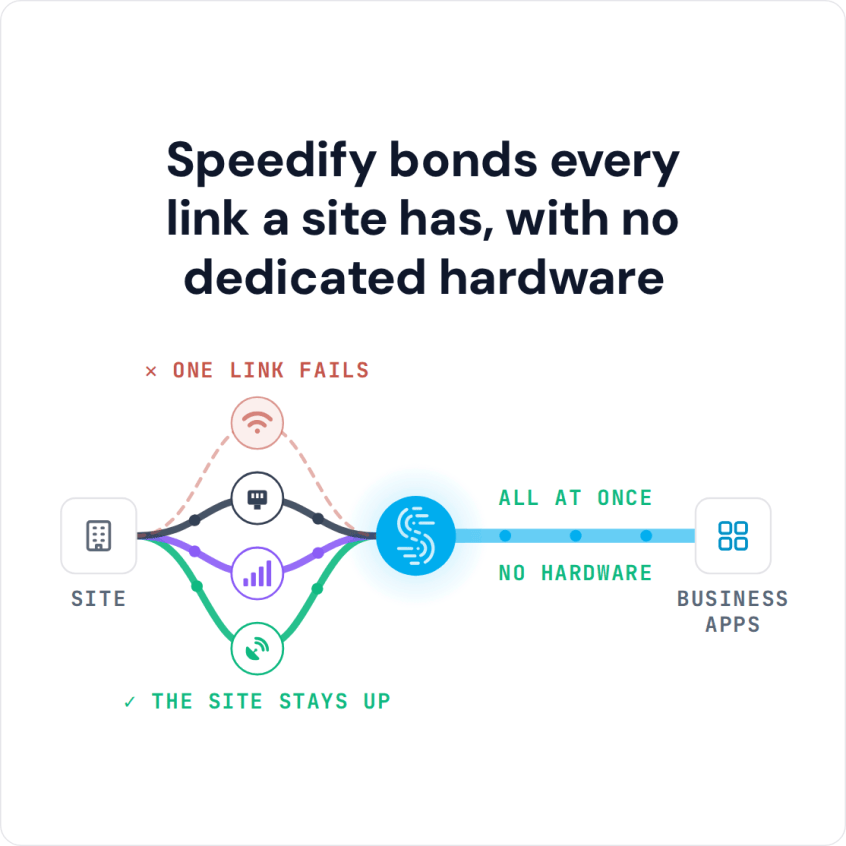
Speedify bonds every link a site has, with no dedicated hardware
Speedify is software that carries your traffic over more than one internet connection at once, for instance the wired office line plus 4G/5G cellular, so calls get more bandwidth and keep running when one line fails. On a single connection, Speedify works as an encrypted VPN and cannot make that line faster or stop it from dropping. This guide covers how much bandwidth a VoIP call really needs, how to test whether you have it, and what to do when you do not.
Watch now
How Speedify combines internet connections on any hardware
Get started with Speedify for your business
Speedify offers three commercial paths. They work together, and most enterprise customers use two or more.
01
Speedify Teams
Speedify on every supported OS for every team member
Centralized dashboard for billing, user provisioning, and usage analytics
CSV import/export and a RESTful management API
02
Speedify for Routers
License for supported OpenWrt routers
Powered by Speedify hardware lineup ready to deploy out of the box
Miri, GL.iNet and other partner models
Covers every device on the network, with no per-device install
03
Embed Speedify into your product
A · DIY
Build it yourself with the Speedify SDK.
Integrate Speedify into your iOS, Android, Windows, macOS, Linux or QNX product. Full developer documentation, sample code and supported integration paths. Your team owns the build, and the Speedify SDK handles combining the internet connections.
B · CUSTOM ENGINEERING
Have the Speedify team build it for you.
VoIP Bandwidth Requirements per Call: Voice and Video
Required VoIP bandwidth depends on several factors, including how well the service compresses the audio it sends and receives. As a rule of thumb, each voice call needs at least 100 kbps in each direction. Plan for headroom above that minimum, because everything else on the same connection competes with your calls.
Video needs much more. For a full HD video call, your bandwidth should be 12 Mbps.
Your smartphone or computer also runs background apps that use bandwidth, such as Facebook, an email client and WhatsApp, so plan for more than 100 kbps per call. According to this article, on a 10 Mbps connection the typical bandwidth left for VoIP is just 2.4 Mbps.
VoIP Data Usage per Hour
At the 100 kbps minimum, an hour-long voice call uses about 45 MB of data in each direction. A full HD video call at 12 Mbps uses about 5.4 GB per hour. Voice calls barely touch a 4G/5G cellular data plan; video calls over cellular use it up quickly.
How to Test Whether Your Connection Has Enough Bandwidth for VoIP
To check whether your connection can handle VoIP, run an online speed test and look at the upload number, since a call sends as much as it receives. Multiply the number of calls you run at once by 100 kbps, add headroom for everything else that shares the connection, and compare the total with your upload speed.
On an Amtrak train, a smartphone getting at least 400 kbps can handle a voice-only VoIP call.
If your bandwidth falls short, or you need several VoIP calls at once from the same location, you have two options: a higher bandwidth plan from your ISP, or Speedify to combine multiple internet connections into one. Here is why Speedify works as a VPN for clear VoIP calls.
How Speedify Adds Bandwidth and Failover for VoIP Calls
Speedify increases your bandwidth and makes your internet more reliable by combining internet connections, and it protects the traffic with advanced encryption. Most of the time, you already have at least 2 internet connections:
- Wi-Fi and 4G/5G cellular on your smartphone or tablet
- wired Ethernet, Wi-Fi and 4G/5G cellular dongles on your PC or Mac
Speedify combines those connections into one with the bandwidth of all of them, so you can run more VoIP calls at the same time. Combining them also helps keep VoIP calls from dropping when one line fails.
Your calls are also encrypted, which protects them from eavesdropping on public Wi-Fi hotspots.
Speedify Is Used on Millions of Devices Worldwide
Speedify has made internet connections faster and more reliable for businesses and individuals since 2014.
15M+
Speedify downloads worldwide75K+
5-star reviews for Speedify on iOS and Android82
Speedify server points of presence in 50+ cities on 6 continents500TB+
Of internet traffic carried by Speedify every weekSpeedify Partners
Speedify works with these companies to bring faster, more reliable internet and networking technology to their customers and employees.


Speedify for VoIP Call Centers: Keeping Agents Online When a Line Fails
A call center depends on availability: agents have to stay online and take VoIP calls where they can clearly understand the caller.
When the internet connection drops, every call drops with it, and a slow connection makes conversations hard to follow. Both hurt a call center’s business and its contracts with the companies it serves. Speedify combines multiple internet connections at once, so a call center gets more bandwidth and a second internet connection that takes over when the first one fails.
Load balancing puts each call on one line, so a call drops when its line fails. Speedify splits traffic per packet across all connections instead, and when one line fails, calls continue over the others. The traffic still leaves through the same Speedify server, so the public IP address stays the same and the VoIP provider does not see a new address in the middle of a call.
For an office or call center, contact Speedify to plan a deployment. To try it on your own connections first, download Speedify and run a few test calls.
Speedify Business Solutions
Speedify Teams
Speedify for Routers

Speedify Embedded Solutions and Integrations
Add Speedify to your own app or hardware with the Speedify SDK. Your product then combines internet connections, fails over automatically when one drops, and encrypts the traffic, using the same technology as the Speedify app.