
Speedify New Mac App Is Available for Direct Download

Brand New App Brings Many Extra Features
Starting with Speedify 15.2 you can download the brand new MacOS app from our website - make sure to choose the “Download directly from Speedify” option. This new version of our channel bonding software is designed for macOS computers and includes:
- A modern macOS System Extension for more reliable and secure connectivity
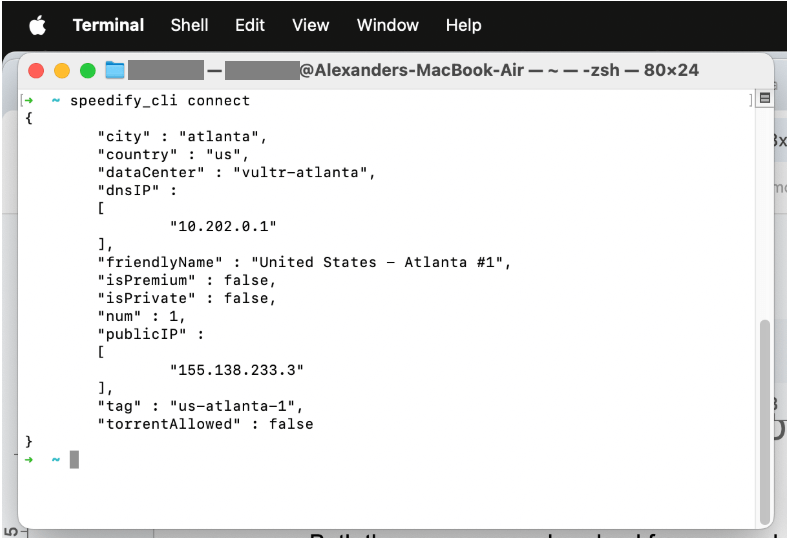
- The Speedify Command Line Interface (CLI) so you can control and monitor Speedify directly from your terminal.
With this new app, Speedify helps you use all available internet connections simultaneously for faster, more stable, and secure online experiences.
The Speedify App Provides Faster Download and Upload Speeds on Your Mac
Speedify fixes slow download and upload speeds on your Mac computers. Use the Speedify app to combine Wi-Fi, 4G / 5G cellular, Ethernet, Starlink and other satellites to use them together at the same time. The Speedify software app works on Mac, but also on Windows, Linux, iOS, Android and supported OpenWrt routers.
Use Speedify to Increase Your Upload and Download Speeds: Combine Wi-Fi, 4G / 5G Cellular, Ethernet, Starlink and Other Satellites

Speedify combines Wi-Fi, 4G / 5G cellular, Ethernet, Starlink, and other satellites for faster internet uploads and downloads
Speedify is the only software app that combines Wi-Fi, 4G / 5G cellular, Ethernet, Starlink and other satellites at once for secure, faster, and more reliable internet uploads and downloads so you stay online without interruptions.
Speedify will automatically detect and start using any available Internet connections on your device while intelligently distributing your online traffic between them for optimal performance. If you need help we have quick start guides available for most common set ups.

Speedify combines multiple personal hotspots for faster internet upload and download speeds
Speedify's Pair & Share feature enables you to connect to multiple hotspots at the same time for faster upload and download speeds and more reliable internet for everyone. Speedify's Pair & Share feature allows you to wirelessly share 4G / 5G cellular connections back and forth between multiple Speedify users on the same local network when live streaming from an event, calling from the commute or sharing from the field.
Speedify is the only app that allows you to share 4G / 5G cellular data between PCs, Macs, iPhones and Androids. Use multiple iPhones and Android phones as hotspots for internet access and get faster upload and download speeds and mobile failover for all paired devices.
Use Speedify to combine...
Combine these connections on:


New Mac System Extension
In this updated release, Speedify adopts Apple’s Network Extension framework (often referred to as a “system extension”) to provide advanced networking capabilities. This modern approach offers several benefits:
- Improved security: running as a system extension means Speedify operates with tighter, more secure controls at the OS level while still adhering to Apple’s Sandbox and Hardened Runtime restrictions, to protect the user.
- A modern macOS system extension for more reliable and secure connectivity. We’ve aligned Speedify with Apple’s current best practices and API’s.
- Enhanced stability and performance: by running as a system extension, Speedify can more efficiently handle multiple internet connections without the limitations of older methods
Differences Between the Direct Download App and the Mac App Store Versions
Both the app you can download from our website and the one you can get from the Mac App Store help you use all available connections at the same time for faster, more reliable and secure Internet. However, there are a few differences between these:
- Speedify command line interface (CLI)
- Direct Download Version: Includes the CLI by default. You can run Speedify commands from the terminal, script functionality, or even integrate Speedify into other workflows.
- Mac App Store Version: Does NOT include the CLI. You can only use the graphical user interface for configuration and monitoring.
- Faster updates and early access to new features
- Direct Download: We can release improvements and bug fixes as soon as they're ready without needing to wait in Apple’s approval review queue.
- Mac App Store Version: Updates are subject to Apple’s review process, which can delay releases. Some experimental or cutting-edge features may also be excluded from the App Store until fully approved.
On Windows, MacOS and Linux, the Speedify CLI and libraries allow you to control Speedify from inside of your own application. Login, Start, Stop, Change Servers, Speed vs Redundant mode, etc. can all be controlled from your app. We also provide wrappers in Python and Java. Check out more details about the Speedify CLI in our knowledge base article.
Which Speedify Mac Version Should You Choose?
We recommend using the direct download version from our website for the best performance, easiest access to updates, and advanced features (like CLI). If you prefer to stick with the App Store ecosystem, the Mac App Store version is also a solid choice, especially if you value a simpler environment.
Regardless of which version you pick, you’ll enjoy Speedify’s robust channel bonding technology that delivers faster, more stable, and secure internet by combining your available networks into one super connection.
Get Started with the New Speedify MacOS App
Ready to try the new Speedify macOS app for yourself? Download it directly and start combining your connections today! If you have any questions or feedback, don’t hesitate to reach out to our support team!

Get started with Speedify today!
With Speedify you can combine Wi-Fi, 4G / 5G cellular, Ethernet, Starlink and other satellites into one bonded super-connection to improve livestreaming, video calling, gaming, web browsing, and everything else you do online.


Speed
Get faster uploads and downloads for everything you do online.
Stability
Avoid buffering and disconnects while streaming, gaming, and browsing.
Security
Keep your personal data safe from hackers, snoops and cyber criminals
Speedify devs love talking tech on YouTube, Tiktok, and Instagram!
Alex Gizis and the Speedify devs discuss and explain technology including Starlink satellites, Wi-Fi 7 routers, Apple networking features, fiber optics, broadband internet, 5G mobile networks, AI, networking protocols, and much more. Follow Speedify on YouTube, TikTok, Instagram, and LinkedIn!
Alex and the Speedify team are always exploring the latest in networking and security technology—like 5G, 6G, WiFi 7, laser and satellite internet—and sharing it in new discussion content across YouTube, TikTok, Instagram, and LinkedIn every week.
Got a tech question? Let's go deeper! Pop into Speedify Office Hours live every Wednesday at 10 AM Eastern. Speedify CEO Alex Gizis and our network engineers are standing by to break down your questions about networks, tech updates, and Speedify features.
