

Speedify Combines Two Starlink Internet Connections for Faster Upload and Download Speeds and Reliable Failover
Yes, you can combine two Starlink internet connections. Each one runs through its own Starlink dish and router, and on its own your device uses only one Starlinks dish at a time.
Speedify is an app that combines two or more internet connections at once – like two Starlink connections – so you get their combined upload and download speed and stay online if either drops. This guide explains the difference between simply having two connections and actually using them together, and how to set it up.
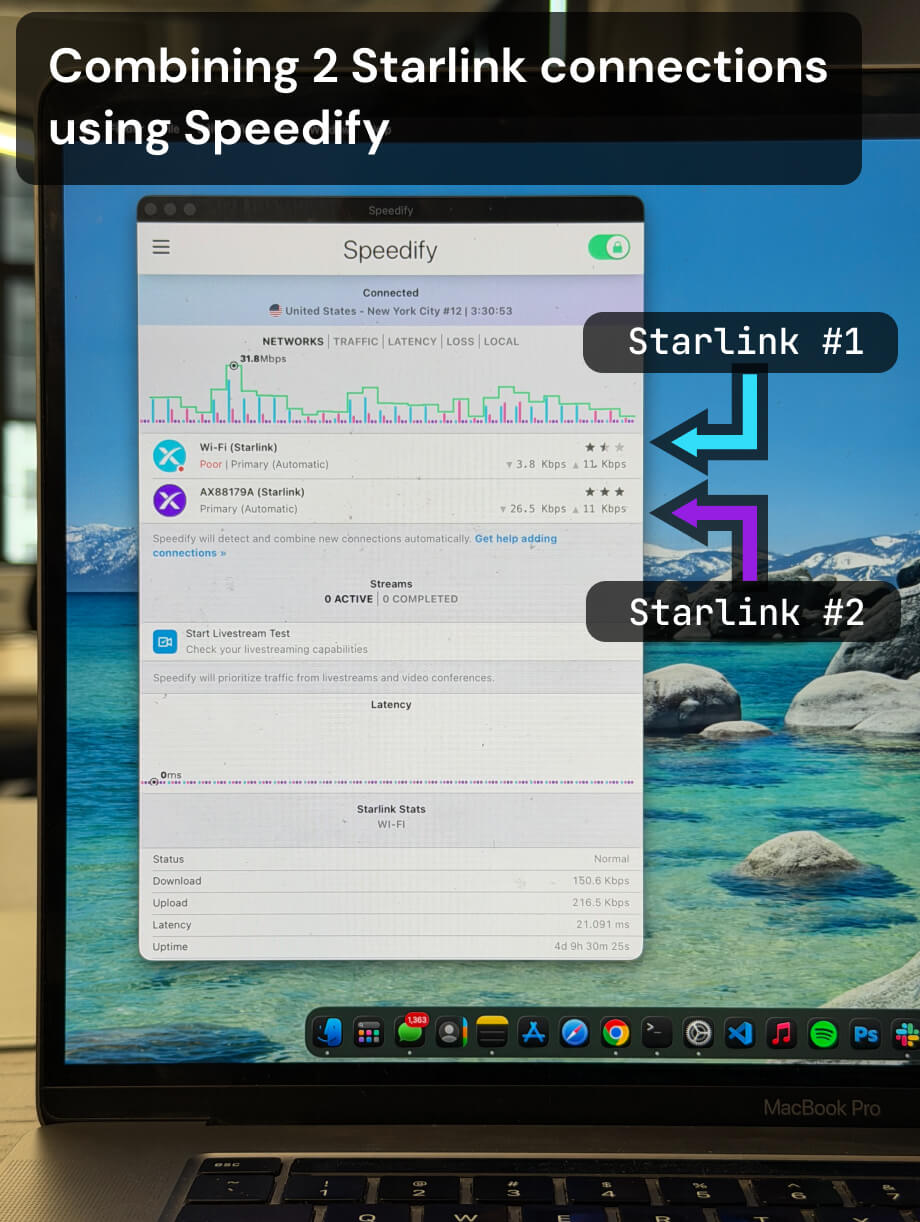
Multiple Starlink dishes, one faster and more reliable connection.
Speedify bonds all your Starlink dishes simultaneously — so you get the combined bandwidth of all your Starlink dishes, and stay online when any one drops.
Watch now
How Speedify's channel bonding technology works on any hardware
Get started with Speedify for your business
Speedify offers three commercial paths. They're not exclusive — most enterprise customers combine two or more.
01
Speedify Teams
Speedify on every supported OS for every team member
Centralized dashboard for billing, user provisioning, and usage analytics
CSV import/export and a RESTful management API
02
Speedify for Routers
License for supported OpenWrt routers
Powered by Speedify hardware lineup ready to deploy out of the box
Miri, GL.iNET, and other partner models
Whole-LAN bonding without per-device install
03
Embed Speedify into your product
A · DIY
Build it yourself with the Speedify SDK.
Integrate Speedify into your iOS, Android, Windows, macOS, Linux, or QNX product. Full developer documentation, sample code, and supported integration paths. You own the build, we provide the bonding stack.
B · CUSTOM ENGINEERING
Have us build it for you.
Having Two Starlink Connections Is Not the Same as Combining Them
Two Starlink internet connections at the same location means two dishes, two routers, and two separate data paths. Your device connects to one Starlink at a time by default. You get no speed increase from the second Starlink connection, and if the first drops, nothing automatically routes you to the second one.
To actually combine two Starlink internet connections, you need software that manages both simultaneously. Speedify does this by bonding both internet connections at the packet level. Your outgoing traffic is split across both dishes and reassembled at Speedify’s servers. Incoming traffic is handled symmetrically. Both Starlink connections work in parallel as a single logical internet path.
If either Starlink connection degrades or goes offline, Speedify moves all traffic to the working connection in milliseconds. Your sessions stay live.
Note: Two Starlink connections on the same account share the same satellite infrastructure pool. For stronger failover, two separate accounts on separate dishes give you independent satellite coverage and reduce the chance of simultaneous congestion.
How Speedify Manages Two Starlink Internet Connections
Speedify monitors both Starlink connections continuously, measuring latency, packet loss, and available bandwidth on each. When both are healthy, Speedify uses both simultaneously and delivers up to 95% of their combined upload and download capacity. When one connection degrades, Speedify shifts all traffic to the healthy one at the packet level, instantly and without dropping sessions.
Speedify also encrypts all your internet traffic across both connections, keeping your data protected on every path.
How to Combine Two Starlink Internet Connections with Speedify
Step 1: Get Both Starlink Connections Active
Install and activate both Starlink dishes. Each should have its own router and be confirmed working. Make sure you can access both networks from the device you plan to run Speedify on.
Step 2: Connect Your Device to Both Starlink Networks
Connect to the first Starlink router via Ethernet. Connect to the second Starlink router via a second Ethernet port or a USB Wi-Fi adapter. Confirm both connections appear as separate active interfaces in your network settings.
Step 3: Download and Run Speedify
Download Speedify and install it on your device. Speedify detects both Starlink connections and begins bonding them automatically. No manual routing configuration is needed.
From that point, Speedify manages both connections in the background: combining them for faster upload and download speeds, monitoring both paths, failing over instantly if either drops, and encrypting all traffic.
Who Should Combine Two Starlink Internet Connections with Speedify
- Remote workers and households in areas where a single Starlink connection is not consistent enough for daily work or calls
- Small businesses at satellite-dependent locations that need more combined upload and download bandwidth than one Starlink dish provides
- Live event production teams who need the combined throughput of two Starlink connections for simultaneous uploads and streams
- Emergency services and response teams where losing internet mid-operation is not an option
- IT administrators managing dual-Starlink setups who need software-based bonding and automatic failover without dedicated router hardware
Speedify Is Used on Millions of Devices Worldwide
Speedify has powered stronger Internet for millions of consumers since 2014
15M
Millions of Speedify downloads worldwide, and growing every day5⭐️
More than 75,000 5-star reviews for Speedify in the iOS and Android app stores82
Points of Speedify presence in datacenters around the globe500TB
Hundreds of terabytes of fast, secure data streamed every week via SpeedifySpeedify Partners
Speedify partners with these amazing organizations to deliver better internet and next-generation networking technology to their customers and employees.


Speedify Also Monitors Both Starlink Connections
Speedify displays real-time Starlink dish alerts for each active connection in the app dashboard. If either Starlink dish detects a stuck actuator motor, a non-vertical mast, or a thermal throttle condition, Speedify surfaces the alert immediately. Alerts appear when the condition has been present for at least 15 seconds and clear once resolved.
Speedify gives you a single dashboard to manage both Starlink internet connections and monitor the hardware health of both dishes.
Speedify Business Solutions
Speedify Teams
Speedify for Routers

Speedify Embedded Solutions and Integrations
Embed Speedify software into your app or hardware products and leverage the core channel bonding technology of Speedify in new and interesting ways.