
Unbreakable VPN Connection for Android by Combining Wi-Fi and 4G / 5G Cellular with Speedify
Yes, an Android phone needs a VPN, and public Wi-Fi is the clearest reason: on a coffee shop network, anyone else on it can see which sites you visit and read anything you send without encryption.
Speedify is a VPN app that scrambles all of it, and it goes past what a standard VPN app does by carrying your Android traffic over Wi-Fi and 4G/5G cellular at the same time.
Security, blocked websites and speed each get a section here. With Speedify on your Android phone, your traffic stays private, uploads and downloads get faster, and losing one internet connection does not put you offline. The speed and failover gains need both Wi-Fi and 4G/5G cellular turned on; on one connection alone, Speedify works as an encrypted VPN and can be a little slower.
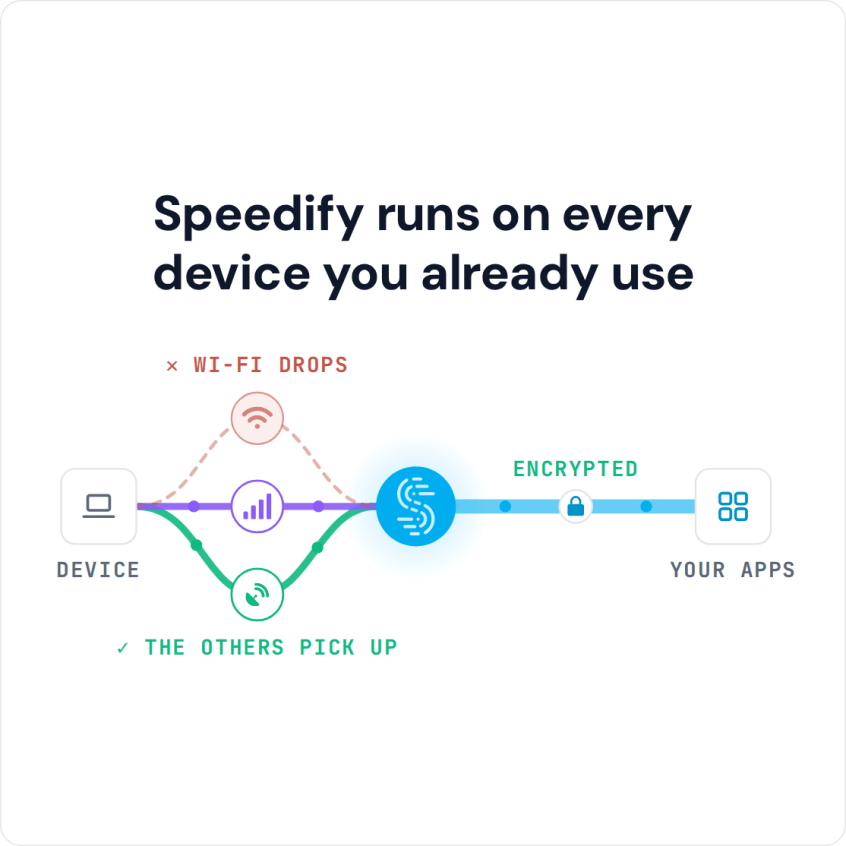
Speedify runs on every device you already use
How to Set Up a VPN on an Android Phone with Speedify
- Download Speedify from the Google Play Store on your Android phone (Android 9 or later).
- Open Speedify and create a free account (the free tier includes 5 GB per month), or sign in.
- Tap OK when Android asks to set up a VPN connection for Speedify.
- Keep both Wi-Fi and the “Mobile data” switch (your 4G/5G cellular) turned on. Speedify connects to a Speedify server automatically and uses both connections at once.
Combining uses some of your 4G/5G cellular data. To control how much, set the cellular connection’s priority (for example Secondary, so Wi-Fi carries most of the traffic) or a data cap for it in Speedify’s connection settings.
Why Use a VPN on Android: Online Security on Public Wi-Fi
A VPN keeps your activity on a network hidden from a hacker on that same network. That hacker could be anyone, from a stranger on the cafe Wi-Fi to an ex or a disgruntled employee.
And it’s not just hackers who are after your data: your ISP wants to see what you’re doing, too, and uses that data to send targeted ads your way.
If you are a journalist, activist or blogger in a country that watches its internet closely, know what a VPN can and cannot do. A VPN encrypts your traffic so the local network and your ISP cannot read it, but it does not make you anonymous: Speedify, for example, keeps no record of the sites you visit but does record connection metadata such as your IP address, device ID, connection time and data used.
Speedify encrypts that traffic with DTLS 1.2, using AES-256-GCM or ChaCha20-Poly1305 (built on Google’s BoringSSL).
Using a VPN on Android Where Websites Are Blocked
Some countries ban specific websites. Depending on the state of online freedom in a country, the government might block social media, email services and news websites, and the ISP enforces those blocks.
A VPN encrypts all your traffic and sends it to a VPN server, so the ISP sees only an encrypted connection to that server, not which websites you open. That is how a VPN gets past blocks on a local network, such as a school, office or hotel Wi-Fi.
Check the law where you are before relying on this, because some countries restrict VPN use itself. Streaming services are a separate case: they set their own regional rules in their terms, and Speedify does not unblock geo-restricted streaming libraries.
You Can Get Faster, More Reliable Internet When Using a VPN on Android
Speed is rarely the reason people use VPN on Android, mainly because VPNs are known to slow speeds down: encryption and the detour through a VPN server cost some speed.
Sure, if you’re getting a broadband speed of 100 Mbps via Wi-Fi and the speed goes down to 85 Mbps, you might not notice a drop. But mobile internet speeds can be limited to about 10-20 Mbps. If these speeds drop, your browsing will be affected.
Speedify, a VPN that combines connections, makes up for that slowdown when Wi-Fi and 4G/5G cellular are both turned on. On Android and other operating systems, Speedify offers:
- a VPN that encrypts your traffic for online security, and
- a connection-combining service that uses Wi-Fi and 4G/5G cellular together on your Android smartphone, for faster, more stable Internet.
Speedify helps you keep your traffic private on any network and, with Wi-Fi and 4G/5G cellular together, get faster uploads and downloads. Get it now on your Android!
Speedify
Get started with Speedify today.
Speedify combines Wi-Fi, 4G/5G cellular, Ethernet, Starlink and satellite into one faster, more reliable internet connection. Free to try: 5 GB a month with a free account. No credit card required.
🚀 Speed
Faster uploads and downloads, because Speedify uses all your internet connections at once.
📶 Stability
If one internet connection drops, Speedify moves your traffic to the others in milliseconds.
🔒 Security
AES-256 encryption on every internet connection, on any network you join.



15M+ downloads worldwide. 75K+ five-star reviews on iOS and Android.