
WiFi Offloading made easy (and secure)
A carrier or MVNO watching data demand climb faster than spectrum has two expensive options: buy more capacity, or move traffic off the cellular network. Offloading to Wi-Fi is the cheaper answer, but handing a subscriber between cellular and Wi-Fi normally breaks whatever they were doing.
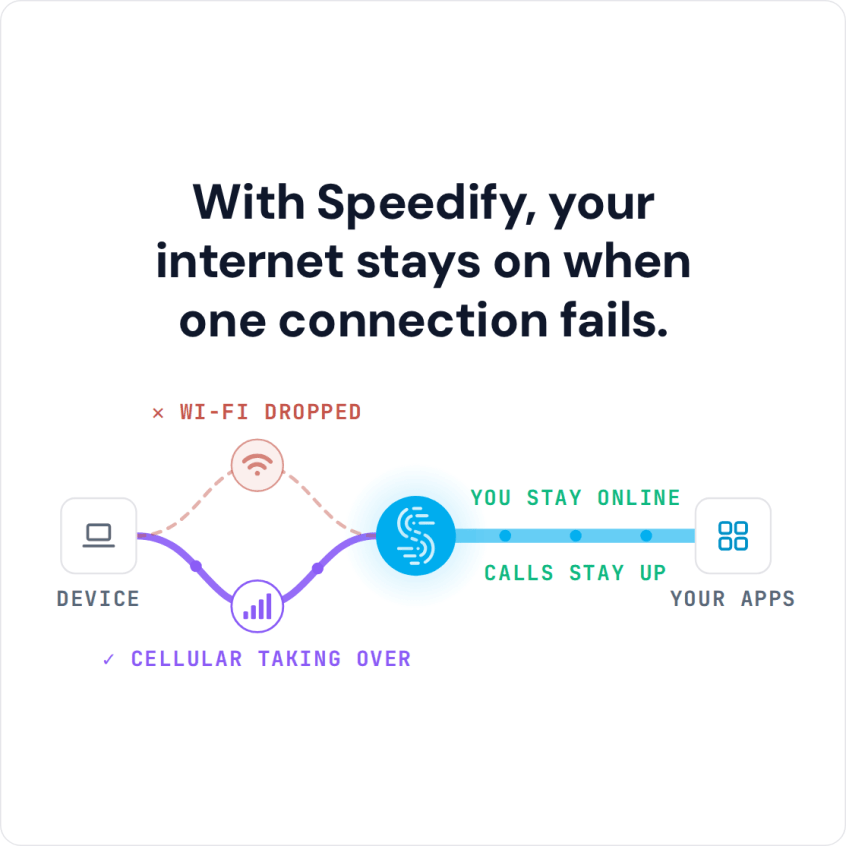
Speedify is software that combines cellular and Wi-Fi rather than switching between them, so traffic can move onto Wi-Fi without the subscriber noticing a handover. Because Speedify keeps both connections in use, a failing hotspot does not drop the session; on a single connection Speedify works as an encrypted VPN and cannot stop that connection from dropping.
Read on to see what Wi-Fi offloading is, and how combining connections makes it work without dropping sessions.
Watch now
How Speedify combines internet connections on any hardware
Get started with Speedify for your business
Speedify offers three commercial paths. They work together, and most enterprise customers use two or more.
01
Speedify Teams
Speedify on every supported OS for every team member
Centralized dashboard for billing, user provisioning, and usage analytics
CSV import/export and a RESTful management API
02
Speedify for Routers
License for supported OpenWrt routers
Powered by Speedify hardware lineup ready to deploy out of the box
Miri, GL.iNet and other partner models
Covers every device on the network, with no per-device install
03
Embed Speedify into your product
A · DIY
Build it yourself with the Speedify SDK.
Integrate Speedify into your iOS, Android, Windows, macOS, Linux or QNX product. Full developer documentation, sample code and supported integration paths. Your team owns the build, and the Speedify SDK handles combining the internet connections.
B · CUSTOM ENGINEERING
Have the Speedify team build it for you.
Wi-Fi Offloading Explained: Moving Traffic from Cellular to Wi-Fi
Wi-Fi offloading is the idea that data should travel over cheaper Wi-Fi instead of cellular networks whenever practical. Offloading the data onto Wi-Fi networks frees up mobile bandwidth and allows carriers to take better advantage of existing wired telecom infrastructure.
In practice, offloading happens in two places. The phone uses Wi-Fi whenever it is joined to a network that works, and the carrier adds Wi-Fi capacity (its own hotspots, partner venues, subscribers’ home routers) and steers phones onto it. The weak point is the move between the two: a change of network usually means a new IP address, so open connections stall or restart.
Some of the primary obstacles are:
- Phones are slow to tell when a hotspot is “dead” (connected but not passing traffic)
- Manually switching between networks is time consuming and cumbersome
- Consumers end up with interrupted internet access during network changeovers
- Consumer concern about hotspot security
Speedify addresses all of these with its technology for combining internet connections.
What Speedify Changes for Carriers and MVNOs
For MVNOs, the benefits of Speedify are twofold: moving more traffic off of LTE and onto Wi-Fi results in bigger savings as well as a better internet experience for customers. There is more in the Wi-Fi offload guide for carriers and MVNOs.
The Speedify technology handles combining internet connections and Wi-Fi offloading on mobile devices. It can be built into existing iOS, Android, Windows and macOS software and runs in the background monitoring and improving network performance for all the apps on the device. Speedify is cost aware and uses policy based routing that can be configured for increased speed or reduced cellular usage. Optional VPN encryption means that Speedify can also keep users secure across public Wi-Fi networks.
When a phone joins a hotspot that is connected but not passing traffic, the phone can take a long time to give up on it and return to cellular, and some phones stay stuck on the dead hotspot. The subscriber is left without a working internet connection and learns to avoid hotspots. Speedify keeps cellular in use alongside Wi-Fi, so when the Wi-Fi stops carrying data, traffic continues over cellular on the same session.
Speedify Is Used on Millions of Devices Worldwide
Speedify has made internet connections faster and more reliable for businesses and individuals since 2014.
15M+
Speedify downloads worldwide75K+
5-star reviews for Speedify on iOS and Android82
Speedify server points of presence in 50+ cities on 6 continents500TB+
Of internet traffic carried by Speedify every weekSpeedify Partners
Speedify works with these companies to bring faster, more reliable internet and networking technology to their customers and employees.


Learn How Speedify can solve Wi-Fi Offloading for your Business
Contact the Speedify team today to schedule a demo or learn more about Speedify enterprise offerings.
The Long Broken Promise of Wi-Fi Offloading
For years, a software answer to Wi-Fi offloading stayed out of reach. Customers had to switch between cellular and Wi-Fi by hand, and because offloading depended on each customer managing it, the amount of traffic offloaded fell far short of what carriers wanted.
In order to avoid overwhelming the network, carriers had to incentivize customers to effectively manage their offloading with data caps and high overage charges. This solution worked for a while, but at the cost of customer satisfaction.
How Speedify Helps Customers and Carriers with Wi-Fi Offloading
The Speedify protocol keeps a mobile device connected to a Wi-Fi network and to cellular at the same time. With cellular set to a lower priority than Wi-Fi, Speedify sends traffic over Wi-Fi whenever Wi-Fi can carry it and uses cellular when it cannot, so offloading happens automatically.
Because Speedify has two simultaneous connections, when something happens to the Wi-Fi, it automatically reroutes data through the cell connection, keeping the customer connected and improving their experience. Once a Wi-Fi network is available again Speedify automatically begins using it again. The user doesn’t have to do anything, or to even know what is happening.
Speedify solves the offloading problem in software: it combines different connections, efficiently manages data routing, and monitors and manages internet connections.
Speedify keeps mobile devices on Wi-Fi as much as possible, which saves the carrier money and takes load off the cellular network.
Carriers can license the Speedify protocol through the Speedify SDK and build it into a carrier-branded app, so the carrier reaches its Wi-Fi offloading targets and subscribers get a connection that stays up through handovers.
Carriers need a robust offloading solution that is easy and inexpensive to implement. That need hasn’t changed in years, and Speedify is built to meet it in software.
Contact the Speedify team today for a Wi-Fi offloading demo, or learn more about Speedify enterprise offerings.
Speedify Business Solutions
Speedify Teams
Speedify for Routers

Speedify Embedded Solutions and Integrations
Add Speedify to your own app or hardware with the Speedify SDK. Your product then combines internet connections, fails over automatically when one drops, and encrypts the traffic, using the same technology as the Speedify app.