
You Can Combine Multiple Internet Connections Together – Like Starlink, Wi-Fi, 4G, 5G, and DSL – with Speedify, to Fix WhatsApp Hanging and Not Working
WhatsApp calls that hang on “Call on Hold”, freeze, or fall silent usually mean your phone’s internet connection went quiet for a moment – a faint Wi-Fi signal, a crowded home internet connection, or a switch to mobile data as you walk out the door.
Speedify is an app that lets your phone use Wi-Fi and 4G/5G cellular data at the same time, and on a computer wired Ethernet or Starlink as well. The rest of this guide covers why WhatsApp freezes and stops responding, and what using Speedify does for your audio and video calls and for your privacy.
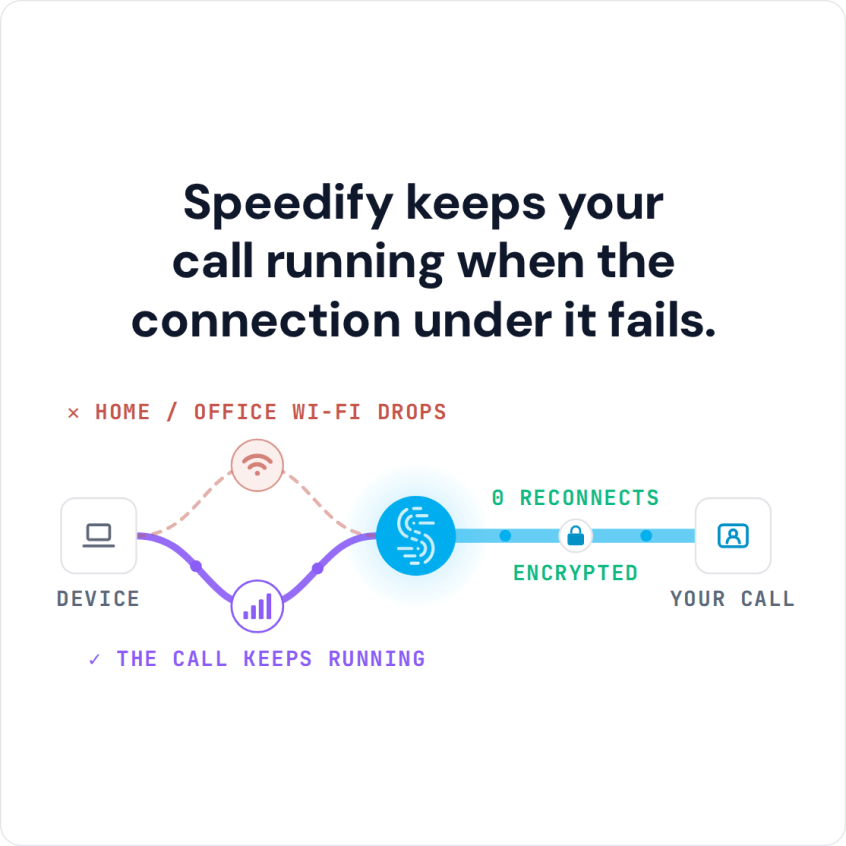
Speedify keeps your call running when the connection under it fails.
Why My WhatsApp Is Freezing and How to Deal with That
There are multiple reasons why your WhatsApp can become non-responsive and hanging; the main ones are:
- out of date app installed on your smartphone
- software conflicts with other apps on your Android or iPhone
- insufficient storage space on Android
- Internet connection that is not reliable – keeps on disconnecting or is very slow.
Most of the times it’s your Internet! WhatsApp calls require a good amount of bandwidth from your Internet connection to work properly. Here is how to check whether WhatsApp is down or it’s your internet.
Here are some solutions to avoid WhatsApp hanging and not working:
- check your Internet connection and speed
- see if the WhatsApp service is down or not
- restart WhatsApp
- update WhatsApp and your operating system
- clear the WhatsApp cache
- reinstall WhatsApp
- restart your smartphone
- restart your router / Internet source
Most often Internet connection is too slow and doesn’t have enough bandwidth for a VoIP HD audio call. Also, if the connection is flaky, you may be experiencing excessive packet loss. What’s worse, is that both of these issues are often amplified when you are on the move. Mobile devices can not seamlessly transition between different Wi-Fi networks or cell towers. When this happens, apps like WhatsApp will hang, drop Internet VoIP calls, and even not work anymore.
When Your Internet Is the Culprit for WhatsApp Hanging and Not Working, Speedify’s Got Your Back!
By default, mobile devices are designed to only use one Internet connection at a time – Wi-Fi or cellular data. This happens even though both connections are active. What if you could use BOTH connections at once, for their combined speed and reliability?
Speedify is the only app that can combine multiple internet sources into one bonded super-connection for more stable and secure live streaming, video calling, and web browsing. Instead of just using one connection at a time, Speedify allows your smartphone or tablet to connect to the Internet over both Wi-Fi and mobile data simultaneously. This instantly increases your connection bandwidth and reliability and provides a better and uninterrupted WhatsApp VoIP call experience. You won’t get the slightest “call on hold” or hanging issues.
Speedify also monitors the quality of your Internet connections with its automatic failover protection capabilities. When it detects that a signal is weak or that the network is too slow, it will automatically and seamlessly reroute the data through the other working connection. Best of all, when the other connection is back online and reliable, it begins using it again – automatically and in the background. Say goodbye to WhatsApp not working!
The app is also smart enough to try and send as much data as possible through Wi-Fi instead of over more expensive mobile data connections – saving you from potential overage fees from your carrier!
Speedify Helps You Avoid WhatsApp Hangs and Not Working, and Also Protects Your Online Privacy
In addition to delivering a faster Internet experience to your mobile device, Speedify uses advanced technology to quickly encrypt all the data sent to and from your device. Speedify keeps you safe from compromised Wi-Fi networks, snooping ISPs, and other threats.
Tired of WhatsApp hanging and not responding because you’re on a slow and unreliable Internet connection? Time to fix that with Speedify channel bonding app! Get it now!
Speedify
Get started with Speedify today.
Combine Wi-Fi, 4G/5G cellular, Ethernet, Starlink, and more into one faster, steadier connection. Free to try — no credit card required.
🚀 Speed
Faster uploads and downloads by bonding all your connections at once.
📶 Stability
Automatic failover in under a second when any connection drops.
🔒 Security
AES-256 encryption on every connection, on every network you join.



15M+ downloads worldwide. 75K+ five-star reviews on iOS and Android.