
Network Connection Issues for Your ESPN Fantasy Football App?
Your league lives on ESPN Fantasy Football, and the app will not load scores or accept a trade offer. Unless ESPN’s whole platform is having an outage, the problem sits with your internet connection: brief gaps in the signal stop the app from syncing with ESPN, so what you do on screen never registers. The same gaps cause ESPN buffering during March Madness.
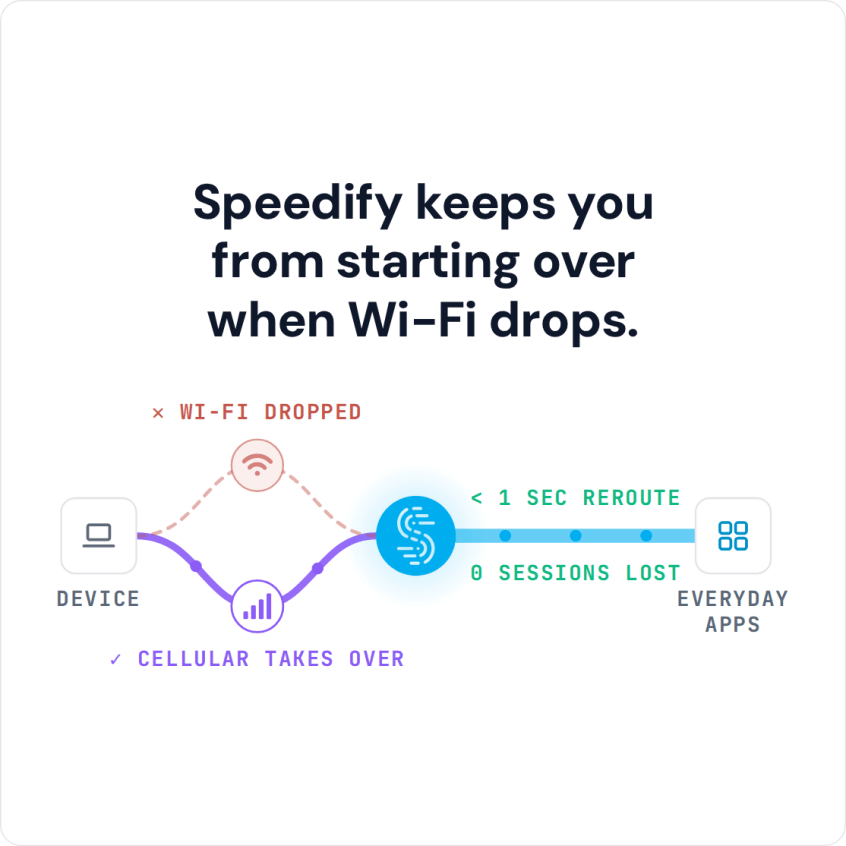
Speedify is an app that pushes your internet traffic through Wi-Fi, 4G/5G cellular, wired Ethernet, Starlink and other internet connections simultaneously, so a gap on one is covered by another. With only one internet connection, Speedify works as an encrypted VPN and cannot stop that connection from dropping, so keep both Wi-Fi and 4G/5G cellular turned on.
Speedify keeps you from starting over when Wi-Fi drops.
See below what causes ESPN Fantasy Football problems, and how using Speedify keeps trades, scores and lineup edits going through while the league is watching. If you play on NFL.com, see fixes for the NFL Fantasy app.
Why Is There a Problem with ESPN Fantasy Football?
The most common cause of ESPN Fantasy Football not working is actually your network. When you have a slow, or unreliable Internet connection, the service / app isn’t able to work properly.
ESPN Fantasy Football uses the internet to send and receive data about your actions: your phone sends each lineup change or trade to ESPN’s servers, and the servers send scores and league updates back.
If your Wi-Fi connection has a momentary blip or your cellular connection fluctuates, some of the flow of those packets gets interrupted. It can take a few moments for the data to catch up.
This results in the ESPN Fantasy Football app failing to update teams or save other actions, or not working at all.
How Speedify Keeps the ESPN Fantasy Football App Connected
Speedify makes your ESPN Fantasy Football experience better by improving the internet connection underneath it. The Speedify app monitors the quality of your internet connections in the background and can combine your Wi-Fi and 4G/5G cellular connections in a single “pipe” on your mobile device.
This improves the bandwidth and stability of your connection, so a drop on one connection no longer stops the ESPN Fantasy Football app from syncing. If you play on Yahoo, see how to fix Yahoo Fantasy not working.
Speedify also routes data when something happens to one of your connections. If you are moving between Wi-Fi networks, or your Wi-Fi or cellular network suddenly go out, you stay connected because Speedify intelligently and automatically reroutes your data until you are connected again to both networks. Best of all, you don’t notice anything because Speedify takes care of it all in the background.
Speedify is available for iOS, Android, macOS, Windows and Linux devices.
Get All Three for Your Internet Connection: Reliability, Speed and Security
Speedify does more than manage your internet connections. Speedify also works as a VPN that combines connections, and it encrypts all of the data you send and receive from your device. This helps keep your private information and conversations secure from digital eavesdroppers and cyber thieves.
Speedify doesn’t just fix your ESPN Fantasy Football network connection issues. It makes your Internet-driven apps more stable and secure, and improves your overall Internet experience.
Most VPNs slow down your internet connection. Speedify combines two or more internet connections and adds encryption, so it can add speed instead; on a single connection, Speedify works as an encrypted VPN and can be a little slower.
If you are tired of ESPN Fantasy Football not working, fix your problems now and get Speedify today!
Speedify
Get started with Speedify today.
Speedify combines Wi-Fi, 4G/5G cellular, Ethernet, Starlink and satellite into one faster, more reliable internet connection. Free to try: 5 GB a month with a free account. No credit card required.
🚀 Speed
Faster uploads and downloads, because Speedify uses all your internet connections at once.
📶 Stability
If one internet connection drops, Speedify moves your traffic to the others in milliseconds.
🔒 Security
AES-256 encryption on every internet connection, on any network you join.



15M+ downloads worldwide. 75K+ five-star reviews on iOS and Android.