
Live Streaming Can Be an Important Revenue Driver for Your Company
Marketing teams get told live video converts, then discover the hard part is not the camera. It is an office or home internet connection that cannot hold a steady upload for forty minutes, which viewers experience as a frozen host and a reason to leave.
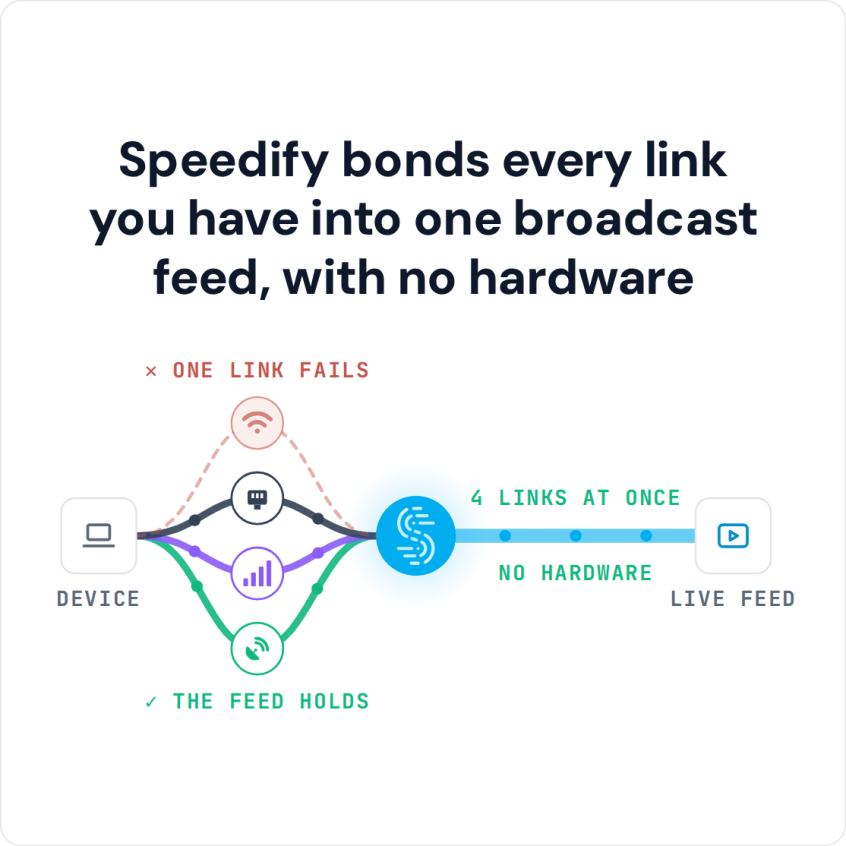
Speedify is an app that joins the internet connections you already have (Ethernet, Wi-Fi, 4G/5G cellular, Starlink) into one path for the broadcast, so a single weak connection does not end it. That needs two or more internet connections; on a single connection Speedify works as an encrypted VPN and cannot stop that connection from dropping.
Speedify bonds every link you have into one broadcast feed, with no hardware
The five-step method here covers goals, topics, resources, a regular schedule and measuring results, plus keeping the broadcast up with Speedify. Speedify’s team can talk through what your organization needs.
Surveys of viewers and businesses show why brands are moving to live video:
- 80% of consumers prefer watching a live video to reading a blog; at the same time, 82% prefer live video from a brand to social posts
- 67% of viewers are more likely to buy a ticket for an event or a concert after watching a live video
- Businesses say their top 3 live streaming challenges are: live streaming to remote employees (41%), live streaming from remote locations or conference centers (39%) and managing bandwidth (36%)
Any brand or agency that has not yet gotten onboard with live streaming will miss out on a lot of opportunities. Luckily, business owners seem to understand the need for that, given all the new brands making their way into the live streaming world, each on their own pace and budget.
Read below to see how Speedify LIVE started, the results the show has had and the method behind it.
Watch now
How Speedify combines internet connections on any hardware
Get started with Speedify for your business
Speedify offers three commercial paths. They work together, and most enterprise customers use two or more.
01
Speedify Teams
Speedify on every supported OS for every team member
Centralized dashboard for billing, user provisioning, and usage analytics
CSV import/export and a RESTful management API
02
Speedify for Routers
License for supported OpenWrt routers
Powered by Speedify hardware lineup ready to deploy out of the box
Miri, GL.iNet and other partner models
Covers every device on the network, with no per-device install
03
Embed Speedify into your product
A · DIY
Build it yourself with the Speedify SDK.
Integrate Speedify into your iOS, Android, Windows, macOS, Linux or QNX product. Full developer documentation, sample code and supported integration paths. Your team owns the build, and the Speedify SDK handles combining the internet connections.
B · CUSTOM ENGINEERING
Have the Speedify team build it for you.
How Speedify LIVE Started: Speedify’s Own Live Streaming Show
Speedify combines multiple internet connections at the same time rather than switching between them, so live streaming was a natural fit for the company.
Over the years, many Speedify users have live streamed with Speedify to get the most out of their internet connections. Then the Speedify team decided to drink its own champagne and enter the live streaming world: that is how Speedify LIVE was born, in August 2021.
What Live Streaming Marketing Did for Speedify
The Speedify team did not expect how fast Speedify LIVE would grow in its first few months. The show went from the team and a few users watching the first live stream to hundreds of viewers on every episode, with questions and comments coming in live.
In its first year, Speedify LIVE drew strong interest from Speedify users and from the influencers and creators who appeared as guests. Here are some of the results so far:
- Better engagement with Speedify users, through a weekly live Q&A stream: Speedify LIVE Office Hours.
- Getting in front of new qualified audiences, as past show guests refer the show to their peers and followers.
- Building trust with potential users: the show demos Speedify and puts it to work on a live stream every week.
Roadmap to Live Streaming Marketing Success: the Speedify LIVE Method
Here’s a brief guide to the steps behind Speedify LIVE:
Step 1: Define Your Goals for Live Streaming
Do you want to get in front of more potential customers (brand awareness)? Do you want to generate more sales from live streaming? Or do you simply want to engage better with your existing audience?
The goal(s) need to be clearly defined at the beginning, as you will use them to evaluate the success of your live streaming marketing campaigns. That’s why you need them to be measurable as well.
Step 2: Find Your Topics for Live Streaming
For Speedify LIVE, the topics revolve around live streaming as an industry and how to be better at it: best practices and success stories of content creators, plus the latest hardware and software for live streaming.
Whatever industry you’re in, you can find something to live stream about. Some suggestions:
- Questions and answers over your products and services / live support
- Live selling (read more)
- Industry thought leadership
Step 3: Plan for Resources
A live streaming video can be done with as little as a smartphone. Of course, if you’re a brand, you will want to make sure it looks professional. That’s why you need to think about:
- The budget and human resources needed for your live streaming activities
- Where you’ll be live streaming from: a studio space, or IRL (on location)?
- The equipment needed to live stream: phone, dedicated camera, dedicated microphone, extra battery pack for IRL, an app such as Speedify that combines internet connections, streaming software and so on
- Where you’ll be live streaming to: YouTube, Facebook, Instagram, TikTok, Twitch, your own platform, etc.
- Who will be live streaming: can somebody from your company host, or will you bring influencers on to talk about your products and services?
- How often you will be live streaming: weekly or daily?
- Who will handle the script for your live stream: the host or the marketing team?
- If you’re interviewing people outside of your organization, you also need a person to reach out to potential guests and be the contact person for them.
Alex Gizis, Speedify’s CEO, hosts the Speedify LIVE show, with a producer who handles everything show-related: research, the script, contact with guests, and coordination with the marketing team on social media and content.
Speedify LIVE streams both from a studio room at Speedify’s headquarters and IRL from locations around the world. Here’s a video of the Speedify LIVE IRL streaming setup, centered around an iPhone:
You can find out more about the studio equipment in this article.
Step 4: Start Live Streaming on a Regular Schedule
After you have everything planned out, go live. Stick to a regular streaming schedule: at least once a week is a good start.
As in any activity, things will go wrong sometimes, and Speedify LIVE has had its share of mishaps. Learn from each one and adjust so it does not happen again. A live streaming checklist, checked before each session the way airline pilots do, helps with that.
There’s certainly a learning curve and errors are part of it. So don’t be discouraged and keep on live streaming!
Step 5: Evaluate the Impact of Live Streaming Marketing Against Your Goals
Evaluate regularly, but allow for the learning curve. Plan to live stream on a regular basis for at least 3 to 6 months before deciding whether live streaming marketing helps your business.
Measure as much of the impact as you can. The most common KPIs are website visitors, interactions on the website and social media, inquiries about your products or services, and conversions such as sales, trials and downloads.
If you get positive results for your goals, then you may also think of augmenting the impact by including your live streams in your brand’s advertising campaigns. When done right, that should help grow faster than just organically.
Conclusion
Every content creator interviewed on Speedify LIVE so far names the same thing behind success at live streaming: commitment, and streaming on a regular basis. That holds for brands too; here is more on live streaming video for your business.
If the above sounds too complicated or not worthwhile for you, do a little research on your competitors’ live streaming efforts and look for best practices. There are also specialized agencies and professionals who can help you tap into this productive stream of new audiences.
Speedify Is Used on Millions of Devices Worldwide
Speedify has made internet connections faster and more reliable for businesses and individuals since 2014.
15M+
Speedify downloads worldwide75K+
5-star reviews for Speedify on iOS and Android82
Speedify server points of presence in 50+ cities on 6 continents500TB+
Of internet traffic carried by Speedify every weekSpeedify Partners
Speedify works with these companies to bring faster, more reliable internet and networking technology to their customers and employees.


Speedify Business Solutions
Speedify Teams
Speedify for Routers

Speedify Embedded Solutions and Integrations
Add Speedify to your own app or hardware with the Speedify SDK. Your product then combines internet connections, fails over automatically when one drops, and encrypts the traffic, using the same technology as the Speedify app.