
Solve Moderate to Severe Packet Loss from Cox Internet for VoIP or Gaming
Cox internet customers who lose data mid-match are seeing packet loss: small bundles of information that never reach the game server, so the game stalls or snaps you backwards. Heavy neighborhood use in the evening often sits behind it.
Speedify is an app that adds a second internet connection alongside your Cox service (4G/5G cellular, another Wi-Fi network, Ethernet, Starlink or satellite) and sends your traffic over all of them at the same time. Speedify needs that second connection to keep a match going when Cox drops: on the Cox line alone, Speedify works as an encrypted VPN and cannot stop that line from dropping. Speedify cannot repair Cox’s own network, so this article shows you how to prove where the data is being lost, then how using Speedify keeps games and voice calls steady anyway. If you have a second Cox line, Speedify can also combine both Cox connections for more bandwidth.
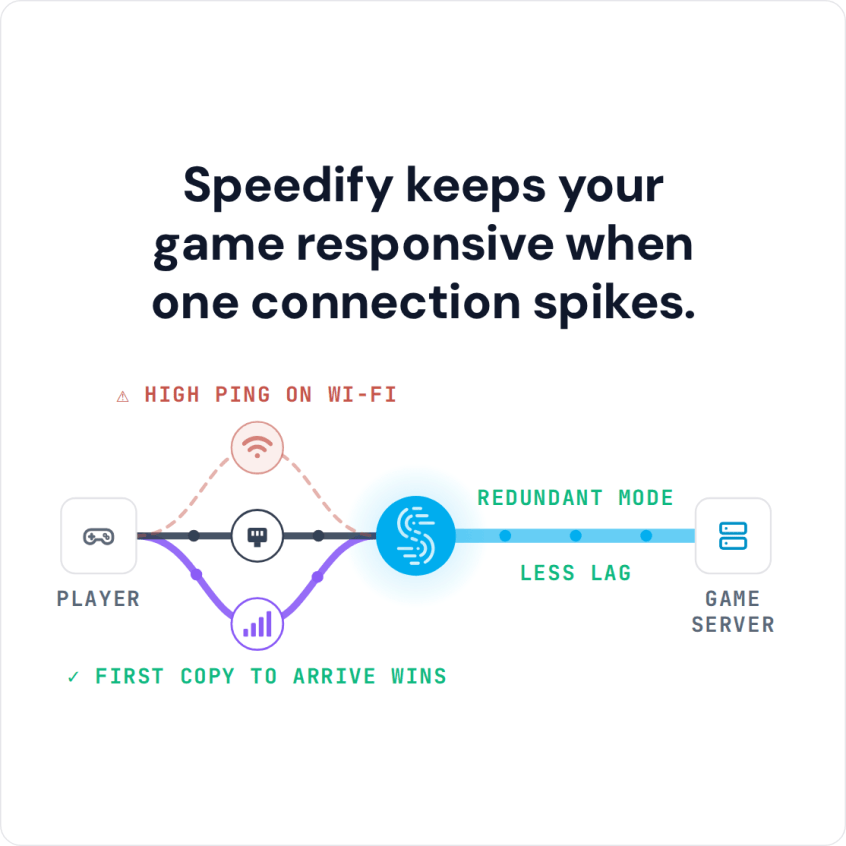
Speedify keeps your game responsive when one connection spikes.
COX is full of shut or incompetent, one of the two. The moment I remove them from the equation my problem is solved. Also when I use Speedify (VPN) the problem disappears as well.
— 402PrimeTime (@402PrimeTime) September 19, 2018
Read below to see how Speedify can help fix Cox internet packet loss.
What Cox Internet Packet Loss Does to Online Games
When you play an online game like Fortnite or stream video online, information is passed between your device (e.g. a smartphone or a computer) and the game / streaming servers. This information is transferred in small bundles of data called packets. Unfortunately, sometimes packets are lost along the way, which slows down your connection. In severe cases of Cox Internet packet loss, you may find that you become disconnected from gameplay entirely!
How to Check Cox Internet Packet Loss for Games like Fortnite
The first thing you should do when you encounter Cox Internet packet loss is check your Internet connection health with Cox’s own speed test tool or a network diagnostics tool. You may run speed and latency tests just to discover that due to network congestion, faulty or outdated hardware or even software bugs, the bitrate of your Internet connection is fluctuating and even dropping at times, which automatically generates packet loss while live streaming or online gaming using Cox Internet.
So, then, you might want to take this up with Cox, but that won’t always fix your issue, and it’ll certainly not be a fast fix. Resetting your modem, router and network adapters might lower the rate temporarily, but eventually if you’re getting a lossy Internet connection, you’ll be right where you started, with high Cox Internet packet loss rates.
How Speedify Reduces Cox Internet Packet Loss
Speedify is an app that combines internet connections and encrypts your traffic. Speedify’s packet-level technology lets you combine multiple Internet connections at the same time for more bandwidth and reliability, and Speedify recovers lost packets to minimize Cox Internet packet loss. Speedify cannot shorten the route to the game server, but with two or more connections in Redundant Mode it sends each packet over every connection and uses the copy that arrives first, so your ping follows whichever connection is faster at that moment.
The key is Speedify’s fast error correction, which works even with just one Internet connection. Speedify detects when a network packet has been lost and resends it before the Internet protocol notices, which prevents much of the slowdown.
Speedify’s Performance on Minimizing Cox Internet Packet Loss
In Speedify’s tests, even on a single link you’re largely shielded from damages caused by losing over 1% of the packets. More impressive still, at 5% packet loss the throughput over Speedify is well over double that of regular TCP. And this goes on while also keeping your private information safe!
Naturally, if you’re using Speedify to combine multiple Internet connections the throughput is even higher for the same packet loss level than while not running Speedify, delivering over triple the performance with just 2 combined connections.

If you’re tired of dealing with heavy Cox Internet packet loss, get started with Speedify today!
Speedify
Get started with Speedify today.
Speedify combines Wi-Fi, 4G/5G cellular, Ethernet, Starlink and satellite into one faster, more reliable internet connection. Free to try: 5 GB a month with a free account. No credit card required.
🚀 Speed
Faster uploads and downloads, because Speedify uses all your internet connections at once.
📶 Stability
If one internet connection drops, Speedify moves your traffic to the others in milliseconds.
🔒 Security
AES-256 encryption on every internet connection, on any network you join.



15M+ downloads worldwide. 75K+ five-star reviews on iOS and Android.