
DIY: IRL Streaming Backpack with a Raspberry Pi and Speedify Network Bonding Technology
Building an IRL streaming backpack usually means paying for a dedicated hardware box that ties several cellular modems together so a stream keeps moving. A Raspberry Pi and the right software do that job for a fraction of the price.
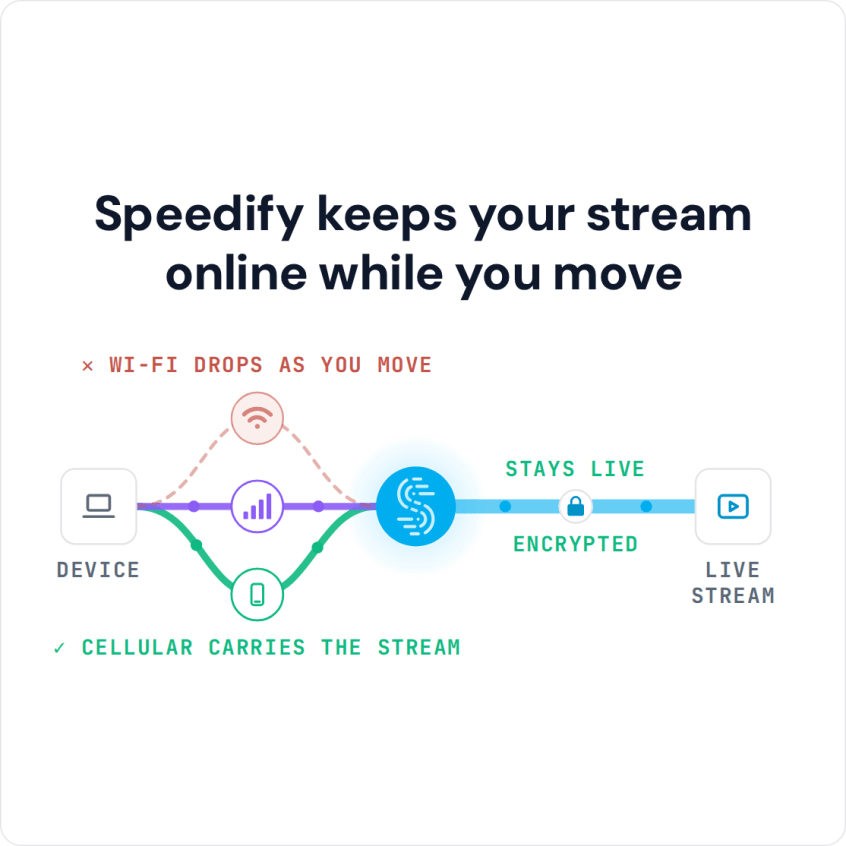
Speedify is the app that does the tying: it pushes your stream through two or more internet connections simultaneously (Wi-Fi, 4G/5G cellular, Ethernet, Starlink and satellite), so no single modem can take the broadcast down. Speedify needs at least two internet connections for that; with only one, Speedify works as an encrypted VPN and cannot stop that connection from dropping. The pages ahead give the concept, the full parts list, the software to install and the final steps that get your own backpack live with Speedify.
Speedify keeps your stream online while you move
The Concept: a Budget IRL Streaming Backpack
A streaming backpack (also called a streamer backpack or IRL backpack) is a bag that carries what you need to live stream on the move: the internet connections, the device that combines them, and the batteries that power everything. Commercial options do the combining with a dedicated hardware box. The Speedify team set out to build a cheap, do-it-yourself version of the LiveU Solo, the popular live-streaming hardware. The LiveU Solo combines cellular connections in hardware (link aggregation) and transcodes video in real time to keep video quality steady while you move around outside.
So the Speedify team installed Speedify on a Raspberry Pi 4. Speedify combines internet connections in software, which covered the combining part of the job right away.
The requirements for this setup:
- stay close to a standard IRL streaming setup on the outside, with cables concealed in the backpack as much as possible.
- keep the stream stable while moving around outside by combining internet connections: sending data over several 4G/5G cellular connections from different carriers at the same time.
The video from a phone or camera had to go through Speedify to Twitch.
And since all of this happens in a backpack, the setup had to be easy to control without a monitor or keyboard.
DIY IRL Streaming Backpack Components List
After researching streaming backpacks and camera equipment, the Speedify team settled on a smartphone, preferably one with the video capabilities of an iPhone 11 Pro or newer (see here a few suggestions). The test used an iPhone 7, which was more than adequate. If the iPhone is your whole setup, see how to stream IRL outdoors with an iPhone.
The cost for this can be $0 if you already have a smartphone with those capabilities. If not, add the cost of an iOS or Android phone, starting from a few hundred dollars. The smartphone connects to the internet over Wi-Fi from the Raspberry Pi.
The computer is a Raspberry Pi 4, for an additional $55, kept cool and protected in a $10 GeeekPi Acrylic RPi 4 Fan case.
A battery pack ($38) powers the whole setup.
The smartphone sits on a $23 Smatree telescoping selfie stick, and a Cocoon GRID IT! Accessory Organizer ($11) holds everything together. Any backpack works; the build used a Jansport backpack that was already lying around.
Finally, you need your internet connections. You can borrow phones from friends to tether or plug in a few USB cellular adapters. The build used two phones tethered to the Raspberry Pi over USB.
Components and costs
- Smartphone: iPhone 11 Pro or newer, or an equivalent for video; $0 if you already have one.
- Computer: Raspberry Pi 4, $55
- Computer accessories: GeeekPi Acrylic Case with Fan RPi 4, $10
- Battery pack: $38.
- Organizer: Cocoon GRID IT! Accessory Organizer, $11
- Camera support: Smatree telescoping selfie stick, $23
- Backpack: Jansport backpack, $30
- Mobile connections: USB cellular dongles, tethered smartphones
- Speedify: as low as $4.99 per month on the 3-year plan (Linux needs a paid plan)
- [Optional] Dedicated streaming solution, if you want to multistream. You can also live stream directly from the platform’s app (YouTube, Facebook Live, Instagram and others).
This brings the budget to about $175 plus the cost of the smartphone, if you don’t have one, and the dedicated streaming software, if you need to livestream on multiple platforms at once. This is still cheaper than the Gunrun backpack, and you may not need to buy all of this equipment if you already have similar items.
Of course, if you’re looking to create a home studio for streaming, you’ll have to go higher.
Software You Need for a Raspberry Pi Live Streaming Backpack
As mentioned before, one of the core elements of this live streaming backpack is Speedify, an app that can combine multiple internet sources into one connection for more stable and secure live streaming, video calling and web browsing. You can easily set up Speedify on your Raspberry Pi using the instructions here.
And, as mentioned above, if you want to live stream to more than one platform at once (Twitch, YouTube, Facebook Live, Instagram and others), you need a dedicated streaming solution. Here are some examples:
- Streamlabs OBS: apps for both iOS and Android
- Streamyard: runs in the browser
- Melon: runs in the browser
- Restream: runs in the browser.
Final Steps: Get the IRL Streaming Backpack Up-and-Running
The Speedify team first tried building OBS on the Raspberry Pi, but it proved too unstable, and the streaming quality was limited by the Raspberry Pi’s hardware.
So the build uses the Raspberry Pi as a router that combines internet connections, sharing the combined Speedify connection with the smartphone over Wi-Fi, which keeps the setup easy to operate from a backpack.
You can use any streaming solution that supports your smartphone’s operating system (iOS or Android).
All you have to do is:
- connect your smartphone over Wi-Fi to the combined Speedify connection from the Raspberry Pi (check out this guide on how to set that up).
- start the livestream from your smartphone, either through the dedicated streaming solution or directly from the social media platform’s app.
Speedify
Get started with Speedify today.
Speedify combines Wi-Fi, 4G/5G cellular, Ethernet, Starlink and satellite into one faster, more reliable internet connection. Free to try: 5 GB a month with a free account. No credit card required.
🚀 Speed
Faster uploads and downloads, because Speedify uses all your internet connections at once.
📶 Stability
If one internet connection drops, Speedify moves your traffic to the others in milliseconds.
🔒 Security
AES-256 encryption on every internet connection, on any network you join.



15M+ downloads worldwide. 75K+ five-star reviews on iOS and Android.