
What You Need for IRL Live Streaming
Shopping for IRL streaming gear is easy until you reach the internet part, where a phone alone leaves you one cellular signal and one point of failure on every walk. Cameras and mounts cannot rescue a stream that stalls because the upload thinned out.
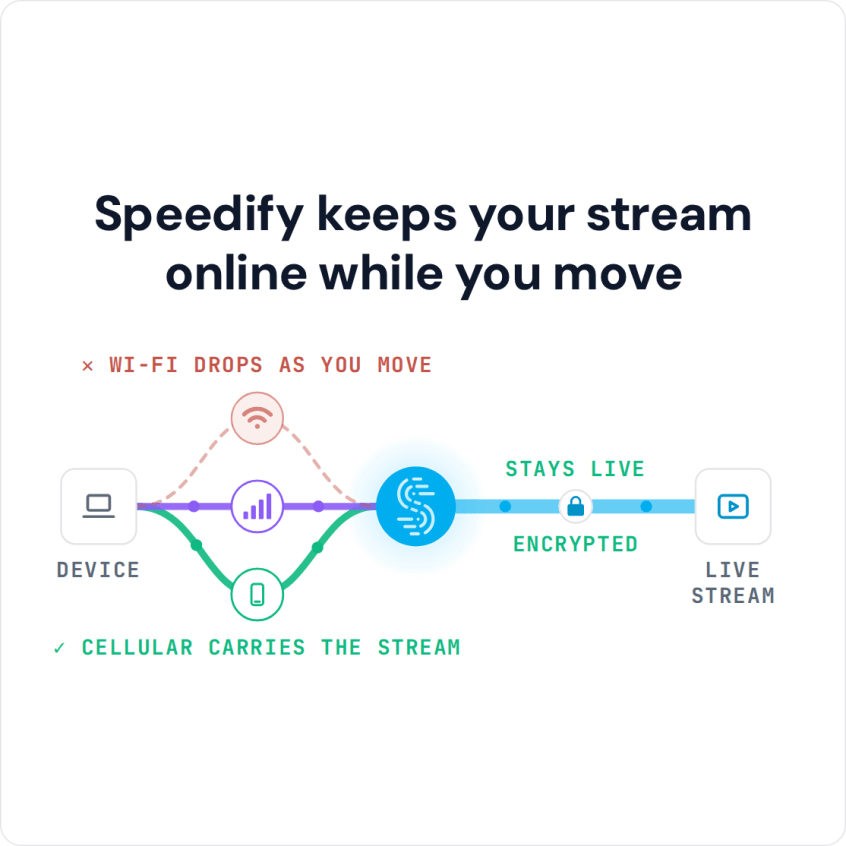
Speedify is an app that bundles two or more internet connections into one steadier connection (Wi-Fi, 4G/5G cellular, Ethernet, Starlink and satellite), so several cellular signals share the load instead of one. With only one internet connection, Speedify works as an encrypted VPN and cannot stop that connection from dropping, so bring at least two (for example two phones or modems on different carriers). This shopping list covers every component, explains why combining internet connections matters for an IRL stream, and compares Speedify with other services that combine connections.
How to IRL Stream: The Equipment You Need
The smartphone will be needed for its camera and live streaming apps / capabilities. But, along with that, you also need to have fast and stable internet, so you don’t get stuttering video, buffering or disconnects.
Here’s a sample list of the components in the Speedify team’s IRL streaming gear budget alternative. Similar hardware with the same functions works just as well.
Sample components and costs
- Smartphone: iPhone 11 Pro or newer, or an equivalent for video; $0 if you already have one.
- Computer: Raspberry Pi 4, $55
- Computer accessories: GeeekPi Acrylic Case with Fan RPi 4, $10
- Battery pack: $38.
- Organizer: Cocoon GRID IT! Accessory Organizer, $11
- Camera support: Smatree telescoping selfie stick, $23
- Backpack: Jansport backpack, $30
- Mobile connections: USB cellular dongles, tethered smartphones
- Speedify: as low as $4.99 per month on the 3-year plan (Linux needs a paid plan)
- [Optional] Dedicated streaming solution, if you want to multistream. You can also live stream directly from the platform’s app (YouTube, Facebook Live, Instagram and others).
The total budget for this IRL streaming gear is about $200 plus the cost of the smartphone, if you don’t have an adequate one. The build still costs far less than the Gunrun backpack, and you may not need to buy all of this equipment if you already have similar items.
Why an IRL Stream Needs Two or More Combined Internet Connections
When you stream from anywhere, you will run into unreliable internet at some point. The most common situations where you might encounter these type of connectivity issues live streams include:
- When traveling or on the go: on the street, a bus or a train. You may be connected to a bad / spotty WiFi hotspot.
- In crowded areas: the available bandwidth on both WiFi and cellular connections may not be enough to serve everyone at a stadium, a concert or a frat house party.
- At home: your ISP may be doing maintenance work right when you’re broadcasting live, or throttling your connection.
Here’s what happens: if the connection is unreliable, you may not be able to stream at a high resolution because bandwidth is limited, so your videos may appear jittery or choppy. And if your connection is spotty and disconnects, you lose many of your viewers, at least for that stream.
So your IRL streaming equipment needs to handle unfriendly internet conditions while streaming live.
Speedify: the App That Combines Connections in an IRL Streaming Backpack
Speedify is an app that gets you faster, more reliable and secure internet. Speedify allows you to use multiple internet connections at the same time. Speedify runs on computers, smartphones, tablets and various devices that run Linux, including Raspberry Pi. Depending on the device, you can combine any mix of two or more Wi-Fi networks, cellular networks and wired networks. Combining them adds an automatic internet failover mechanism for reliability and gives the stream more upload bandwidth. In Redundant Mode, Speedify sends each packet over every connection and uses the copy that arrives first, so latency (ping) follows whichever connection is faster at that moment.
To use 2 or more internet connections at once, Speedify relies on its technology for combining internet connections: your traffic is split packet by packet across all of them.
If one of your connections fails, Speedify automatically reroutes all the traffic through your other available connection(s). This happens in the background without you having to do anything. When the dropped connection is back online, Speedify will pick it up and start using it again.
Speedify vs Hardware for Combining Internet Connections in an IRL Streaming Backpack
Combining internet connections is key to a fast and reliable connection when live streaming, and it is not tied to one architecture. You can choose a mixed hardware-software solution from companies like Peplink and Mushroom Networks, or go with Speedify’s software-only implementation, which you can also deploy on a hardware device of your choice running Linux.
Many people choose solutions built around dedicated hardware, such as multi-WAN routers or SD-WAN networking devices. If you’re planning to adopt a hybrid hardware-software solution, here are some things you should consider.
- Performance: you are limited by the performance of the hardware and sometimes by its software. Your smartphones or computers may be able to go faster, but it won’t make any difference.
- Flexibility: will this solution still be usable if you change something in your current setup?
- Scalability: hardware gets old quickly. Does the solution include free hardware upgrades?
- Cost of implementation: hardware adds a cost to the final solution.
On the other hand, if you choose a software-only solution like Speedify, the benefits are straightforward. The only limitations you’ll have are related to:
- the devices you’re using and what type of network connections they support.
- the speeds of the Internet connections you’re planning to combine.
There are no flexibility or scalability issues. When it comes to cost, Speedify is only a fraction of the price of mixed hardware-software solutions for combining internet connections, which makes Speedify the practical choice for an IRL stream setup.
Speedify
Get started with Speedify today.
Speedify combines Wi-Fi, 4G/5G cellular, Ethernet, Starlink and satellite into one faster, more reliable internet connection. Free to try: 5 GB a month with a free account. No credit card required.
🚀 Speed
Faster uploads and downloads, because Speedify uses all your internet connections at once.
📶 Stability
If one internet connection drops, Speedify moves your traffic to the others in milliseconds.
🔒 Security
AES-256 encryption on every internet connection, on any network you join.



15M+ downloads worldwide. 75K+ five-star reviews on iOS and Android.