
Beyond Switching Providers: A Smart Alternative to Starlink for Enterprise Connectivity
The main alternatives to Starlink are other satellite internet services, like Viasat and HughesNet, and, where you can get them, 5G home internet, fixed wireless, cable or DSL. Viasat and HughesNet cover wide areas, but their satellites sit much farther from Earth, so every click and call takes longer than on Starlink. For Amazon’s satellite internet service, here is how Amazon Leo compares with Starlink.
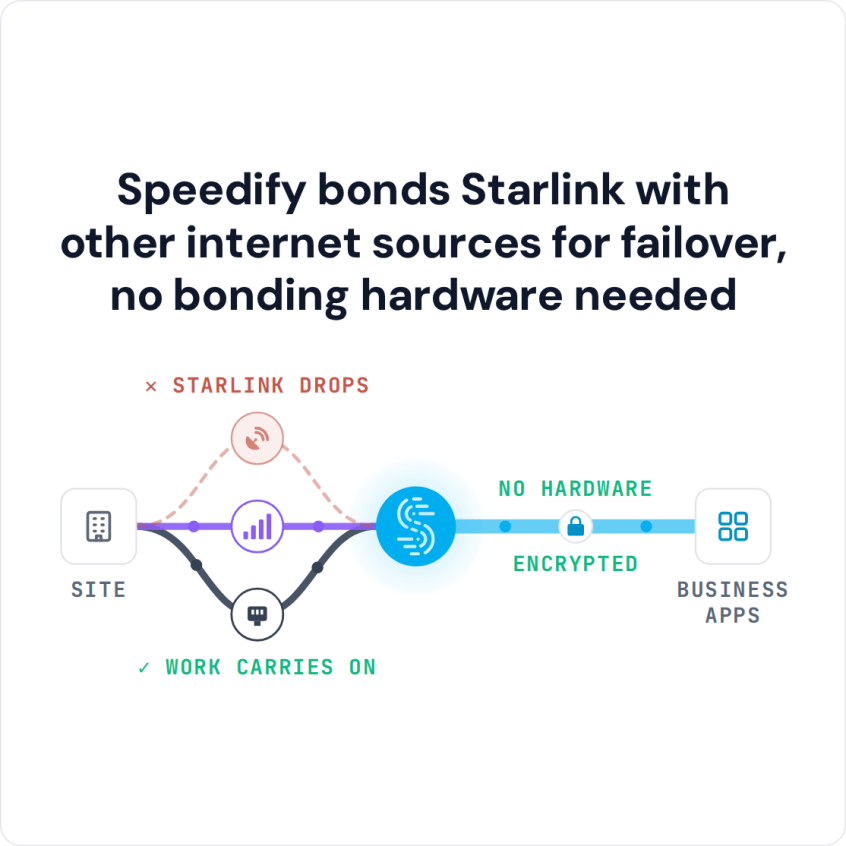
If you’re looking for an alternative because Starlink drops or slows down, you may not need to switch. Speedify uses Starlink and a second internet connection, like 4G/5G cellular, at the same time, so when Starlink dips, your calls and downloads keep going on the other one.
Speedify bonds Starlink with other internet sources for failover, no bonding hardware needed
Watch now
How Speedify's channel bonding technology works on any hardware
Get started with Speedify for your business
Speedify offers three commercial paths. They're not exclusive — most enterprise customers combine two or more.
01
Speedify Teams
Speedify on every supported OS for every team member
Centralized dashboard for billing, user provisioning, and usage analytics
CSV import/export and a RESTful management API
02
Speedify for Routers
License for supported OpenWrt routers
Powered by Speedify hardware lineup ready to deploy out of the box
Miri, GL.iNET, and other partner models
Whole-LAN bonding without per-device install
03
Embed Speedify into your product
A · DIY
Build it yourself with the Speedify SDK.
Integrate Speedify into your iOS, Android, Windows, macOS, Linux, or QNX product. Full developer documentation, sample code, and supported integration paths. You own the build, we provide the bonding stack.
B · CUSTOM ENGINEERING
Have us build it for you.
Starlink Alternatives Compared: Viasat, HughesNet and 5G Home Internet
Starlink: SpaceX’s satellite internet. Its satellites fly close to Earth, so Starlink says the delay is usually 25 to 60 milliseconds on land, with downloads of 45 to 280 Mbps. Starlink still slows down or drops in heavy weather or when something blocks the dish’s view of the sky, and it isn’t available everywhere yet.
Viasat: Viasat’s satellites are much farther from Earth. Viasat covers wide areas and has plans for businesses, but the longer delay makes video calls and online games harder.
HughesNet: another satellite service with satellites far from Earth. HughesNet is steady but usually slower, with data allowances, and it has the same long delay as Viasat.
5G home internet, cable and DSL: where a strong cellular signal or a wired line reaches you, these are worth comparing, and none of them needs a clear view of the sky. See Starlink vs. 5G home internet.
Every satellite service, Starlink included, shares the same weak spots: weather, anything that blocks the view of the sky, and outages you can’t control.
Why Using Starlink with a Second Internet Connection Beats Switching Providers
Moving from Starlink to another satellite service swaps one set of problems for another. Using Starlink together with a second internet connection keeps what Starlink does well and covers what it doesn’t. With Speedify, your business:
- keeps the Starlink dishes it already paid for, and gets more out of them
- isn’t tied to any one provider’s outages
- moves traffic automatically to whichever internet connection is working best at that moment
- gets nearly the full speed of all its internet connections combined when they’re all working
Speedify needs that second internet connection. With one Starlink dish and nothing else, Speedify can’t add speed or stop drops.
Which Internet Connections to Use Together with Starlink
Starlink plus a second Starlink dish: two Starlink dishes placed apart protect you when something blocks one dish’s view, or when one dish fails.
Starlink plus fixed wireless, DSL or cable: even an old, slow wired line helps, because it keeps important traffic moving when Starlink drops.
Starlink plus 4G/5G cellular: cellular doesn’t depend on the sky, so it often keeps working through the weather and obstructions that interrupt satellite internet.
Speedify runs as an app on Windows, macOS, Linux, iOS and Android, or on routers powered by Speedify that cover a whole site. Speedify checks every internet connection all the time, sends your traffic where it moves best, and keeps calls and sessions connected when one internet connection weakens.
How Businesses Use Starlink with Other Internet Connections and Speedify
Emergency response. Disaster response teams can set up Starlink quickly and combine it with whatever ground-based internet still works, so command centers stay in touch when local networks are damaged.
Remote construction sites. Two Starlink dishes used together with 5G keep a site online through bad weather that would cut off a single internet connection.
Mobile medical services. Clinics in vans and trucks use Starlink with cellular so video appointments keep working wherever they park.
Live broadcasting. Reporters, event organizers and anyone else who streams live can run Speedify on the streaming device itself and use every internet connection they have.
Remote research. From island research labs to ships studying marine life in the middle of the Pacific Ocean, using several satellite internet connections together gets more work done.
Speedify Is Used on Millions of Devices Worldwide
Speedify has made internet connections faster and more reliable for businesses and individuals since 2014.
15M+
Speedify downloads worldwide75K+
5-star reviews for Speedify on iOS and Android82
Speedify server points of presence in 50+ cities on 6 continents500TB+
Of internet traffic carried by Speedify every weekSpeedify Partners
Speedify works with these companies to bring faster, more reliable internet and networking technology to their customers and employees.


Using Starlink with Speedify vs. Switching Providers: What It Costs Your Business
- No switching costs. Adding an internet connection avoids replacing equipment and retraining staff.
- No downtime during a changeover. You add internet connections instead of swapping one system for another.
- More from the Starlink you already have. Your Starlink dishes keep earning their cost instead of being replaced.
- Spend as you grow. Add internet connections one at a time as your needs grow, with no big upfront cost.
For businesses: Speedify can combine every Starlink dish and internet connection at your sites. Contact Us to plan the setup.
For home users: before you pay for a new provider, download Speedify and use your Starlink internet connection together with your phone’s cellular connection.
Speedify Business Solutions
Speedify Teams
Speedify for Routers

Speedify Embedded Solutions and Integrations
Embed Speedify software into your app or hardware products and leverage the core channel bonding technology of Speedify in new and interesting ways.