
Speedify Makes Starlink a Reliable Internet Connection for Vehicle Fleets
Yes, you can use Starlink in vehicles, from a single car or truck to a whole fleet. Starlink Roam and Priority plans work on the move (Residential plans are for one fixed address), so vehicles stay connected on rural highways, job sites and remote routes where cellular alone falls short.
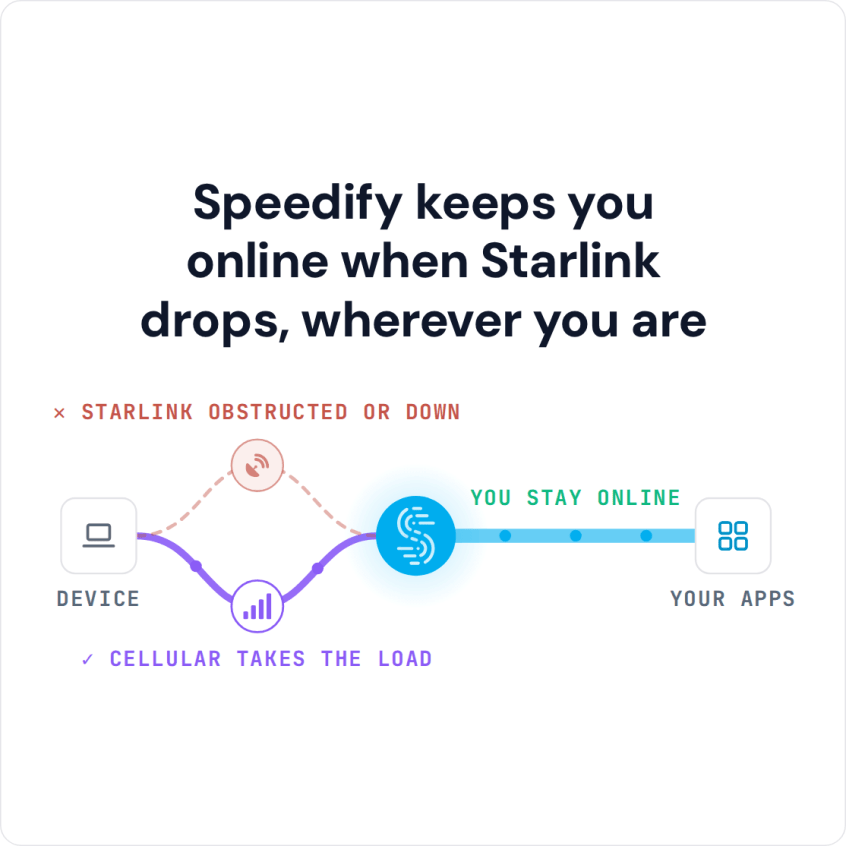
Speedify is an app that uses Starlink and cellular at the same time. Where cellular is strong, Speedify uses both for faster speeds. Where cellular fades, Speedify moves the traffic to Starlink, and back to cellular when Starlink drops, so GPS tracking, driver logs and dispatch stay online without the driver doing anything.
Speedify keeps you online when Starlink drops, wherever you are
Watch now
How Speedify's channel bonding technology works on any hardware
Get started with Speedify for your business
Speedify offers three commercial paths. They're not exclusive — most enterprise customers combine two or more.
01
Speedify Teams
Speedify on every supported OS for every team member
Centralized dashboard for billing, user provisioning, and usage analytics
CSV import/export and a RESTful management API
02
Speedify for Routers
License for supported OpenWrt routers
Powered by Speedify hardware lineup ready to deploy out of the box
Miri, GL.iNET, and other partner models
Whole-LAN bonding without per-device install
03
Embed Speedify into your product
A · DIY
Build it yourself with the Speedify SDK.
Integrate Speedify into your iOS, Android, Windows, macOS, Linux, or QNX product. Full developer documentation, sample code, and supported integration paths. You own the build, we provide the bonding stack.
B · CUSTOM ENGINEERING
Have us build it for you.
How Starlink Works for Vehicles and Fleets
Vehicle fleets have always relied on 4G/5G cellular for internet in the vehicle. Cellular works well in and around cities, but it gets unreliable on rural highways, at remote job sites, in national parks and anywhere with few cell towers. Drivers and field workers lose the internet exactly where their work takes them.
A Starlink dish made for use while driving, mounted on the vehicle, reaches rural and remote areas where cellular falls short. Fleet managers can equip vehicles with Starlink to keep GPS tracking, electronic logging devices (ELDs, which record drivers’ hours), dashboard cameras that upload video, driver calls and dispatch apps online wherever the vehicle is.
If your fleet uses a Priority plan, know that once a Priority plan runs out of its data, Starlink slows it to 1 Mbps down and 0.5 Mbps up. A second internet connection in the vehicle keeps work apps usable when that happens.
How Speedify Manages Starlink and Cellular in Each Fleet Vehicle
The strongest fleet setup uses Starlink and cellular together through Speedify. Speedify runs on the router or device in each vehicle and watches the Starlink dish and the 4G/5G cellular modem at the same time. While both work, Speedify combines them, so the vehicle gets nearly the full speed of both. When one weakens or drops, Speedify moves all traffic to the internet connection that still works. Tracking systems, dispatch apps and calls stay connected along the whole route.
Speedify also encrypts all internet traffic, which protects fleet data, driver information and company messages on every internet connection.
How to Set Up Speedify with Starlink Across a Vehicle Fleet
Step 1: Install a Starlink Dish on Each Fleet Vehicle
Mount a Starlink dish made for use while driving on each vehicle and connect it to the vehicle’s router. Check that the Starlink internet connection works before the vehicle goes out.
Step 2: Add 4G/5G Cellular to Each Vehicle
Connect a 4G/5G cellular modem or SIM card to each vehicle’s router alongside Starlink. For better rural coverage, choose modems that work with more than one cellular carrier.
Step 3: Install Speedify on Each Vehicle’s Router or Device
Download Speedify and install it on the router or device in each fleet vehicle. Speedify finds the Starlink dish and the cellular modem and starts using them together right away, for the whole route.
Which Fleets Get the Most from Starlink and Speedify
- Long-haul trucking and freight fleets that need driver logs, tracking and dispatch to work on rural and remote highways
- Field service and utility fleets whose technicians need cloud apps, manuals and video support wherever the job is
- Public safety and government fleets that need live communication and data everywhere they operate
- Construction, mining and forestry fleets at remote job sites where cellular coverage is weak or missing
- Fleet managers and IT teams who need one software setup for Starlink and cellular across many vehicles, such as delivery vehicles that drive through dead zones
- Drivers who work from their car or truck and need their laptop or phone online on the road
Speedify Is Used on Millions of Devices Worldwide
Speedify has powered stronger Internet for millions of consumers since 2014
15M
Millions of Speedify downloads worldwide, and growing every day5⭐️
More than 75,000 5-star reviews for Speedify in the iOS and Android app stores82
Points of Speedify presence in datacenters around the globe500TB
Hundreds of terabytes of fast, secure data streamed every week via SpeedifySpeedify Partners
Speedify partners with these amazing organizations to deliver better internet and next-generation networking technology to their customers and employees.


Speedify Also Shows Starlink Dish Alerts for Each Fleet Vehicle
Speedify shows real-time Starlink dish alerts for each connected Starlink dish in the app. If a vehicle’s Starlink dish has a problem, such as overheating, Speedify shows the alert right away, so someone can fix it before the driver loses internet on the road.
For fleet managers: Speedify can combine Starlink and cellular in every vehicle in your fleet. Contact Us to plan the rollout for your fleet.
For drivers with one car, truck or camper: Download Speedify to use Starlink and your phone’s cellular data together on the road.
Speedify Business Solutions
Speedify Teams
Speedify for Routers

Speedify Embedded Solutions and Integrations
Embed Speedify software into your app or hardware products and leverage the core channel bonding technology of Speedify in new and interesting ways.