
Unbreakable VPN Connection for iPhone 18 by Combining Wi-Fi and 4G / 5G Cellular at One with Speedify
How long should it take to get a VPN running on an iPhone 18? A couple of taps, not a hand-built configuration profile.
Speedify installs as an app, encrypts what leaves the iPhone 18, then does what a standard VPN app cannot: Speedify sends your traffic over Wi-Fi and 5G cellular at the same time, so uploads and downloads speed up instead of slowing down.
The setup steps are below, plus why Speedify beats the old manual VPN profiles: private traffic on your iPhone 18, faster uploads and downloads, and an internet connection that does not drop when you leave Wi-Fi behind. Those speed and failover gains need two internet connections, Wi-Fi plus 5G cellular; on one connection alone, Speedify works as an encrypted VPN and can be a little slower. The same setup covers Apple’s foldable, where the iPhone Duo’s Split View puts two apps on one internet connection.
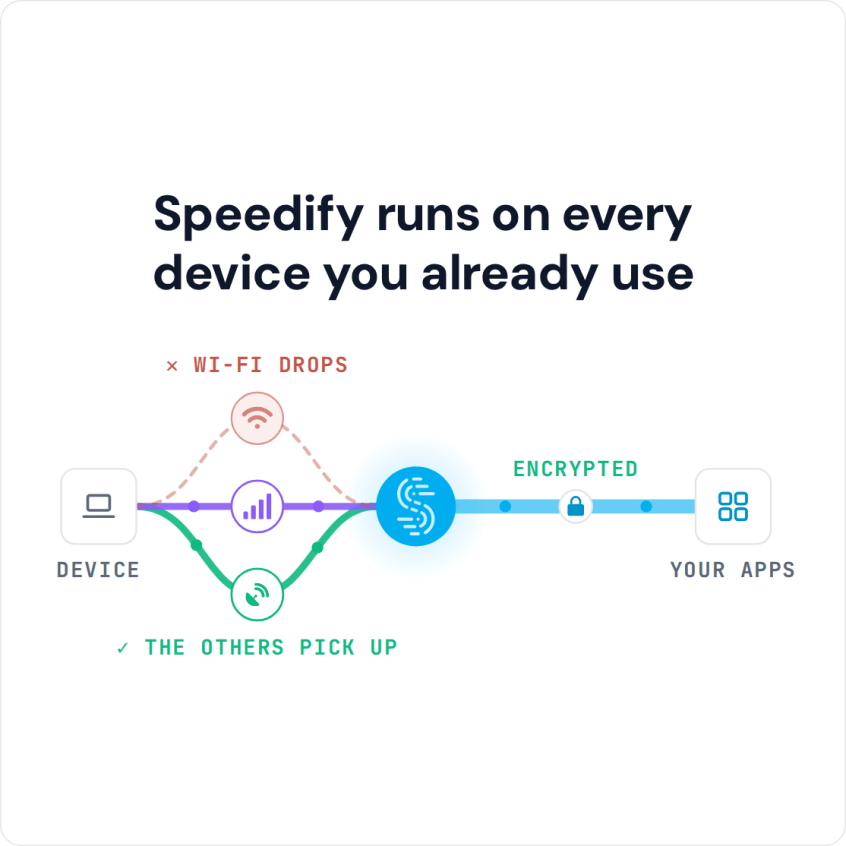
Speedify runs on every device you already use
How to Set Up a VPN on iPhone 18 with Speedify
- Download Speedify from the App Store on your iPhone 18 (Speedify also runs on Android, Windows, macOS and Linux).
- Open Speedify and create a free account (the free tier includes 5 GB per month), or sign in.
- Tap Allow when your iPhone asks to add a VPN configuration.
- Keep both Wi-Fi and Cellular Data turned on. Speedify connects to a Speedify server automatically and uses both connections at once.
Speedify on iPhone 18: A VPN Built for Speed, Security and Mobility
Most VPN apps slow down your Internet connection a little, because every byte takes an extra trip through a VPN server over a single connection. Speedify is built differently: it encrypts your traffic too, and with Wi-Fi and 5G cellular both turned on, it gives you more speed to work with.
Speedify is a VPN for mobility that lets your iPhone 18 connect to the Internet through both a Wi-Fi and a 4G/5G cellular connection at the same time, so you have more bandwidth for uploads and downloads than either connection gives alone.
Speedify works in the background, monitoring the quality of your connections. With a standard VPN, if your Wi-Fi signal became unstable you would immediately be disconnected. With Speedify, if one connection goes down (Wi-Fi, for example), all the traffic is automatically rerouted to the other one (4G/5G cellular) until the Wi-Fi comes back online. Your traffic keeps leaving from the same Speedify server, so your public IP address stays the same and logged-in apps and calls carry on.
Speedify keeps no record of the browsing you do online while using the service and does not sell your personal data. It does record connection metadata: IP address, device ID, connection time and data used.
Skip Manual iOS VPN Profiles on iPhone 18: Install the Speedify App Instead
Speedify saves you the time you would spend setting up VPN profiles by hand, because the app adds its VPN configuration when you install it. Combining Wi-Fi and 4G/5G cellular at the same time also helps you avoid buffering issues and disconnects when streaming movies or doing your own live streaming on Facebook or Twitch, pages load faster, and your FaceTime call won’t suddenly be disconnected because of your VPN or Wi-Fi issues. Speedify works with all your iOS apps on iPhone 18, with no setup needed per app.
After setup, Speedify’s VPN configuration appears in Settings > General > VPN & Device Management > VPN. That screen is also where you switch between VPN apps: an iPhone runs one VPN at a time, so turn the other VPN off before you use Speedify.
Public networks are still risky, so it makes sense to use a VPN on your iPhone all the time. With Speedify and a second internet connection, that VPN does not have to cost you speed or drop when the Wi-Fi does.
Get started with Speedify today for FREE: get it from the App Store and create a free account, which includes 5 GB per month.
Speedify
Get started with Speedify today.
Speedify combines Wi-Fi, 4G/5G cellular, Ethernet, Starlink and satellite into one faster, more reliable internet connection. Free to try: 5 GB a month with a free account. No credit card required.
🚀 Speed
Faster uploads and downloads, because Speedify uses all your internet connections at once.
📶 Stability
If one internet connection drops, Speedify moves your traffic to the others in milliseconds.
🔒 Security
AES-256 encryption on every internet connection, on any network you join.



15M+ downloads worldwide. 75K+ five-star reviews on iOS and Android.