
Share VPN on WiFi: Use Speedify VPN for Faster Uploads and Downloads

Share an Unbreakable VPN Connection over Wi-Fi by Combining Starlink, Wi-Fi, 4G, 5G, and DSL with Speedify
Are you happy with the protection you get from your VPN service? Then you should think of extending that and protecting all your devices in your household. Most VPNs offer subscriptions that support multiple devices under the same account, but maybe you want to protect the online traffic going through your SmartTV, video streaming device (such as Chromecast, Roku, etc.) game console, a Microsoft Phone, etc.
In this case, the simplest way to protect all devices is to share the VPN connection over WiFi so that all devices benefit from it. If you can’t afford a good WiFi router with VPN embedded (prices start at $100, not including the VPN subscription), then you can easily use your Windows laptop.
Read below how to share VPN over WiFi in 5 minutes or less, without complicated “Run as Administrator” and “cmd” Windows steps.
Speedify delivers an unbreakable VPN connection by intelligently bonding multiple internet sources, ensuring continuous uptime and encrypted protection.
Why Speedify is unbreakable vs. other VPNs
Most VPNs stop working the moment one of your internet connections has a problem. If your Wi-Fi glitches, or your device briefly switches between 4G / 5G and Starlink, you can suddenly lose your VPN connection.
Speedify is built to prevent that. Instead of relying on just one connection, Speedify can use all your available internet connections at the same time: Wi-Fi, 4G / 5G cellular, Ethernet, Starlink and other satellites. If one connection slows down or drops, Speedify instantly moves your traffic to another internet source so your VPN stays connected and your online activity isn’t interrupted.
In this video, you’ll see how Speedify keeps your internet connection secure, smooth, and reliable by intelligently spreading your encrypted data across Wi-Fi, 4G / 5G cellular, Ethernet, Starlink and other satellites. The result: an unbreakable VPN tunnel.
Combining Wi-Fi, 4G / 5G Cellular, Ethernet, Starlink and Other Satellites Together Makes Speedify VPN Unbreakable

Speedify combines 5G, 4G, Wi-Fi, Ethernet, Starlink and other satellite into one secure and unbreakable VPN tunnel
Speedify is the only VPN app that seamlessly combines Wi-Fi, 4G / 5G cellular, Ethernet, Starlink and other satellite internet into one unbreakable internet connection. You get faster upload and download speeds while no one can spy on what you do online. Speedify allows you to unblock restricted content by connecting to one of the VPN servers distributed across 6 continents in 50+ cities.
Speedify will automatically detect any available Internet connections on your device, encrypting and intelligently distributing your online traffic between them for optimal performance. If you need help we have quick start guides available for most common set ups.
Speedify combines multiple personal hotspots for faster internet upload and download speeds
Speedify's Pair & Share feature enables you to connect to multiple hotspots at the same time for faster upload and download speeds and more reliable internet for everyone. Speedify's Pair & Share feature allows you to wirelessly share 4G / 5G cellular connections back and forth between multiple Speedify users on the same local network when live streaming from an event, calling from the commute or sharing from the field.
Speedify is the only app that allows you to share cellular data between PCs, Macs, iPhones and Androids. Use multiple iPhones and Android phones as hotspots for internet access and get faster upload and download speeds and mobile failover for all paired devices.
Use Speedify to combine...
Combine these connections on:


Share VPN over WiFi Using a Windows Laptop and One Software App
Here’s what you need to share your VPN connection over WiFi:
- A working Windows laptop or PC with a WiFi card or dongle. This can be the laptop you’re currently using or an older laptop or PC that’s just collecting dust
- A fast VPN service that can deliver good speeds to all your devices at once – Speedify is a next generation mobile VPN that can combine multiple connections, giving you increased bandwidth
- A hotspot software app which can share the VPN Internet connection from the laptop or PC over WiFi – Connectify Hotspot is the most popular hotspot software available, basically a virtual router inside your Windows machine.
3 Steps to Share VPN over WiFi in 5 Minutes or Less
It’s time to get busy:
- Download and install Connectify Hotspot and Speedify on your Windows laptop or PC
- Open Speedify and connect to a server (usually the closest will be best). If you have multiple Internet connections from different networks, you can combine and use them at the same time with Speedify to create a super-connection with increased bandwidth and lower lag.
- Run Connectify Hotspot. Under Wi-Fi Hotspot mode give your hotspot a custom name and password, and select the “Speedify Virtual Adapter” from the Internet to Share drop-down menu. Then click “Start Hotspot”.
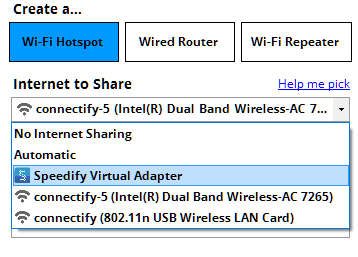
You can now connect all devices to the hotspot you configured using Connectify. All the traffic going through this wifi hotspot will be protected by Speedify, the fast, reliable and secure VPN.
Additional Benefits of Sharing VPN Over WiFi with Connectify Hotspot
Outside of helping you share VPN over WiFi easily, there are other perks of using Connectify as your personal hotspot app:
- Save bandwidth and time with the embedded universal ad blocker. You can also eliminate ads from native iPhone and Android apps.
- Boost your range instantly with Wi-Fi repeater mode: Easily extend the range of your existing Wi-Fi network!
- Save money while traveling: stuck at a hotel that charges for Internet per-device? With Connectify Hotspot, join the Wi-Fi, start a hotspot, and get all of your devices online for the price of one.
- Share any type of Internet Connection with All your Devices: With Connectify Hotspot you can share Internet from existing Wi-Fi networks, ethernet, 3G/4G, even tethered smart phones!
Speedify – Fast, Reliable and Secure VPN to Share Over WiFi
Using a VPN will protect you, but most of them will also slow down the Internet, as all data passes through their servers first before going to or from its final destination.
Speedify is a next generation mobile VPN built for speed and reliability that doesn’t slow down your online speed. Speedify uses a proprietary encryption algorithm that is fast and secure, to make sure you don’t compromise speed for security. This is very important when multiple devices will be using the same VPN connection.
Plus – most important – Speedify doesn’t log any data regarding your online activity, as other VPNs (or even your own ISP) might do, in order to sell your browsing data to marketing agencies – ever wondered how come “the ads” know you’ve been looking at something in particular?
It’s time you protect all traffic from your household with Speedify, a fast VPN built for speed, and Connectify Hotspot, a flexible personal hotspot app. This way, you’ll be using the Internet on your own terms.
Speedify provides the speed, security and reliability as the best VPN to share over WiFi. Get started with Speedify now – no strings attached, no email sign-up necessary!

Get started with Speedify today!
With Speedify you can combine Wi-Fi, 4G / 5G cellular, Ethernet, Starlink and other satellites into one bonded super-connection to improve livestreaming, video calling, gaming, web browsing, and everything else you do online.


Speed
Get faster uploads and downloads for everything you do online.
Stability
Avoid buffering and disconnects while streaming, gaming, and browsing.
Security
Keep your personal data safe from hackers, snoops and cyber criminals
Speedify devs love talking tech on YouTube, Tiktok, and Instagram!
Alex Gizis and the Speedify devs discuss and explain technology including Starlink satellites, Wi-Fi 7 routers, Apple networking features, fiber optics, broadband internet, 5G mobile networks, AI, networking protocols, and much more. Follow Speedify on YouTube, TikTok, Instagram, and LinkedIn!
Alex and the Speedify team are always exploring the latest in networking and security technology—like 5G, 6G, WiFi 7, laser and satellite internet—and sharing it in new discussion content across YouTube, TikTok, Instagram, and LinkedIn every week.
Got a tech question? Let's go deeper! Pop into Speedify Office Hours live every Wednesday at 10 AM Eastern. Speedify CEO Alex Gizis and our network engineers are standing by to break down your questions about networks, tech updates, and Speedify features.
