
Is HearthStone Down or Is It Your Connection?
Waiting on a turn timer that expires before your card lands is lag: a delay between your tap and the game hearing about it. Blizzard’s servers are sometimes to blame, but far more often the phone or PC has switched networks mid-match or is sitting on a weak signal.
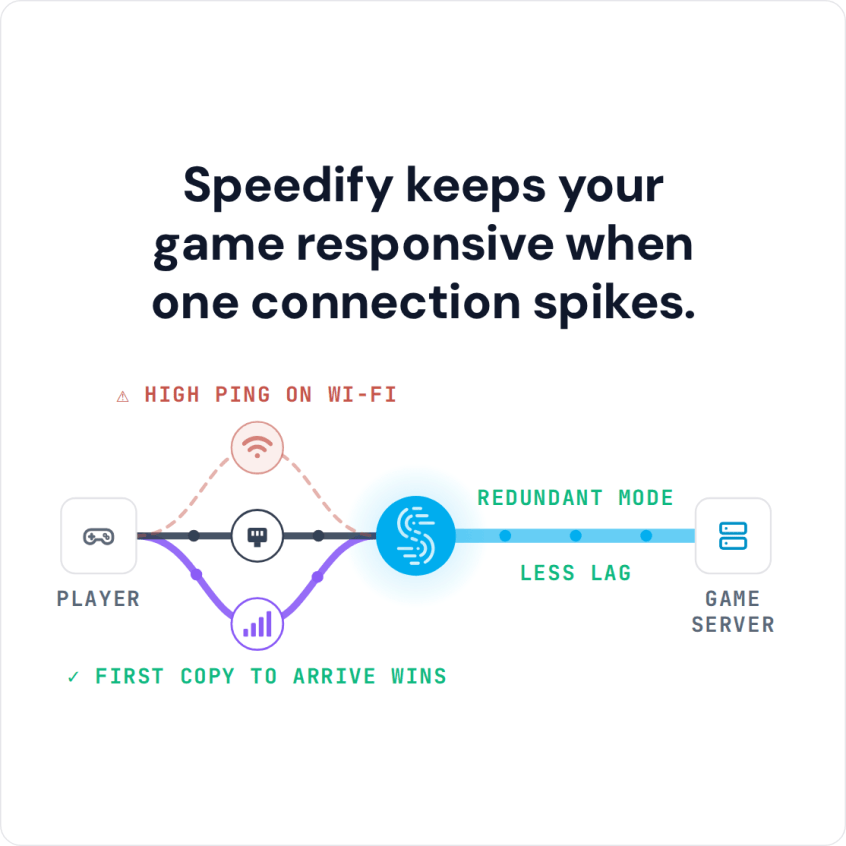
Speedify spreads your traffic across Wi-Fi, 4G/5G cellular, Ethernet, Starlink and satellite internet connections at once, so Hearthstone has a working path out when one connection falters. Speedify can only keep you online through a drop when it has two or more internet connections to work with, for example Wi-Fi plus your phone’s 4G/5G cellular. On a single connection, Speedify works as an encrypted VPN and cannot stop that connection from dropping. Speedify cannot shorten the route to the game server, but with two or more connections in Redundant Mode it sends each packet over every connection and uses the copy that arrives first, so your ping follows whichever connection is faster at that moment. Below you will find how to tell whether Hearthstone is down or your internet connection is, and what using Speedify changes on iPhone, Android and PC.
Speedify keeps your game responsive when one connection spikes.
Why You Get Connection Issues with HearthStone
HearthStone players around the world are sometimes complaining about connection issues. Why does this happen?
On one hand, this may originate in HearthStone server issues. To make sure nothing is wrong with those, just check out their Twitter account for announcements regarding server issues.
However, if you get HearthStone connection issues, most likely it’s your connectivity you have to investigate. Online games are very sensitive to unreliable internet connections. Even though the contract with your ISP states that you should have a certain speed and uptime, things are not always like that. Any temporary network issue on the ISP’s side can hinder your HearthStone experience.
Fix HearthStone Connection Issues with Speedify
Whether you are running HearthStone on your computer or on your smartphone, Speedify helps when the problem is an unreliable internet connection: Speedify runs a second internet connection alongside the first, so one connection faltering does not end your match.
By default, computers and smartphones only connect to the internet through one connection at a time. You are either connected through a cellular signal, through Wi-Fi, or through Ethernet. Speedify allows your device to connect to the internet using multiple internet connections simultaneously. It increases the bandwidth you have available, which can help fix connectivity issues in HearthStone.
On your phone, Speedify lets you use Wi-Fi and 4G/5G cellular together, and you can set a data cap for cellular in Speedify so you do not go over your plan. If you’re playing HearthStone on your computer, you can combine your home network Internet with a public WiFi or a 4G / LTE dongle. Consoles do not run Speedify, so if you’re playing from your game console, you can share the Speedify connection over Wi-Fi to your gaming device using a Windows PC, or use a router running Speedify.
Speedify also has auto failover. When one of your connections becomes weak or spotty, for example when you’re playing HearthStone on your commute to work, Speedify moves all the data to the working connection in milliseconds and keeps the same public IP address, so the game server does not see a new address. Once the other connection is available again, Speedify automatically adds it back into the mix.
Fix Connection Issues with HearthStone when Internet Is Restricted
Speedify encrypts all traffic from your device, like a VPN. On a restricted network such as a school or workplace, the network then sees only an encrypted connection to a Speedify server, not the game, so you may be able to play HearthStone while running Speedify. Check your school’s or employer’s rules first; some networks block VPN connections too.
If you want to fix HearthStone connection issues, download Speedify and give it a second internet connection.
Speedify
Get started with Speedify today.
Speedify combines Wi-Fi, 4G/5G cellular, Ethernet, Starlink and satellite into one faster, more reliable internet connection. Free to try: 5 GB a month with a free account. No credit card required.
🚀 Speed
Faster uploads and downloads, because Speedify uses all your internet connections at once.
📶 Stability
If one internet connection drops, Speedify moves your traffic to the others in milliseconds.
🔒 Security
AES-256 encryption on every internet connection, on any network you join.



15M+ downloads worldwide. 75K+ five-star reviews on iOS and Android.