
How Speedify Outperforms iPhone’s Wi-Fi Assist
Wi-Fi Assist is the iPhone setting that switches over to 4G/5G cellular when the Wi-Fi signal gets too weak to be useful; up to iOS 26 you find it at the bottom of Settings > Cellular, and in iOS 27 Apple renamed it Connectivity Assist and moved it to Settings > Wi-Fi. Wi-Fi Assist helps, but it only ever uses one internet connection at a time, and it waits until the Wi-Fi is already failing before acting, so a call or an upload can stall first.
Speedify is an app that runs an iPhone’s internet over Wi-Fi and 4G/5G cellular together rather than switching between them, so a fading Wi-Fi signal does not leave the phone waiting. Like Wi-Fi Assist, Speedify needs both connections turned on: with Wi-Fi alone, Speedify works as an encrypted VPN and cannot stop the Wi-Fi from dropping. If Wi-Fi keeps cutting out on your iPhone, see why your iPhone keeps dropping Wi-Fi.
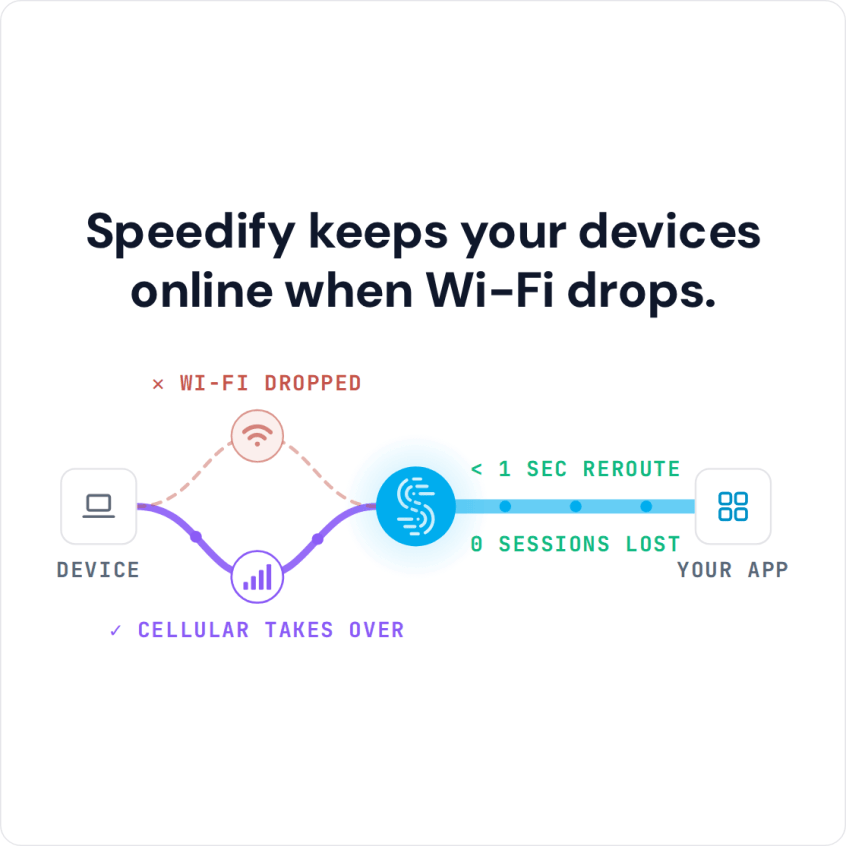
Speedify keeps your devices online when Wi-Fi drops.
Compared point by point below: where Apple’s setting falls short, the everyday situations that catch it out, and what changes on an iPhone running Speedify instead.
What Is iPhone Wi-Fi Assist and Why It’s Not Enough
iPhone Wi-Fi Assist is Apple’s setting for weak Wi-Fi. Introduced with iOS 9, Wi-Fi Assist watches your Wi-Fi signal quality and moves you to 4G/5G cellular when Wi-Fi performance drops too far. Apple notes that Wi-Fi Assist can use more cellular data.
Wi-Fi Assist is a simple switch that works on an either/or basis: you are on Wi-Fi or on cellular, never both at once, so each switch leaves a short gap, and you only ever get one connection’s speed.
What Is Connectivity Assist on iPhone in iOS 27
Connectivity Assist is the name Apple gives Wi-Fi Assist in iOS 27 and iPadOS 27. Apple’s support page describes it as using cellular data in addition to Wi-Fi for a more reliable internet connection. If Wi-Fi Assist was on before the update, Connectivity Assist is on by default.
Apple lists three cases where Connectivity Assist is not used: while the iPhone is roaming internationally, in cellular Low Data Mode, and with some third-party apps that stream audio and video. It can also use more of your cellular plan. Apple has not published how far it now runs cellular alongside Wi-Fi rather than switching between them, so the comparison below describes Wi-Fi Assist as it worked up to iOS 26.
Speedify works the same way on either version: it sends traffic over Wi-Fi and 4G/5G cellular at the same time for every app on the iPhone, streaming apps included, and keeps the same public IP address when one of the two connections drops. Speedify also lets you set each connection’s priority and data limit, which Connectivity Assist does not.
Where iPhone Wi-Fi Assist Falls Short
Connection Interruptions: During the switch between Wi-Fi and cellular, you experience brief disconnections that can drop video calls, interrupt downloads, or cause streaming buffers.
Speed Limitations: You’re limited to the speed of whichever single connection is active, missing opportunities to combine available bandwidth.


Tardy Switching: Wi-Fi Assist waits until the Wi-Fi is clearly failing, so you can sit on poor Wi-Fi for a while first.
No Control: You can’t customize when switching occurs or prioritize which connections to use for specific applications.
Switching, not Combining: The system forces an either/or decision rather than intelligently using all available connections.
Real-World Scenarios Where iPhone Wi-Fi Assist Can Fail
Consider these common situations where Apple’s Wi-Fi Assist solution for iPhones and iPads often has issues:
Video Conferencing: You are on an important Zoom call when Wi-Fi gets flaky. iPhone Wi-Fi Assist switches to 4G/5G cellular, and the brief disconnection interrupts your presentation.
Large Downloads: Downloading work files over coffee shop Wi-Fi, the connection degrades but remains barely functional. Wi-Fi Assist won’t switch because it meets minimum thresholds, leaving you with painfully slow speeds.
Streaming Entertainment: Moving between rooms causes frequent switching between Wi-Fi and cellular, creating constant buffering interruptions in your Netflix show.
Business Travel: In hotels with unreliable Wi-Fi, you’re constantly switching back and forth, never getting consistent performance for critical work tasks.
How Speedify Differs from iPhone Wi-Fi Assist
Speedify combines multiple internet connections at the same time rather than switching between them, and that changes what happens when Wi-Fi gets weak:
Simultaneous Connection Usage: Unlike Wi-Fi Assist’s switching approach, Speedify uses your Wi-Fi and 4G/5G cellular connections at the same time, for more speed and reliability.
Failover Without a Switch: When one connection fails, Speedify moves traffic to the remaining connection (Speedify says in milliseconds) and keeps the same public IP address, so calls and logged-in apps carry on.
Combined Speed: Instead of being limited to one connection’s speed, you get most of the speed of both: Speedify says up to 95% of the combined speed of your connections.
Intelligent Traffic Management: Speedify watches each connection and sends traffic over the ones that are performing, and you can set each connection’s priority and data limit.
iPhone Wi-Fi Assist vs. Speedify Comparison
|
Feature |
iPhone Wi-Fi Assist |
Speedify |
|
Connection Method |
Switching (Wi-Fi or 4G/5G cellular) | Combining (Wi-Fi and 4G/5G cellular at once) |
|
Speed Potential |
Limited to single connection |
Up to 95% of the combined speed of Wi-Fi and 4G/5G cellular (Speedify figure) |
|
Interruption Handling |
Brief disconnections during switches |
Failover to the remaining connection, same public IP |
|
Customization |
None |
Full control over connection priorities |
|
Data Usage Control |
Conservative but inflexible |
Smart optimization with data limits |
|
Supported Connection Types |
Wi-Fi, 4G/5G cellular | Wi-Fi, 4G/5G cellular, Ethernet, Starlink and satellite |
|
Performance Monitoring |
Basic |
Advanced analytics and optimization |
Even More Performance with Speedify’s Cellular Sharing Feature
Where iPhone Wi-Fi Assist does not help is groups. Speedify’s cellular sharing feature lets one person with strong cellular coverage share that connection with other devices running Speedify on the same Wi-Fi network (with no Wi-Fi, on one phone’s Personal Hotspot).
Business travelers on unreliable hotel or venue Wi-Fi can add a team member’s cellular connection to their own, which Wi-Fi Assist, working on one device at a time, cannot do.
Wi-Fi Assist or Speedify: Which One Fits
Wi-Fi Assist reacts after the Wi-Fi has failed. Speedify treats Wi-Fi and cellular as connections to combine rather than alternatives to choose between, so a weak Wi-Fi signal does not have to fail before cellular helps.
For calls you cannot afford to drop, travel on patchy networks and anyone who wants consistent internet on an iPhone, Speedify with Wi-Fi and 4G/5G cellular does what Wi-Fi Assist cannot: Speedify uses both at once.
Speedify
Get started with Speedify today.
Speedify combines Wi-Fi, 4G/5G cellular, Ethernet, Starlink and satellite into one faster, more reliable internet connection. Free to try: 5 GB a month with a free account. No credit card required.
🚀 Speed
Faster uploads and downloads, because Speedify uses all your internet connections at once.
📶 Stability
If one internet connection drops, Speedify moves your traffic to the others in milliseconds.
🔒 Security
AES-256 encryption on every internet connection, on any network you join.



15M+ downloads worldwide. 75K+ five-star reviews on iOS and Android.