
You Can Combine Multiple Internet Connections Together – Like Starlink, Wi-Fi, 4G, 5G, and DSL – with Speedify, to Fix Snapchat Down
Is Snapchat down for everyone, or only for you? A genuine Snapchat outage takes the whole service offline and no app on your phone can fix that – but far more often Snapchat only looks down because your own internet connection is losing data. Here is how to rule out internet causes when Snapchat is unstable.
Speedify is an app that builds one internet connection out of Wi-Fi and 4G/5G cellular data used together, so a weak signal cannot make Snapchat appear dead. Ahead, you can check for a real outage and see how using Speedify clears the far more likely cause.
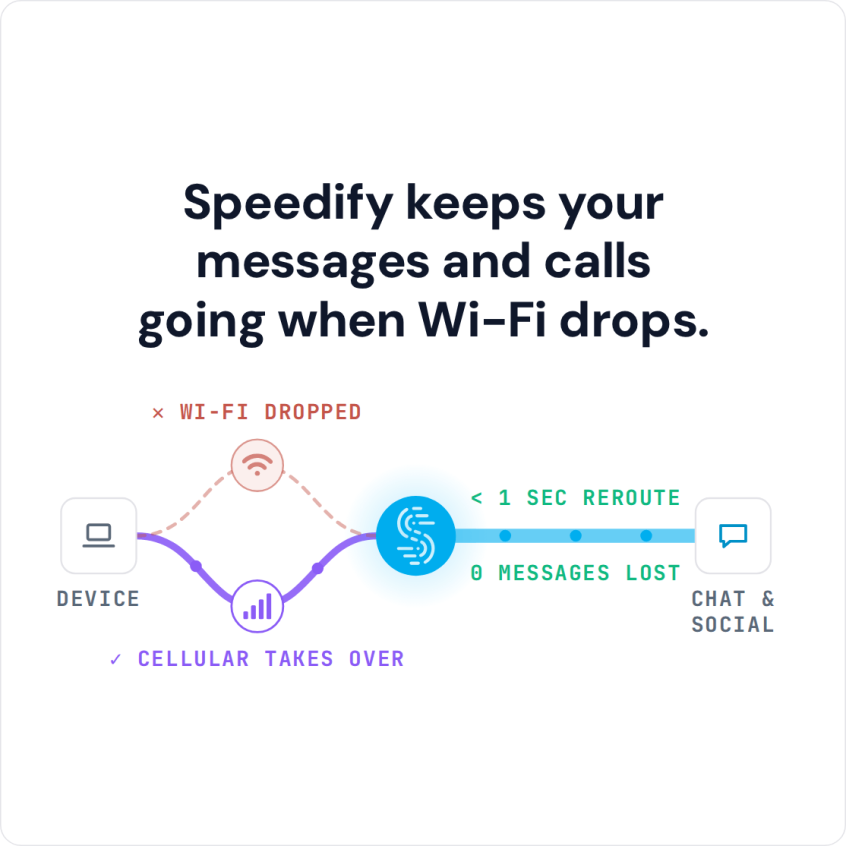
Speedify keeps your messages and calls going when Wi-Fi drops.
Why is Snapchat Down?
The Snapchat app requires a good amount of Internet bandwidth to work properly. When determining why your Snapchat is down or not working, you should look at your Internet connection. It might be that your Internet is too slow and doesn’t have enough bandwidth. Or that the connection is flaky and experiencing excessive packet loss. What’s worse is that both of these issues are often amplified when you are on the move. This happens as mobile devices can not easily transition between different Wi-Fi networks or cell towers without interrupting the connection, thus, the functionality of the apps. Make sure you try these:
- See if Snapchat tweeted anything about their service status recently
- Restart the device
- Clear the cache of the Snapchat app
- Reinstall the app
Regardless of the cause, mobile devices are designed to only use one Internet connection at a time, despite the fact that they are often connected to both WiFi and cellular data. So, why not use BOTH connections for their combined speed and reliability?
Fix the Annoying Snapchat Down Issue with Speedify
Speedify is a fast bonding VPN service that changes the way your mobile device connects to the Internet. Instead of just using one connection, Speedify allows your mobile device to connect to the Internet over both Wi-Fi and mobile data simultaneously. This instantly increases your connection bandwidth and reliability and provides a better and uninterrupted Snapchat experience so you won’t experience issues with Snapchat being down.
Speedify also monitors the quality of your Internet connections. When it detects that a signal is weak or that the network is too slow, it will automatically and seamlessly reroute the data through the other working connection. Best of all, when the other connection is back online and reliable, it begins using it again – automatically and in the background. Say goodbye to Snapchat down or not working.
Secure Your Snapchat Stories with Speedify
In addition to delivering a faster Internet experience to your mobile device, Speedify encrypts all the data sent to and from your device. Speedify keeps you safe from compromised Wi-Fi networks, snooping ISPs, and other threats. It is also smart enough to try and send as much data as possible through Wi-Fi instead of over more expensive mobile data connections – saving you from potential overage fees from your carrier!
No more Snapchat down, unless it’s their fault! Get Speedify to improve the Internet connection on your iPhone or Android smartphone.
Speedify
Get started with Speedify today.
Combine Wi-Fi, 4G/5G cellular, Ethernet, Starlink, and more into one faster, steadier connection. Free to try — no credit card required.
🚀 Speed
Faster uploads and downloads by bonding all your connections at once.
📶 Stability
Automatic failover in under a second when any connection drops.
🔒 Security
AES-256 encryption on every connection, on every network you join.



15M+ downloads worldwide. 75K+ five-star reviews on iOS and Android.