
Use Speedify for Stable Internet when Playing Splatoon 2 on Nintendo Switch
Nintendo’s “connection is unstable” warning in Splatoon 2 means your Switch could not keep sending and receiving data without pauses. A weak Wi-Fi signal reaching the console, or someone else at home streaming on the same internet connection, is usually behind it. When many players get the error at the same time, the cause is more often an outage on Nintendo’s side.
Speedify is an app that combines Wi-Fi, 4G/5G cellular, Ethernet, Starlink and satellite internet connections into one connection, and it keeps a match going when one connection drops only if it has two or more to work with, such as home Wi-Fi plus a phone’s 4G/5G cellular. On a single connection, Speedify works as an encrypted VPN and cannot stop that connection from dropping. A Nintendo Switch cannot run Speedify, so Speedify runs on a Windows PC, a Mac or a supported router, and the Switch connects through it. This guide covers the causes of the Splatoon 2 unstable connection error, the checks to try first, and the Speedify setup.
Splatoon 2 Connection Issues: Why Matches Cut Out
Splatoon 2 players have been complaining about connection problems and mid-match “connection is unstable” errors since the game launched. Why does this happen?
Online games like Splatoon 2 send small updates back and forth many times a second, so even a short pause on your connection can trigger the error or drop you from the match. Your internet plan promises a certain speed, but a short fault at your provider, a weak Wi-Fi signal at the console or a busy home network can still interrupt those updates.
Causes of the Splatoon 2 Connection Unstable Error and Nintendo’s Fixes
The data between your Nintendo Switch and the other players travels in small bundles called packets. When some packets are lost on the way, the game lags, and heavy packet loss can disconnect you from the match.
According to Nintendo, a “connection is unstable” error in Splatoon 2 can happen due to:
- your network connection being unable to continuously send or receive data.
- a slow internet connection, or a network connection made unstable by wireless interference or unresponsive networking equipment.
Nintendo also recommends these fixes:
- restart your Nintendo Switch console
- restart your Internet modem / router
- move the Switch console closer to the wireless router
- connect to a different wireless band, if supported by your router.
Splatoon 2 Servers Down or a Home Network Problem: How to Tell
If other players report the same error at the same time, the problem is probably on Nintendo’s side. Nintendo’s network status page lists maintenance and outages for its online services and games. During an outage or maintenance, nothing on your home network will bring the servers back sooner, so wait until the status page clears.
If the status page shows no problem, the cause is most likely on your side. On the Switch, open System Settings > Internet > Test Connection to check the connection. Pause large downloads and video streams on other devices, and if you can, play a match on a wired connection through a LAN port on the dock or a USB LAN adapter. If the error stops on the cable, the Wi-Fi link to the Switch is the problem. These checks apply to Splatoon 3 and other online Switch games too.
How Speedify Keeps Splatoon 2 Connected Using Two Internet Connections
Because the Switch cannot run the app itself, the combined connection reaches it through a device that does. A Windows PC running Speedify can share its connection over Wi-Fi. A Mac running Speedify can share it over Ethernet, if the Switch has a LAN port on its dock or a USB LAN adapter. A router running Speedify serves the Switch like any home router.
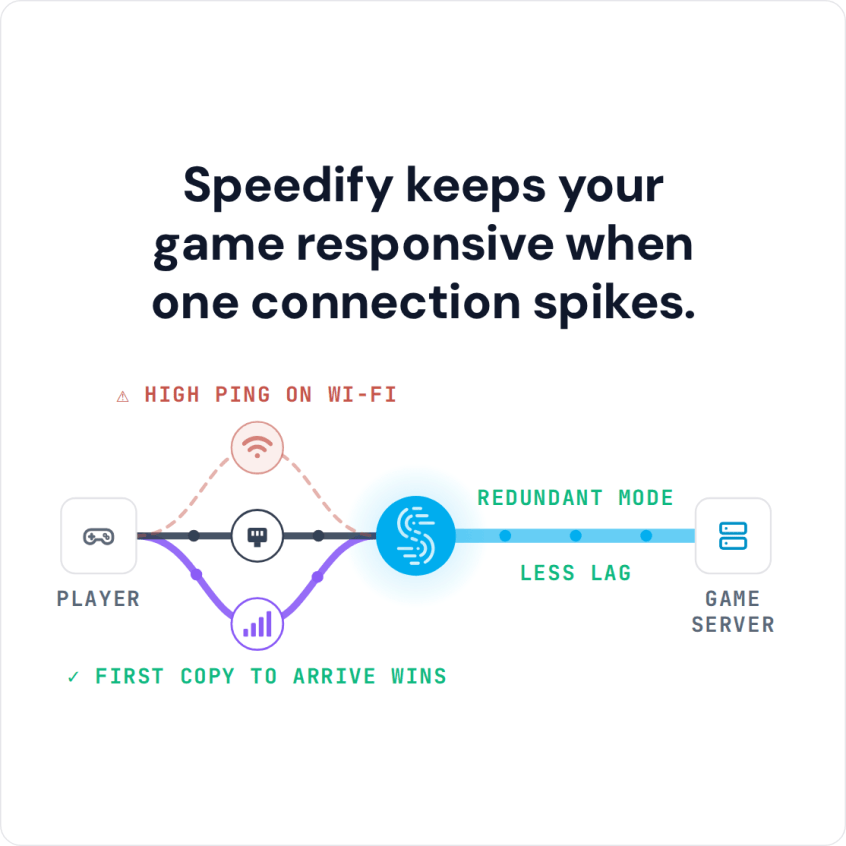
By default, a computer uses one internet connection at a time: Wi-Fi, cellular or Ethernet. Speedify connects through multiple internet connections simultaneously and splits the traffic across them. When one connection drops, Speedify moves the traffic to the others and keeps the same public IP address, so the game does not see a new address and the match can continue. With two or more connections, Speedify’s Redundant Mode sends every packet over each connection and uses the copy that arrives first, so ping follows whichever connection is faster at that moment and a packet lost on one connection does not stall the game. Redundant Mode uses more data. Speedify cannot shorten the route to a distant game server.
Here’s what you have to do:
- Download Speedify on your Windows PC and sign in, or create a free account (the free tier includes 5 GB per month). Connect the PC to your home internet plus a second internet connection, such as public Wi-Fi or a 4G/5G cellular connection from a USB modem or a phone tethered over USB. Here is a list of other internet connections you might have nearby.
- Share the combined connection over Wi-Fi (here’s a guide on that), then connect the Nintendo Switch to that Wi-Fi network in System Settings > Internet.
- Start Splatoon 2. If one internet connection drops during a match, Speedify keeps the game going on the other one.
Speedify
Get started with Speedify today.
Speedify combines Wi-Fi, 4G/5G cellular, Ethernet, Starlink and satellite into one faster, more reliable internet connection. Free to try: 5 GB a month with a free account. No credit card required.
🚀 Speed
Faster uploads and downloads, because Speedify uses all your internet connections at once.
📶 Stability
If one internet connection drops, Speedify moves your traffic to the others in milliseconds.
🔒 Security
AES-256 encryption on every internet connection, on any network you join.



15M+ downloads worldwide. 75K+ five-star reviews on iOS and Android.