
Unbreakable VPN Connection to Fix Android Disconnects by Combining Wi-Fi and 4G / 5G Mobile Data with Speedify
When a VPN keeps disconnecting on Android, the usual cause is that most Android VPN apps hold one internet connection and nothing more. A short Wi-Fi glitch, a weak 5G signal, a hand-over to the next cell tower, or walking out of Wi-Fi range (the phone switches to 4G/5G cellular while the VPN was tied to the Wi-Fi that just disappeared) is enough to drop the VPN seconds after it connects. Sleep mode is another trigger: see Android VPN dropping in sleep mode.
Speedify is an app that encrypts your traffic like a VPN and carries it over Wi-Fi and 4G/5G cellular at the same time, so losing one of them does not knock an Android phone or tablet offline. That needs both connections turned on; on Wi-Fi alone, Speedify works as an encrypted VPN and can be a little slower.
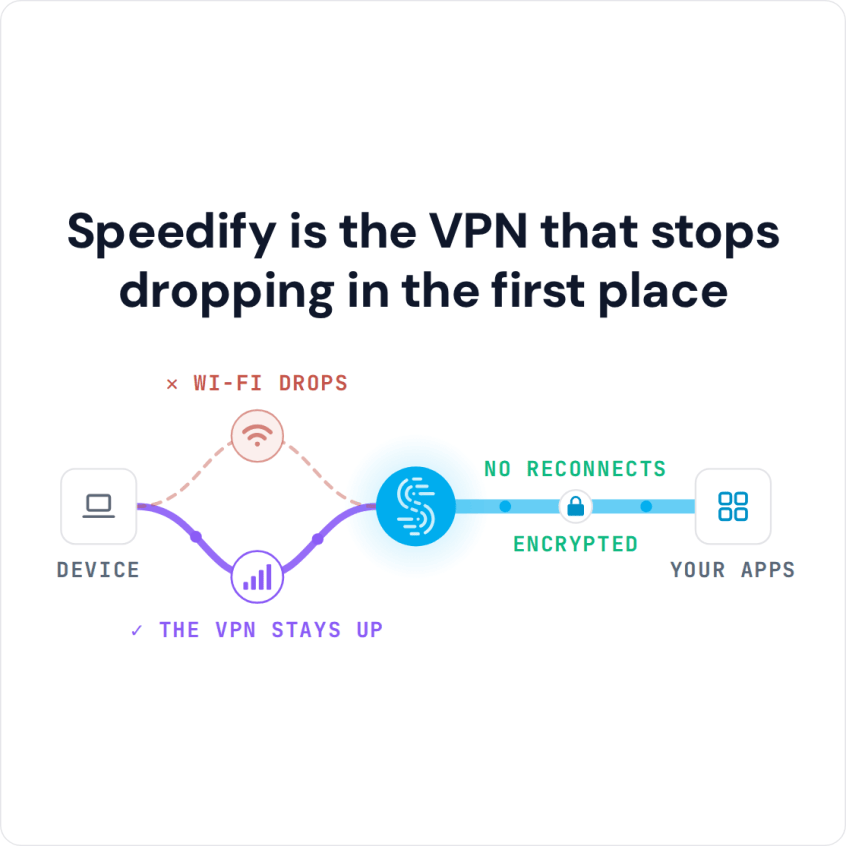
Speedify is the VPN that stops dropping in the first place
You are not the only one whose VPN drops the moment the phone leaves Wi-Fi. This article explains why an Android VPN disconnects, what the always-on VPN warning means, and how Speedify keeps work email, banking and browsing private and connected.
Why an Android VPN Connection Drops after a Few Seconds
The basic design of VPN software has been the same for over a decade. The VPN app encrypts your data on the device and sends all of it over a single Internet connection to the VPN server, which decrypts it and forwards it to its destination.
Even if devices are capable of using more than one Internet connection at a time, the VPN software only uses a single connection. So if something happens to that connection (getting out of the range of your Wi-Fi network, or a cell signal that fluctuates), the VPN on your Android phone or tablet will disconnect. You will have to manually reconnect to the VPN server, assuming you’re watching the active screen on your phone to see if the little key icon for VPN is still there.
Why Conventional Android VPNs Disconnect Right Away
Unfortunately, most Android VPN disconnects are a matter of app design. Conventional VPNs do a great job of keeping your data secure from hackers and unauthorized surveillance. But, because they rely on a single socket and a single Internet connection, they often slow down your Internet experience and make disconnections and connection problems much more likely.
If you are trying to use a VPN while moving (while riding the train or bus), you are even more likely to get disconnected, as the connection will fluctuate more. With a standard VPN service all of your data packets are in one channel.
The design of traditional VPN software makes getting disconnected on your Android device a question of when, not if. There is no way to increase the speed and reliability of a VPN without redesigning the software.
Fix the Always-On VPN Disconnected Warning and Lost Internet on Android
Android can keep one VPN app running at all times. On Pixel phones the setting is under Settings > Network & internet > VPN, then the gear icon next to the app; on Samsung phones it is under Connections > More connection settings > VPN. When that always-on VPN loses its server, Android warns that it is disconnected, and if Block connections without VPN is also on, the phone has no internet at all until the VPN reconnects. That is one common reason Android loses internet as soon as the VPN connects or drops.
To fix it, open the VPN app and reconnect, or pick another server. Set the VPN app’s battery use to Unrestricted in its app settings, so Android does not stop it in the background. If the VPN still cannot connect, turn off Block connections without VPN while you troubleshoot, so the phone can reach the internet. To turn a VPN off for good, disconnect it in the app and switch off Always-on VPN in the same VPN settings screen.
If it is a work VPN, such as FortiClient, that keeps disconnecting, ask your IT team first. Speedify cannot run side by side with another VPN on the same phone, and it does not replace a company VPN.
Speedify Fixes VPN Disconnects on Android Phones and Tablets
The developers behind Speedify redesigned the VPN experience from the ground up so that users no longer have to choose between security, speed and reliability. Speedify is a VPN that combines internet connections, and with Wi-Fi and 4G/5G cellular both on, it gives you all three.
Speedify connects to its server over multiple parallel sockets and uses the phone’s 4G/5G cellular connection and a Wi-Fi signal simultaneously. Using both adds their bandwidth together and keeps you connected to the VPN even if one connection goes down. Because your traffic leaves from the Speedify server, your public IP address stays the same through the switch, so banking apps and logins do not see a new address.
How to Keep an Android VPN Connected with Speedify
- Download Speedify from Google Play on your Android phone or tablet (Android 9 or later).
- Open Speedify and create a free account (the free tier includes 5 GB per month), or sign in.
- Tap OK when Android asks to set up a VPN connection.
- Keep Wi-Fi and “Mobile data” both turned on. Speedify uses both at once, so when you walk out of Wi-Fi range, traffic keeps flowing over 4G/5G cellular.
- Open Speedify’s battery settings (Settings > Apps > Speedify > Battery on most phones) and choose Unrestricted, so Android does not stop Speedify in the background.
Speedify encrypts your traffic with AES-256-GCM or ChaCha20-Poly1305. Speedify’s own battery test reported no impact on your battery.
Stop Android VPN Disconnects with Speedify
Your phone is not the one you had ten years ago, so why keep the same single-connection VPN design? Speedify is available on Google Play. Get started for free today: a free Speedify account gives you 5 GB per month.
Speedify
Get started with Speedify today.
Speedify combines Wi-Fi, 4G/5G cellular, Ethernet, Starlink and satellite into one faster, more reliable internet connection. Free to try: 5 GB a month with a free account. No credit card required.
🚀 Speed
Faster uploads and downloads, because Speedify uses all your internet connections at once.
📶 Stability
If one internet connection drops, Speedify moves your traffic to the others in milliseconds.
🔒 Security
AES-256 encryption on every internet connection, on any network you join.



15M+ downloads worldwide. 75K+ five-star reviews on iOS and Android.