
Use Speedify’s Pair and Share Feature to Combine Multiple Cellular Internet Sources at Once
Cellular bonding is the way to go when you need reliable Internet in any location. Whether you’re traveling and working remotely or you’re live streaming to your audience, fast and uninterrupted connectivity is a must.
Most solutions for cellular bonding include a dedicated hardware device you can use for this. All you have to do is put your SIM cards or tether mobile devices to the device, power it up with an external battery (or make sure it has its own battery charged) and you can benefit from the power of all mobile data connections at the same time. Such solutions are provided by companies like LiveU, Teradek, Dejero, etc. – check out a comparison of cellular bonding solutions.
However, there are also cellular bonding solutions that are software only and run directly on your device. This is the case with Speedify and in this article we’re going to explain how you can use cellular bonding directly on your smartphone or mobile device with Speedify’s Pair & Share feature.
<1 sec
With Speedify, your internet stays on when one connection fails.
When one of your internet connections drops, Speedify shifts your traffic to your remaining connections in under a second — so calls don’t cut out and downloads don’t stall.
Should you have a backup 4G, 5G, Starlink, or cable internet connection?
Yes — every internet connection goes down, including Starlink, which drops for ~34 minutes a day on average. A backup connection from a different provider means one outage never takes you fully offline. The most common options are a 4G/5G cellular hotspot, a cable or DSL line, or a second satellite dish.
4G/5G cellular
Works anywhere. Just a SIM or hotspot — no installation needed.
Learn more →Cable / DSL
Best for fixed locations. Different network, so outages rarely overlap.
Learn more →Second Starlink
Adds redundancy and throughput for remote sites or heavy usage.
Learn more →Speedify bonds any two connections into one — automatic failover, more speed, no dropped calls.
Try Speedify free →

Speedify Feature · Pair & Share
Cellular sharing that works better than a mobile hotspot.
Speedify Pair & Share: share cellular between your devices, both ways
Most hotspots give. Speedify's Pair & Share gives and takes. Two devices running Speedify pair up and each uses the other's cellular connection simultaneously, so you both get faster uploads, faster downloads, and a steadier connection. No extra hardware, no new data plans, no setup beyond a tap.
Learn how Speedify's Pair & Share works ›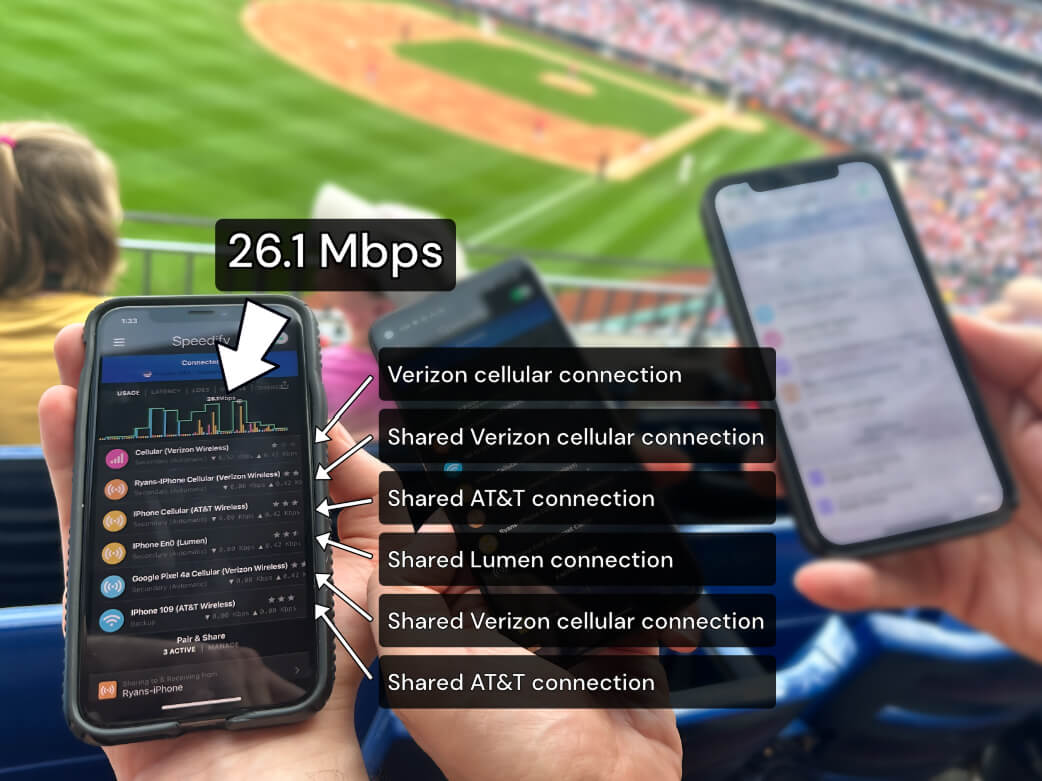
More speed
Every device you pair with adds its cellular to yours, and yours to theirs.
Stays connected
If a paired device drops out, Speedify keeps you online on the remaining links.
Always private
Every shared connection runs through AES-256 encryption. Your traffic is yours.
No new gear
Runs on devices already running Speedify, over your local network. Pair once, reconnects automatically.
4G/5G Cellular Bonding Directly on Your Mobile Device: What You Need
Cellular bonding needs at least two 4G/5G mobile data connections. So, if you want to use two cellular connections on your smartphone, you will need the following:
- two smartphones (iPhone, Android), preferably connected to different network carriers
- the Speedify Internet bonding software app
It’s very simple to get things going and turn your smartphone into a cellular bonding device, whether you’re just traveling and need to hop on a video call or if you’re a reporter, broadcasting from the field and needing the best video quality when live streaming.
iPhone / Android Cellular Bonding Made Easy
Here’s what you need to do:
- Install and run Speedify on both smartphones (iPhone / Android). Make sure you enable the Pair & Share feature when you run the app for the first time.
- Have the 4G/5G mobile data connection enabled on your smartphones.
- Connect both iPhone / Android to the same Wi-Fi. If there isn’t any available, just create a personal hotspot on one of the phones and connect the other to that.
- Pair your devices from the Speedify app and you’re ready to bond the two cellular internet sources.
Read more about what is Speedify’s Pair & Share feature and how to get started here.
See more details on how to combine two connections on your iPhone or Android mobile device.
Why Speedify Is Best Solution for Bonded Cellular on Device
Speedify is the only app that lets you combine any number of Internet connections for better performance. It’s available on all of your devices – PC, Mac, iPhone, Android, Linux and OpenWrt.
Channel bonding technology is used intelligently by Speedify to spread traffic between connections. It can seamlessly failover if one of them disappears in the middle of a video call or livestream. Speedify actually optimizes streaming traffic by prioritizing it and enabling redundancy on the fly.
On top of all that, at its core Speedify is also a VPN and it encrypts all of your web traffic to improve privacy and security.
Alex and the Speedify team are always exploring the latest in networking and security technology—like 5G, 6G, WiFi 7, laser and satellite internet—and sharing it in new discussion content across YouTube, TikTok, Instagram, and LinkedIn every week.
Got a tech question? Let's go deeper! Pop into Speedify Office Hours live every Wednesday at 10 AM Eastern. Speedify CEO Alex Gizis and our network engineers are standing by to break down your questions about networks, tech updates, and Speedify features.

Speedify
Get started with Speedify today.
Combine Wi-Fi, 4G/5G cellular, Ethernet, Starlink, and more into one faster, steadier connection. Free to try — no credit card required.
🚀 Speed
Faster uploads and downloads by bonding all your connections at once.
📶 Stability
Automatic failover in under a second when any connection drops.
🔒 Security
AES-256 encryption on every connection, on every network you join.



15M+ downloads worldwide. 75K+ five-star reviews on iOS and Android.