
Combine Starlink with Wi-Fi, 4G/5G Cellular or DSL in Speedify to Fix Netflix Buffering on Starlink and Starlink Mini
Netflix buffers on Starlink and Starlink Mini when your Starlink internet connection slows down or has short drops: when something blocks your Starlink dish’s view of the sky, when your TV or streaming device has a weak Wi-Fi signal, or when your Starlink dish switches satellites. On a Starlink plan with a monthly data limit, Netflix can also use up your data faster than you expect.
You can fix most of these yourself. For the rest, use Starlink together with a second internet connection, like another Starlink dish, 4G/5G cellular or a DSL line, and Speedify keeps Netflix playing when Starlink dips.
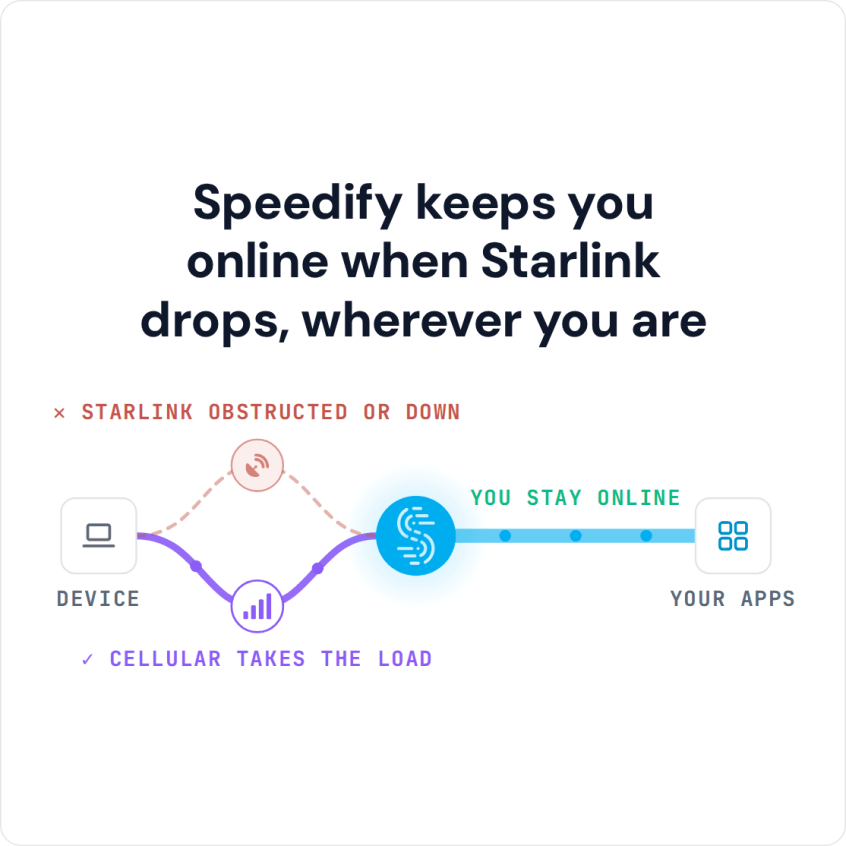
Speedify keeps you online when Starlink drops, wherever you are
Starlink Internet Connection Drops Happen to Everyone
Speedify measures thousands of Starlink users in more than 140 countries. In September 2026, fixed Starlink dishes went offline for about 38 minutes a day on average, and Starlink dishes on RVs and boats for about 46 minutes a day.
All Starlink dishes also see short dropouts roughly every 15 seconds as the Starlink internet connection switches from one moving satellite to the next. Even a perfectly installed Starlink dish goes offline, and about 7 in 10 Starlink users on Speedify use Starlink together with a second internet connection, like 4G/5G cellular.
Why Netflix Buffers on Starlink and Starlink Mini
Check the Starlink app first. If it shows your Starlink dish offline or obstructed, the problem is the Starlink dish or its view of the sky (check your Starlink status). If it shows Online, the buffering usually starts somewhere between the Starlink router and your TV.
- Clear what blocks your Starlink dish’s view of the sky. Even if nothing covers the Starlink dish itself, a tree or part of your roof off to the side can block the view as the satellites move overhead. The obstruction map in the Starlink app shows where.
- Your TV or streaming device has a weak Wi-Fi signal from the Starlink router. If your TV and your Starlink router both have an Ethernet port, connect them with an Ethernet cable. A Starlink Mini has its Wi-Fi built in, so keep it close to the TV when you can. The same fix helps when Apple TV keeps buffering on Starlink.
- Your Starlink dish switches satellites about every 15 seconds. Each switch can cause a short drop, and a drop at the wrong moment starts Netflix buffering.
For every other fix for a slow Starlink internet connection, see why is my Starlink so slow.
How Much Starlink Data Netflix Uses
Netflix says it uses up to 1 GB an hour in standard definition, up to 3 GB an hour in HD and up to 7 GB an hour in Ultra HD. If your Starlink plan has a monthly data limit, like Roam 100GB, 2 hours of HD a night can use up to 180 GB a month. To use less, open your Netflix account, choose your profile, go to Playback settings and pick a lower data usage setting.
Traveling with a Starlink Mini? Download episodes in the Netflix app on your phone or tablet while your Starlink internet connection is steady, then watch them offline with no buffering at all. Downloads still count toward your Starlink data.
Stop Netflix Buffering on Starlink with a Second Internet Connection and Speedify
For the short drops, use a second internet connection at the same time as Starlink: 4G/5G cellular, another Starlink dish or an old DSL line, whatever you have.
Speedify is the only app that combines all of your internet connections to keep you online when it matters most. Speedify sends your internet traffic over all of your internet connections at the same time, even a single Netflix stream, so you get the speed of all of them combined and less buffering. If Starlink drops, Speedify switches your traffic to the other internet connection automatically. Speedify needs that second internet connection: with Starlink alone, it can’t add speed or stop the drops.
Download Speedify on your computer, phone or tablet. For Netflix on a smart TV, Speedify has no TV app: it runs on a router that works with Speedify, and the TV uses it through your Wi-Fi. Watch your cellular data: HD Netflix uses up to 3 GB an hour, so set cellular to Backup in Speedify and it only carries the show when Starlink drops. On a phone or tablet, Speedify’s cellular sharing adds another phone’s cellular data: put them on the same Wi-Fi, install Speedify on both, and pair them in the Speedify app.
Speedify
Get started with Speedify today.
Combine Wi-Fi, 4G/5G cellular, Ethernet, Starlink, and more into one faster, steadier connection. Free to try — no credit card required.
🚀 Speed
Faster uploads and downloads by bonding all your connections at once.
📶 Stability
Automatic failover in under a second when any connection drops.
🔒 Security
AES-256 encryption on every connection, on every network you join.



15M+ downloads worldwide. 75K+ five-star reviews on iOS and Android.