
Stable Internet Connection is Critical to Live Broadcast Journalism
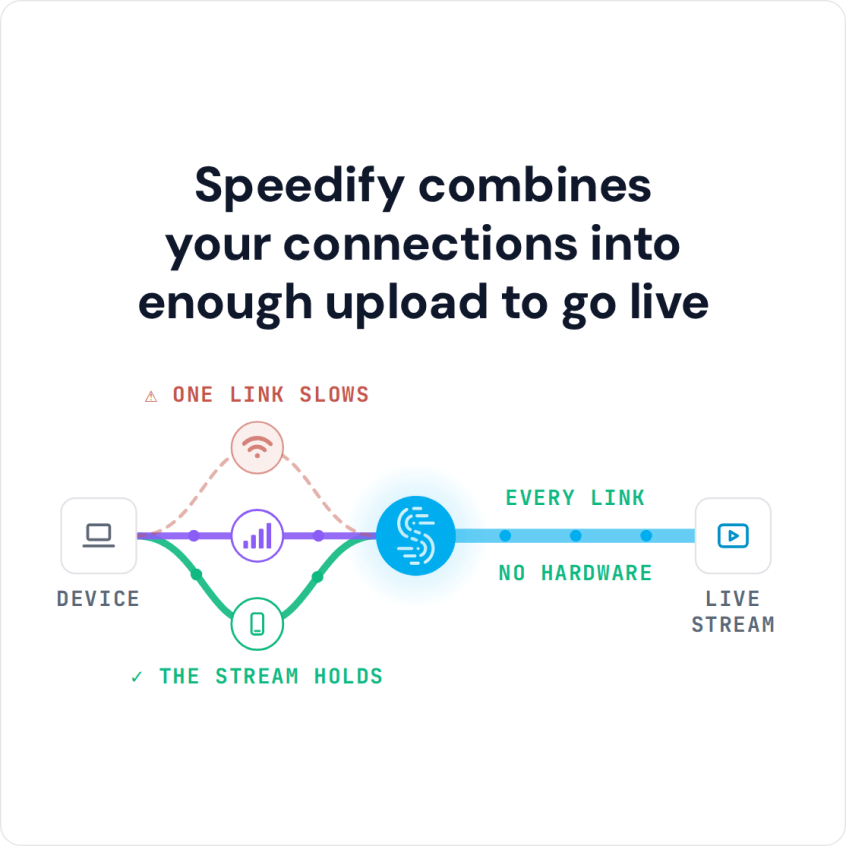
Live broadcast journalism reaches viewers when its upload speed stays steady from the field. Speedify is an app that combines two or more internet connections at once – Wi-Fi, 4G/5G cellular and more – into one faster, steadier upload, and it keeps the broadcast running if any single connection drops.
Here is how reporters can get reliable internet to broadcast live from anywhere.
Speedify combines your connections into enough upload to go live
How do I use WiFi and 4G/5G cellular at the same time with Speedify?

Pick your two internet connections and your device below and we'll take you to the step-by-step setup guide.


Getting Rid of Connection Issues when Live Broadcasing as a Reporter
We’ve all been there – experiencing slow Internet and even disconnects at some point. But it’s most annoying when it’s in the middle of live broadcasting journalism – both for you and your viewers.
The most common situations where you might encounter these type of connectivity issues with live streams include:
- Reporting on the move / while traveling – on the street, bus, train. You may be connected to a bad / spotty WiFi hotspot which breaks the live broadcast,
- In crowded areas – the available bandwidth may not be sufficient to serve everyone at an event (most frustrating!), on a stadium, at a concert etc.
- At home or work – if your ISP is doing maintenance work right when you’re live broadcasting. Or maybe you’re paying for a certain download/upload speed and you’re not getting that.
Here’s what happens: if the connection is slow, you may not be live streaming at a high resolution due to limited available bandwidth, so your videos may appear jittery / choppy. Plus – if your Internet connection is spotty and disconnects for some reason – your viewers are left watching the loading or an error screen.
How Speedify Improves Live Broadcast Journalism by Combining Multiple Internet Connections
If the Internet connection speed and latency causes issues with your live video streams as a journalist / reporter in the field, then you should get more bandwidth, preferably from more sources. Here is how journalists get fast, encrypted internet in the field.
Speedify is a software app that gets you faster, more reliable and secure Internet by allowing you to use multiple Internet connections at the same time. By doing that, you’re not only solving the bandwidth and latency issues related to live broadcast journalism, but also the need for an automatic failover mechanism that needs to kick in should anything happen to one of your connections.
In order to combine 2 or more Internet connections simultaneously, Speedify uses patent pending channel bonding technology to do that – it’s the only software-only solution that can run on any device, whether it’s a desktop or laptop computer, smartphone or tablet.
If one of your connections fails, Speedify automatically reroutes all the traffic through your other available connection(s). This happens in the background without you having to do anything. When the dropped connection is back online, Speedify will pick it up and start using it again.
Journalists: Broadcast Live with Speedify, the Best VPN for Live Streams
Speedify doesn’t just get reporters and journalists a fast and reliable Internet connection when live broadcasting online. Speedify is the only true mobile VPN available. It protects you from compromised wifi networks and snooping hackers. It uses real military-grade encryption to make sure your private data stays under your control and nobody can snoop in on the data you stream online or that you send to your colleagues back at the studio.
Before Speedify, users often had to choose between security and speed. Because Speedify was designed with speed as one of its primary goals, you no longer have to sacrifice speed for security. You can have both.
Whether you’re experiencing Internet related issues when broadcasting live to Facebook, YouTube, Twitter or your own platform, or want to improve the quality of the live streaming videos, it’s time you step to the next level! Get started with Speedify today – no strings attached!
Speedify
Get started with Speedify today.
Combine Wi-Fi, 4G/5G cellular, Ethernet, Starlink, and more into one faster, steadier connection. Free to try — no credit card required.
🚀 Speed
Faster uploads and downloads by bonding all your connections at once.
📶 Stability
Automatic failover in under a second when any connection drops.
🔒 Security
AES-256 encryption on every connection, on every network you join.



15M+ downloads worldwide. 75K+ five-star reviews on iOS and Android.