
Speedify Uses a Tethered iPhone as Backup for Starlink on Ubuntu Linux to Keep You Online
Plug your iPhone into your Ubuntu computer with a USB cable, turn on Personal Hotspot, and Speedify uses your iPhone’s 4G/5G cellular together with Starlink. If your Starlink internet connection drops, Speedify switches your traffic to the iPhone automatically, so SSH sessions, downloads and calls keep going.
Your iPhone is already a second internet connection: no extra hardware and no extra internet plan, as long as your iPhone’s data plan includes Personal Hotspot. Without the iPhone, Speedify has only Starlink to work with: it then works as an encrypted VPN and cannot stop Starlink from dropping. The USB cable also charges your iPhone while it works. On a Windows PC, here is how to combine Starlink and a tethered iPhone.
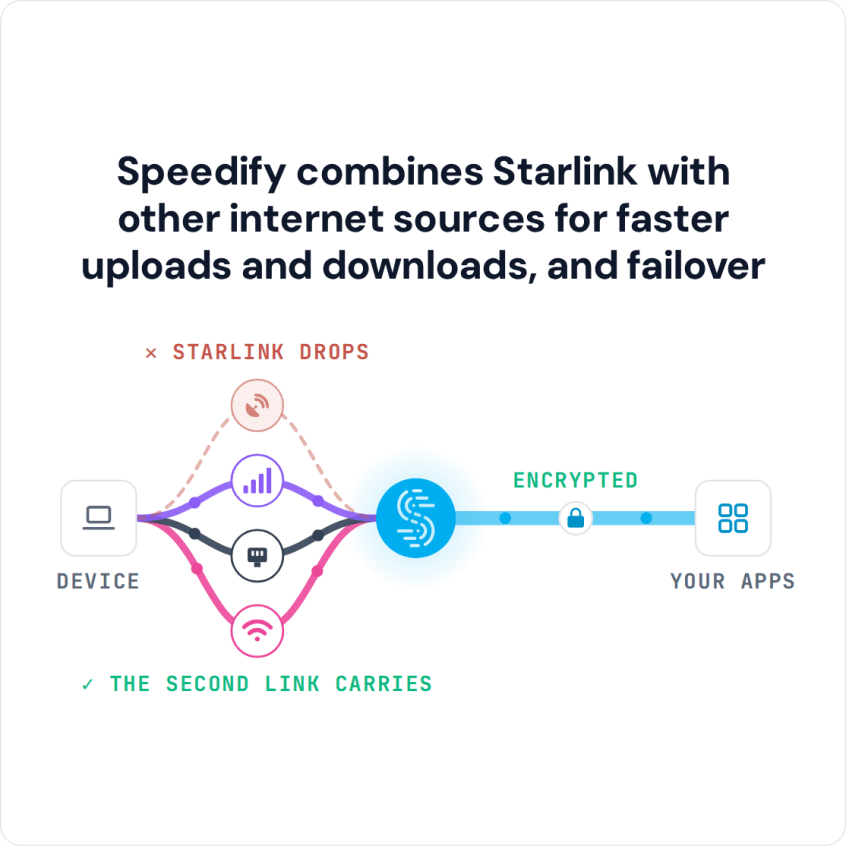
Speedify combines Starlink with other internet sources for faster uploads and downloads, and failover
Starlink Internet Connection Dropouts Happen to Everyone
Speedify measures thousands of Starlink users in more than 150 countries. From 29 September to 12 October 2026, fixed Starlink dishes went offline for about 37 minutes a day on average, and Starlink dishes on RVs and boats for about 61 minutes a day.
Starlink also switches each dish to a new satellite every 15 seconds, and a switch can cause a short dropout. Even a perfectly installed Starlink dish goes offline, and about 7 in 10 Starlink users on Speedify use Starlink together with a second internet connection, like 4G/5G cellular.
Why an iPhone Is a Good Failover Connection for Starlink on Ubuntu Linux
Starlink reaches you from satellites, and your iPhone’s 4G/5G cellular comes from towers on the ground. What slows Starlink down, like something blocking your Starlink dish’s view of the sky, a busy Starlink network in the evening, or the short drop each time your Starlink dish switches satellites (about every 15 seconds), doesn’t affect your iPhone’s cellular signal. A cell tower outage doesn’t affect Starlink.
With Speedify on your Ubuntu computer, Starlink and your iPhone carry your traffic at the same time. When Starlink drops, Speedify moves everything to your iPhone without breaking what you’re doing, and uses both again when Starlink comes back. Speedify needs that second internet connection: with Starlink alone, it can’t add speed or stop drops. A wired cable, fiber or DSL line also works: see how to add wired Ethernet failover to Starlink on Ubuntu.
Speedify also encrypts all your internet traffic on Starlink and on your iPhone’s cellular connection.
How to Use Starlink and a Tethered iPhone Together on Ubuntu Linux with Speedify
Step 1: Turn On Personal Hotspot and Connect Your iPhone to Ubuntu with a USB Cable
On your iPhone, go to Settings > Personal Hotspot and turn on Allow Others to Join. Connect your iPhone to your Ubuntu computer with a USB or USB-C cable, and tap Trust on the iPhone if it asks. Ubuntu usually adds the iPhone as a wired network connection on its own. Open Settings > Network and check that it shows as connected. If it doesn’t show up, unlock your iPhone, check that Personal Hotspot is still on, and unplug the cable and plug it back in.
Step 2: Connect Your Ubuntu Computer to Your Starlink Wi-Fi Network
Click the network icon in the top-right corner of the screen, open Wi-Fi and pick your Starlink Wi-Fi network. Check that Starlink Wi-Fi and the iPhone connection both show as connected.
Step 3: Install and Open Speedify on Your Ubuntu Computer
To download Speedify for Ubuntu, open the Terminal app, paste this command, press Enter, and type your Ubuntu password if it asks for it:
bash -c "$(wget -qO- https://get.speedify.com)"
When it finishes, open Speedify from your apps menu. Speedify finds both internet connections on its own, and you don’t need to set up any routing yourself. Speedify’s Linux install steps have more detail.
You choose how Speedify uses your iPhone’s cellular connection: click the iPhone connection in Speedify and set its priority. “Primary” uses the iPhone all the time, for the fastest downloads and uploads. “Secondary” uses the iPhone when Starlink is too slow. “Backup” uses the iPhone only when Starlink drops, which saves the most cellular data. You can also set a data limit for it. An Android phone works the same way: connect it with a USB cable and turn on USB tethering in its settings.
Speedify Also Shows Your Starlink Dish Status on Ubuntu Linux
Speedify shows real-time Starlink dish alerts in the app on your Ubuntu computer. If the dish’s motor is stuck, its mast is tilted or it is overheating, Speedify shows an alert, so you know your Starlink dish needs attention.
Speedify
Get started with Speedify today.
Speedify combines Wi-Fi, 4G/5G cellular, Ethernet, Starlink and satellite into one faster, more reliable internet connection. Free to try: 5 GB a month with a free account. No credit card required.
🚀 Speed
Faster uploads and downloads, because Speedify uses all your internet connections at once.
📶 Stability
If one internet connection drops, Speedify moves your traffic to the others in milliseconds.
🔒 Security
AES-256 encryption on every internet connection, on any network you join.



15M+ downloads worldwide. 75K+ five-star reviews on iOS and Android.