
What Live Broadcast Equipment Do I Need?
Cameras, lights, microphones and a switcher get bought first, and then the whole kit is fed through one internet line that cannot push the video out fast enough. Upload speed, not camera quality, is usually what decides whether a live broadcast holds together.
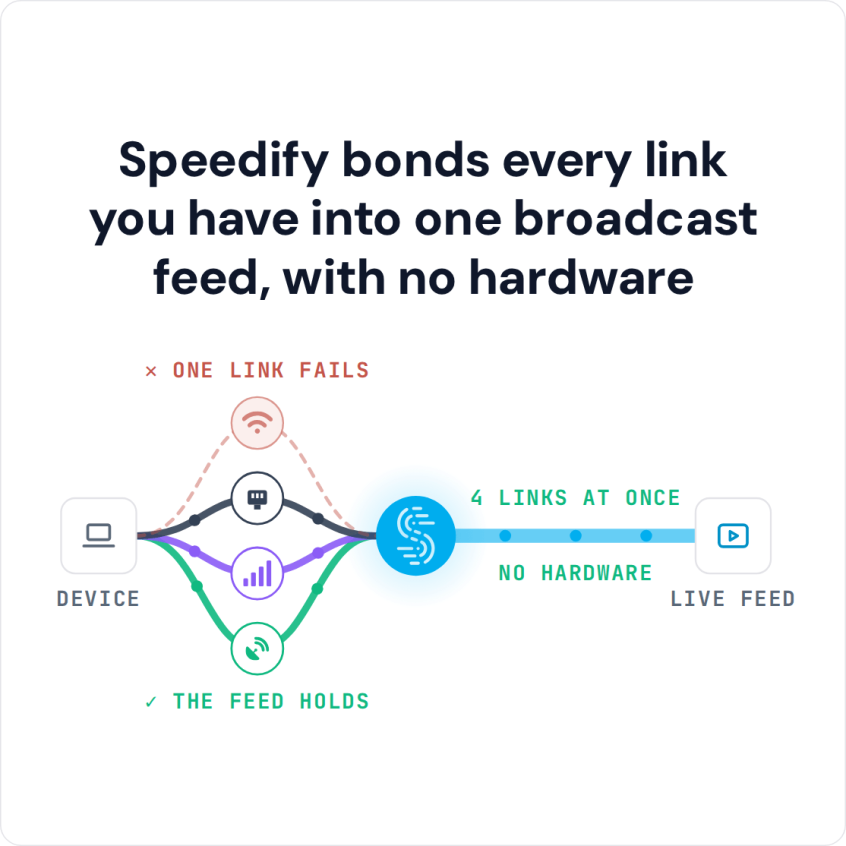
Speedify is an app that sends outbound video over Wi-Fi, 4G/5G cellular, Ethernet, Starlink and satellite internet connections at the same time, which raises the upload speed a stream can draw on and keeps the broadcast live when one connection drops. Those gains need two or more internet connections; on a single connection Speedify works as an encrypted VPN and cannot stop that connection from dropping.
Speedify bonds every link you have into one broadcast feed, with no hardware
The checklist below runs from a starter kit to broadcast television requirements, with Speedify covering the internet side. Contact Speedify to plan a deployment for your operation.
Watch now
How Speedify combines internet connections on any hardware
Get started with Speedify for your business
Speedify offers three commercial paths. They work together, and most enterprise customers use two or more.
01
Speedify Teams
Speedify on every supported OS for every team member
Centralized dashboard for billing, user provisioning, and usage analytics
CSV import/export and a RESTful management API
02
Speedify for Routers
License for supported OpenWrt routers
Powered by Speedify hardware lineup ready to deploy out of the box
Miri, GL.iNet and other partner models
Covers every device on the network, with no per-device install
03
Embed Speedify into your product
A · DIY
Build it yourself with the Speedify SDK.
Integrate Speedify into your iOS, Android, Windows, macOS, Linux or QNX product. Full developer documentation, sample code and supported integration paths. Your team owns the build, and the Speedify SDK handles combining the internet connections.
B · CUSTOM ENGINEERING
Have the Speedify team build it for you.
Live Broadcast Equipment When Getting Started
Technology keeps getting better and cheaper. All you really need for your first live broadcast is a good mobile phone and a fast and reliable internet connection. People have used their phones instead of expensive live broadcast equipment to stream everything from lava flows to protests to their children opening birthday presents.
Most mobile phones have good HD cameras and are always connected to the internet. It takes time to get good at live broadcasting, so start with what you already have and buy better equipment as your skills improve and your budget allows.
Equipment You Need for TV Quality Broadcasting
If you are ready to make the transition from using just a mobile phone to TV quality streaming, you will need some better live broadcasting equipment. It used to be that you needed a huge truck, camera, and crew to do TV broadcasting. But, with the right equipment you now only need a laptop, a friend, and a few pieces of equipment small enough to fit in a briefcase.
The key pieces of TV broadcasting equipment you will need are:
- 4K camera
- Wireless microphone
- Laptop
- Portable lighting
- Portable power source
- Fast and reliable Internet connection
A great camera is the most essential piece of live broadcast equipment you will need. Get a camera that shoots in 4K resolution. Your live video will look sharp on small screens, 4K televisions, and even movie screens. Your camera will either need to be equipped with mobile internet or connect to your laptop, so you can actually broadcast.
In addition to looking amazing, you want to make sure you sound amazing. You will want a microphone that wirelessly connects with your camera or laptop. Depending on the type of live broadcast you want to do, you can choose between lapel mics, handheld mics, or mounted studio microphones.
You will need a laptop or tablet and the right software to put your video and sound together and broadcast it live over the internet. Choose a laptop or tablet with enough processing power, and connect to the internet over a fast connection to prevent latency or buffering issues.
A portable lighting setup will make sure that you and anything you are shooting are well lit, free from shadows, and will give your live broadcast a true professional look and feel.
In order to power everything, you will also want a reliable portable power source. This is basically a giant battery that you can charge from a wall or car and that has enough juice to power your live broadcasting equipment.
Speedify Is Used on Millions of Devices Worldwide
Speedify has made internet connections faster and more reliable for businesses and individuals since 2014.
15M+
Speedify downloads worldwide75K+
5-star reviews for Speedify on iOS and Android82
Speedify server points of presence in 50+ cities on 6 continents500TB+
Of internet traffic carried by Speedify every weekSpeedify Partners
Speedify works with these companies to bring faster, more reliable internet and networking technology to their customers and employees.


Speedify: Essential Tool for Live Video Broadcasting for Fast and Reliable Internet
In addition to all of this live broadcasting equipment, you will need a fast and reliable internet connection. Speedify is an app for combining internet connections that you can use with your smartphone, tablet and laptop. Speedify combines and manages multiple Wi-Fi and cellular connections at the same time into a single fast and steady internet connection.
With two or more internet connections, Speedify keeps the broadcast going through dropped signals and reduces blurry live streams and buffering, because the video moves to the other connections when one weakens. In Redundant Mode, Speedify sends each packet over every connection and uses the copy that arrives first, so latency follows whichever connection is faster at that moment.
Get Speedify today to keep your live broadcast at the highest quality your internet connections allow.
Speedify Business Solutions
Speedify Teams
Speedify for Routers

Speedify Embedded Solutions and Integrations
Add Speedify to your own app or hardware with the Speedify SDK. Your product then combines internet connections, fails over automatically when one drops, and encrypts the traffic, using the same technology as the Speedify app.