
What Is Bandwidth Bonding and How Does It Benefit You?
Anyone shopping for a bonding router has already decided they need more than one internet connection working together. The open question is whether that requires a dedicated appliance at every location.
Speedify is software that combines those connections directly on the devices you already run (laptops, phones, or a router you already own), so there is no appliance to buy, ship or configure per site. Like a bonding router, Speedify needs two or more internet connections to add speed or keep a session up when one drops; on a single connection it works as an encrypted VPN.
Find out what bandwidth bonding actually does, and how bonding in software compares with buying a router for it.
How a Router Combines Internet Connections at One Site
A bonding router (also sold as a WAN bonding or internet bonding router) is a box with several WAN ports that combines two or more internet connections at one site, for example cable, DSL and a 4G/5G cellular modem, into one faster connection. True bonding needs a server on the far side that puts the traffic back together. Routers without one only load-balance: each download or call still runs over a single connection, and it restarts when that connection fails.
Bonding routers suit fixed sites such as a branch office. They do nothing for a laptop or phone that leaves the building, and every site needs its own box. Speedify does the same combining in software on the devices themselves, or on a supported router.
Watch now
How Speedify combines internet connections on any hardware
Get started with Speedify for your business
Speedify offers three commercial paths. They work together, and most enterprise customers use two or more.
01
Speedify Teams
Speedify on every supported OS for every team member
Centralized dashboard for billing, user provisioning, and usage analytics
CSV import/export and a RESTful management API
02
Speedify for Routers
License for supported OpenWrt routers
Powered by Speedify hardware lineup ready to deploy out of the box
Miri, GL.iNet and other partner models
Covers every device on the network, with no per-device install
03
Embed Speedify into your product
A · DIY
Build it yourself with the Speedify SDK.
Integrate Speedify into your iOS, Android, Windows, macOS, Linux or QNX product. Full developer documentation, sample code and supported integration paths. Your team owns the build, and the Speedify SDK handles combining the internet connections.
B · CUSTOM ENGINEERING
Have the Speedify team build it for you.
Speedify: Combining Internet Connections on Your Device Without a Router
Speedify was launched in 2014 as a service for combining internet connections in software. Standard 802.3ad / 802.1AX link aggregation balances whole flows across links between two switches; Speedify splits traffic per packet across separate internet connections and reassembles it at a Speedify server. Here’s what it brings, compared with bonding routers:
- Flexibility: Unlike bonding hardware, Speedify’s technology for combining connections is software-based. It uses fast cloud servers which act as a middleman between you and the rest of the internet, and it updates like any other app instead of needing a hardware swap.
- Value for money and scalability: Speedify runs directly on the device that needs it, so there is no extra box to power, carry or ship to each site. Adding a site or a user means installing the app, not buying another appliance.
- Security and online privacy: Speedify encrypts the combined traffic between your device and the Speedify server (DTLS 1.2 with AES-256-GCM or ChaCha20-Poly1305). Private browsing data is safe from anyone else on the local network.
How Speedify Combines Internet Connections in Software
When running on your computer or mobile device, Speedify identifies all available internet connections in real time. You can add or remove them while it runs, and Speedify adjusts how it spreads traffic across them. Speedify “routes” all of them into a virtual network adapter.
The Speedify app establishes a secure and encrypted connection to a speed server in the cloud. That server acts as a middleman between you and the rest of the Internet and puts the traffic from every connection back together. The server can be either public or a dedicated one.
Speedify works in tandem with the speed servers in the cloud: the app splits your Internet traffic per packet across every connection and the server reassembles it, so a single transfer can use all of them (Speedify’s published figure is up to 95% of the combined speed). Alex Gizis walks through it in a video on how Speedify works.
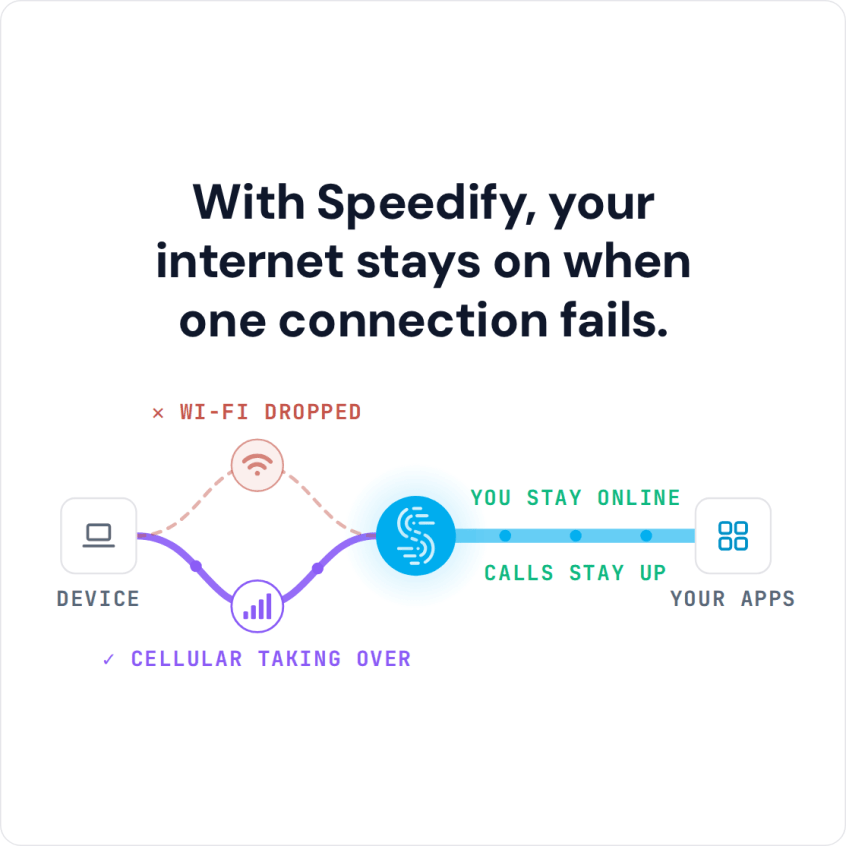
- Speedify monitors the quality of your connection in the background. If one of your connections becomes unstable, Speedify’s automatic failover moves your traffic to the others, and the public IP address stays the same, so calls and logged-in sessions carry on. Once the lost connection is available again, Speedify starts to use it again.
- Speedify also encrypts all of your data, as a VPN that combines internet connections. This keeps other people on the same network from reading your traffic.
Speedify on an Out-of-the-Box Bonding Router: the Miri X510
How Combining Internet Connections Helps Your Organization
Speedify provides internet solutions for consumers and businesses of all sizes. Speedify’s technology for combining internet connections spreads individual packets across all of your available internet connections, so even large single-socket transfers such as streaming video, uploading, or downloading files get faster.
Alongside the app itself, available for Windows, macOS, Linux, iOS, Android and OpenWrt routers, Speedify can also be embedded into other software apps via the Speedify SDK, or into networking, IoT and hardware products via the Powered by Speedify program.
Speedify Business Solutions
Speedify Teams
Speedify for Routers

Speedify Embedded Solutions and Integrations
Add Speedify to your own app or hardware with the Speedify SDK. Your product then combines internet connections, fails over automatically when one drops, and encrypts the traffic, using the same technology as the Speedify app.