
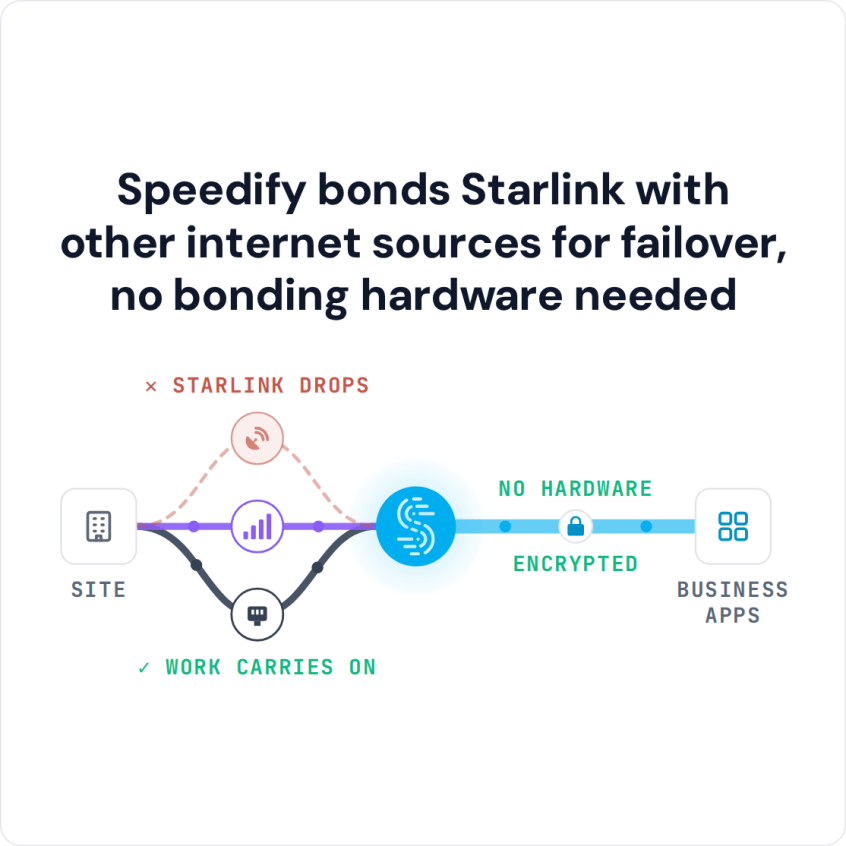
Speedify and Peplink both combine Starlink with other internet connections, like 4G/5G cellular, and use them at the same time as one faster and steadier internet connection, often called Starlink bonding. The difference is where the combining runs. Peplink does it on Peplink routers, with a feature called SpeedFusion. Speedify is software, an app for Windows, macOS, Linux, iOS, Android and supported routers, so it runs on the laptops, phones and routers your business already has. For combining internet connections beyond Starlink, see Peplink vs. Speedify in hardware or software.
Speedify bonds Starlink with other internet sources for failover, no bonding hardware needed
Below: how each one works with Starlink, a side-by-side table, and which Speedify setup fits a business that is looking at Peplink. To talk through your own sites, contact the Speedify team.
Watch now
How Speedify combines internet connections on any hardware
Get started with Speedify for your business
Speedify offers three commercial paths. They work together, and most enterprise customers use two or more.
01
Speedify Teams
Speedify on every supported OS for every team member
Centralized dashboard for billing, user provisioning, and usage analytics
CSV import/export and a RESTful management API
02
Speedify for Routers
License for supported OpenWrt routers
Powered by Speedify hardware lineup ready to deploy out of the box
Miri, GL.iNet and other partner models
Covers every device on the network, with no per-device install
03
Embed Speedify into your product
A · DIY
Build it yourself with the Speedify SDK.
Integrate Speedify into your iOS, Android, Windows, macOS, Linux or QNX product. Full developer documentation, sample code and supported integration paths. Your team owns the build, and the Speedify SDK handles combining the internet connections.
B · CUSTOM ENGINEERING
Have the Speedify team build it for you.
How Speedify Combines Starlink with Other Internet Connections Without a Peplink Router
Speedify sends your internet traffic over every internet connection you have at the same time: Wi-Fi, 4G/5G cellular, Ethernet, Starlink and satellite. Speedify’s servers around the world put the pieces back together, so even a single download, upload or video stream gets nearly the full speed of all your internet connections combined.
When one internet connection weakens or drops, Speedify moves your traffic to the others automatically, and calls and uploads keep going. Speedify needs at least two internet connections to do this. With one Starlink dish and nothing else, it can’t make downloads and uploads faster or stop dropouts.
Speedify runs on Windows, macOS, Linux, iOS, Android and supported OpenWrt routers, so the combining happens on the device that needs it. There is no Peplink box to buy, ship and set up at every site.
Two Speedify Features Made for Starlink Sites
- Starlink dish status. Speedify’s Starlink Control Center shows each Starlink dish’s live status, speed, ping, obstructions, uptime and alerts, for several Starlink dishes at once. The alerts flag problems like a stuck dish motor, a dish that is no longer upright, or a dish that is overheating.
- Cellular sharing. With Speedify’s cellular sharing, a field crew pairs their phones on the same Wi-Fi or hotspot, and Speedify adds each phone’s 4G/5G cellular as another internet connection.
Speedify vs. Peplink for Starlink: Side-by-Side Comparison
| What you’re comparing | Peplink (SpeedFusion) | Speedify |
|---|---|---|
| How it combines internet connections | Splits data across connections, and can send extra copies to smooth out dropouts | Splits data across all connections, for nearly their full speed combined |
| Hardware you need | Yes, a Peplink Balance or MAX router | None, software on devices you already have |
| Runs on phones, laptops and servers | The Peplink app smooths out dropouts, but full combining needs a Peplink router | Yes, Windows, macOS, Linux, iOS, Android |
| Uses two Starlink dishes plus cellular | Yes | Yes, in software |
| Managing many sites from one place | InControl 2, with detailed multi-site management | Speedify Teams |
| Your own private server | Peplink cloud or a self-hosted Peplink appliance | Add-on on any plan: Speedify Dedicated Servers or Speedify Self-Hosted Servers |
| Time to get the first site online | Buy and set up hardware | Install an app |
Which Speedify Setup Fits a Business Looking at Peplink
The closest match to a Peplink router with its cloud service is the Speedify app plus one of two add-ons: Speedify Dedicated Servers (a private server that nobody else shares) or Speedify Self-Hosted Servers (Speedify running on your own servers). Either one gives your traffic the same private, controlled route, without Peplink hardware at either end. For the server side, see Speedify Self-Hosted Server vs. Peplink FusionHub.
If you still want one router at a fixed site, a Powered by Speedify router on OpenWrt, GL.iNet or Miri hardware covers the whole network there, and the Speedify app covers everyone else. More in Speedify as an enterprise alternative to Peplink.
More Comparisons of Speedify and Other Starlink Options for Business
See how Speedify compares with other ways to use Starlink together with other internet connections at a business.
- Every Starlink option for business compared with Speedify
- Speedify vs. Bondix
- Speedify vs. Mushroom Networks
- Speedify vs. Viprinet
- Speedify vs. Dejero
- Speedify vs. LiveU
- Speedify vs. TVU Networks
- Speedify vs. Cradlepoint
- Speedify vs. OpenMPTCProuter
The Bottom Line on Speedify vs. Peplink for Starlink
If your goal is a reliable Starlink internet connection without buying and running a hardware program, Speedify is quicker to set up, runs on devices your business already owns, and adds Starlink dish status and cellular sharing. Speedify makes your business internet faster, more reliable, and more secure.
See how Speedify combines internet connections or read how Speedify uses several Starlink dishes at once for business.
Speedify Business Solutions
Speedify Teams
Speedify for Routers

Speedify Embedded Solutions and Integrations
Add Speedify to your own app or hardware with the Speedify SDK. Your product then combines internet connections, fails over automatically when one drops, and encrypts the traffic, using the same technology as the Speedify app.