
How Emergency Services Keep a Working Internet Connection in the Field
Speedify bonds 4G/5G cellular, Wi-Fi, Ethernet, and Starlink into one reliable internet connection for first responders and emergency services. For crews that already carry Starlink, see how Speedify keeps Starlink online for first responders.
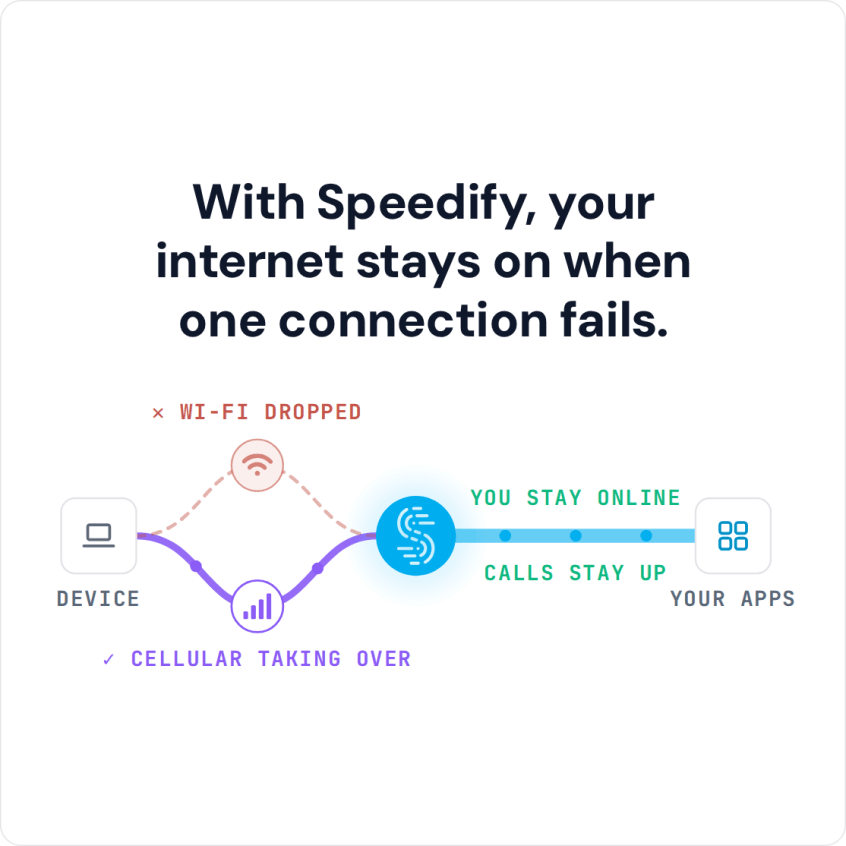
When one connection drops in the field (due to damaged infrastructure, cellular congestion, or coverage gaps), Speedify automatically shifts all traffic to the remaining active connections, so communications sessions typically continue. That needs two or more internet connections; on a single connection Speedify works as an encrypted VPN and cannot stop that connection from dropping. Speedify’s Redundant Mode sends each data packet over multiple connections simultaneously, so a heavily degraded connection is less likely to break an active call or data session.
With Speedify, your internet stays on when one connection fails.
This article covers how Speedify works for first responder and emergency services deployments, what connection setups provide the most reliable field communications, and how to get started.
Watch now
How Speedify combines internet connections on any hardware
Get started with Speedify for your business
Speedify offers three commercial paths. They work together, and most enterprise customers use two or more.
01
Speedify Teams
Speedify on every supported OS for every team member
Centralized dashboard for billing, user provisioning, and usage analytics
CSV import/export and a RESTful management API
02
Speedify for Routers
License for supported OpenWrt routers
Powered by Speedify hardware lineup ready to deploy out of the box
Miri, GL.iNet and other partner models
Covers every device on the network, with no per-device install
03
Embed Speedify into your product
A · DIY
Build it yourself with the Speedify SDK.
Integrate Speedify into your iOS, Android, Windows, macOS, Linux or QNX product. Full developer documentation, sample code and supported integration paths. Your team owns the build, and the Speedify SDK handles combining the internet connections.
B · CUSTOM ENGINEERING
Have the Speedify team build it for you.
Why Internet Connectivity Is Critical for First Responders
First responders (police, fire, EMS, search and rescue, and disaster response teams) depend on real-time communications and data access in conditions where the underlying network infrastructure may be damaged, absent, or overloaded. The connectivity problems first responders face are distinct from those in commercial environments:
- A disaster or emergency event is often the exact scenario that damages cellular towers, power infrastructure, and fixed internet connections in the affected area.
- Mass casualty and large-scale emergency events bring a surge of people to an area simultaneously, congesting whatever cellular coverage remains on the same towers the first responders are depending on.
- Command posts and staging areas are deployed in locations with no fixed internet infrastructure and must rely on cellular and satellite internet connections provisioned on the spot.
- Field teams move through areas with varying cellular coverage, and a dropped data connection during an active incident coordination can directly affect the outcome.
A single internet connection cannot provide the redundancy first responder operations require. Speedify bonds multiple connections simultaneously and manages failover at the packet level so communications stay running through degraded and changing network conditions.
How Speedify Works for Emergency Services
Speedify’s channel bonding technology distributes internet traffic across all active connections in real time: 4G/5G cellular from multiple carriers, Wi-Fi where available, wired Ethernet, and Starlink or other satellite. Speedify monitors latency, packet loss, and jitter on each connection continuously and adjusts routing at the packet level every few milliseconds.
For first responder operations, Speedify’s Redundant Mode is the appropriate setting for critical communications. In Redundant Mode, Speedify sends each data packet over each active connection (up to three) simultaneously. The first packet to arrive at the destination is used; duplicates are discarded.
This means that even a connection with significant packet loss can continue contributing to a stable data session. As long as any one connection is delivering packets, the session continues.
Speedify also encrypts traffic between the device and the Speedify server through its VPN tunnel, protecting operational communications and incident data from interception on shared or public network infrastructure.
Speedify and Dedicated Combining Hardware, Compared for First Responder Operations
| Feature | Dedicated bonding routers (Peplink, Teltonika and similar appliances) | Speedify |
|---|---|---|
| What you buy | A bonding router appliance for every site or vehicle | A software subscription per user, running on devices you already operate |
| Typical entry cost | From roughly $500 for an entry LTE router to several thousand for a multi-SIM unit, plus a vendor cloud subscription | $89.99 a year per user, billed yearly |
| Internet connections bonded | Ethernet, Wi-Fi and cellular, limited by how many SIM slots the model has | Ethernet, Wi-Fi, 4G/5G cellular and Starlink, up to 31 connections |
| Maximum bonded throughput | Around 200 Mbps through the vendor’s bonding cloud on common models | Typically 200 to 300 Mbps on public servers, up to 1 Gbps on a Dedicated Server |
| Static IP and port forwarding | A vendor cloud add-on | A Dedicated Server ($120 billed monthly, or $900 billed yearly) or a Self-Hosted Server (from $40 a month, or $300 a year) |
| Central management | The vendor’s own dashboard | The Speedify Teams dashboard (users, billing and usage statistics) and a REST API |
| Moving between sites or vehicles | Ship or reinstall the appliance | Sign in on another device |
| If you do want hardware | Required | Optional: a Router License on a compatible OpenWrt router, or the Miri X510 |
Field Deployment Options for First Responders
- Command post and incident command: Speedify for Routers. Deploy a Miri X510 bonding router or a compatible OpenWrt router at the incident command post. Connect Starlink and 4G/5G cellular from multiple carriers as WAN inputs. Every device at the command post (laptops, tablets, radio over IP gateways, video monitoring systems) gets the bonded connection automatically. No per-device Speedify installation required.
- Individual responder devices: Speedify Teams. Install the Speedify app on field responder laptops, tablets, and smartphones. Each device bonds available 4G/5G cellular connections with any available Wi-Fi on-site. Manage all devices from the centralized Speedify Teams Dashboard (users, billing and usage statistics), and push configuration remotely via the Teams API.
- Redundant communications: Speedify Redundant Mode. For active incidents where communications continuity is critical, enable Redundant Mode in Speedify. Speedify sends each packet simultaneously over each active connection (up to three). Active VoIP calls and data sessions can continue even when one or more connections are heavily degraded.
- Rapid deployment kit: Miri X510 router. The Miri X510 bonding router powered by Speedify supports up to 7 simultaneous connections, runs on hot-swappable NP-F batteries for operation without power infrastructure, and can be configured and deployed quickly. This makes it a practical option for rapid incident command post setup in the field.
Connection Setups for First Responder Operations
- Multi-carrier 4G/5G cellular bonding. Bond 4G/5G cellular connections from two or more different carriers simultaneously. When one carrier’s coverage fails or becomes congested in the affected area, other carriers’ connections remain available. Speedify uses all active carrier connections simultaneously in Speed Mode for maximum throughput, or in Redundant Mode for maximum continuity.
- Starlink plus 4G/5G cellular. When a Starlink dish is available at the incident command post, bond it with 4G/5G cellular from multiple carriers. Starlink provides baseline throughput and the cellular connections provide carrier redundancy. Speedify manages failover automatically based on real-time connection performance.
- Starlink plus VSAT for remote or high-priority operations. Operations in areas beyond 4G/5G cellular coverage can bond Starlink with a VSAT system for two independent satellite connections. Speedify provides automatic failover between them and uses both simultaneously for faster upload and download speeds when both are active.
How to Deploy Speedify for First Responder Operations
- For command post deployments: connect Starlink and 4G/5G cellular adapters to a Miri X510 or compatible OpenWrt router. Install Speedify on the router via the Speedify install script and activate the Router License. Set Starlink and all cellular connections to Primary priority. Enable Redundant Mode for critical communications workloads. Connect command post devices to the router’s local Wi-Fi.
- For individual device deployments: install the Speedify app on each responder’s device. Connect all available 4G/5G cellular connections. Sign in to the Speedify Teams account. Enable Redundant Mode on devices used for active incident communications.
- Manage users, billing and usage statistics in the Speedify Teams Dashboard, and push settings such as connection priorities to each device remotely through the Teams REST API, without requiring on-site access to each device.
Which First Responder and Emergency Services Organizations Need Speedify
- Fire departments and emergency medical services. Field units that depend on real-time communications, patient data access, and coordination with dispatch and hospitals during active incidents. Speedify keeps these communications sessions running through cellular coverage gaps and congestion.
- Law enforcement agencies. Officers and investigators in the field accessing databases, real-time video feeds, and coordination systems over 4G/5G cellular networks that may be congested or unavailable in active incident areas.
- Search and rescue operations. SAR teams operating in remote areas with no fixed internet infrastructure depend on satellite and cellular internet for communications with command. Speedify bonds available connections and manages failover so SAR communications continue through changing field conditions.
- Disaster response and emergency management agencies. Organizations deploying incident command infrastructure in disaster-affected areas where fixed internet is unavailable or damaged. Speedify provides the bonded, redundant connection that keeps command post operations running on satellite and cellular internet.
- Public safety communications centers. Dispatch centers and 911 centers that need backup internet connectivity for computer-aided dispatch and VoIP communications systems. Speedify bonds primary wired broadband with 4G/5G cellular and Starlink so sessions can continue on the other connections if the wired line fails.
Speedify Plans for First Responders and Emergency Services
Speedify Teams provides centralized user management, billing and usage statistics, and a REST API that emergency services organizations need to deploy and manage Speedify across field teams and command infrastructure.
For organizations that require a static IP address for VPN gateway access or secure data system connections, Speedify Dedicated Servers provide a managed private server with up to 1 Gbps throughput. For organizations with data residency requirements, Speedify Self-Hosted Servers let the organization run Speedify traffic through its own infrastructure; they still activate through my.speedify.com.
Speedify Business Solutions
Speedify Teams
Speedify for Routers

Speedify Embedded Solutions and Integrations
Add Speedify to your own app or hardware with the Speedify SDK. Your product then combines internet connections, fails over automatically when one drops, and encrypts the traffic, using the same technology as the Speedify app.