
How to Keep a Professional Live Stream Online by Bonding Several Internet Connections
Speedify combines Wi-Fi, Ethernet, 4G/5G cellular and Starlink into one reliable internet connection for professional live streaming. For an overview, watch how Speedify works.
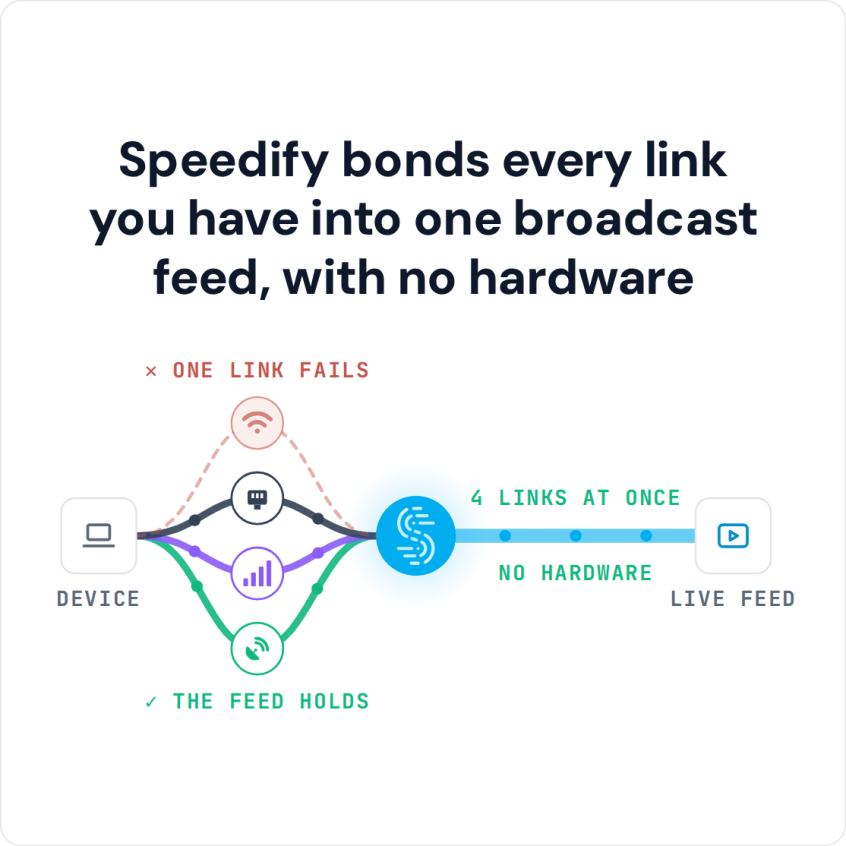
When any single internet connection drops or degrades during a broadcast, Speedify automatically shifts all traffic to the remaining active connections without dropping the stream. That needs two or more internet connections; on a single connection Speedify works as an encrypted VPN and cannot stop that connection from dropping.
Speedify bonds every link you have into one broadcast feed, with no hardware
Speedify’s Enhance Streaming mode prioritizes stream traffic over all other internet traffic on the device, maintaining bitrate stability even when internet conditions change.
This article covers how Speedify works for professional live streaming, what connection setups deliver the best results, and how to get started.
Watch now
How Speedify combines internet connections on any hardware
Get started with Speedify for your business
Speedify offers three commercial paths. They work together, and most enterprise customers use two or more.
01
Speedify Teams
Speedify on every supported OS for every team member
Centralized dashboard for billing, user provisioning, and usage analytics
CSV import/export and a RESTful management API
02
Speedify for Routers
License for supported OpenWrt routers
Powered by Speedify hardware lineup ready to deploy out of the box
Miri, GL.iNet and other partner models
Covers every device on the network, with no per-device install
03
Embed Speedify into your product
A · DIY
Build it yourself with the Speedify SDK.
Integrate Speedify into your iOS, Android, Windows, macOS, Linux or QNX product. Full developer documentation, sample code and supported integration paths. Your team owns the build, and the Speedify SDK handles combining the internet connections.
B · CUSTOM ENGINEERING
Have the Speedify team build it for you.
Why Internet Reliability Is the Biggest Problem in Professional Live Streaming
Professional live streaming demands consistent upload speeds and low latency. A stream that drops, buffers, or degrades mid-broadcast is not recoverable in real time. The audience sees the failure immediately, and the content is lost.
The most common causes of stream failure are not equipment problems. They are internet connection problems:
- A single Wi-Fi connection drops or gets congested by other users on the same network.
- A 4G/5G cellular connection loses signal or hits a data throttle threshold mid-stream.
- A venue internet connection becomes overloaded during peak event hours.
- An off-grid location has no reliable single internet source at all.
Cellular bonding devices from manufacturers like LiveU and Teradek, and broadband hardware from Mushroom Networks, solve this problem with dedicated hardware, but at a cost that puts them out of reach for many content creators and small production teams. Speedify solves the same problem in software, running on devices you already own.
The Miri X510 router, powered by Speedify, gives professional streamers a dedicated device that combines internet connections without the cost of traditional broadcast cellular bonding hardware.
Speedify in the Field: MrBeast, Kai Cenat, and UFD Tech
Speedify and the Miri X510 router powered by Speedify have been tested in some of the most demanding live streaming conditions outside a broadcast studio.
When MrBeast and Kai Cenat planned a joint 4th of July live stream from a remote field location (filming a building being filled with fireworks), the team arrived on location to find no usable 4G/5G cellular coverage.
The Miri X510 was deployed on-site with two Starlink dishes, two cellular modems on 4G and 5G, two Wi-Fi hotspots connected over Ethernet, and additional phones using Speedify’s cellular sharing feature to share their cellular connections wirelessly.
Speedify combined all of these internet connections simultaneously and kept the stream running for the duration of the broadcast.
You can read more about how the MrBeast and Kai Cenat off-grid stream was powered by Speedify.
Team UFD Tech used Speedify and Speedify’s cellular sharing feature during their Cannonball for the Cure 2022 coast-to-coast live stream, approximately 60 hours of continuous live streaming across the US from New York City to Los Angeles. Speedify combined multiple cellular connections and hotspots throughout the journey to keep the stream online across areas with varying cellular coverage.
Read more about UFD Tech’s Cannonball for the Cure stream powered by Speedify.
Both deployments illustrate the core value of Speedify for professional live streaming: the ability to combine whatever internet connections are available at a given location, regardless of how many or what type, into one reliable stream.
Speedify vs. Dedicated Broadcast Hardware for Professional Live Streaming
| Feature | Dedicated cellular bonding hardware (LiveU, Dejero, Teradek, TVU Networks, Streambox) | Speedify |
|---|---|---|
| What you buy | A proprietary cellular bonding device, often paired with its own streaming encoder | A software subscription that runs on hardware you already own |
| Typical entry cost | Roughly $1,000 for an entry-level encoder, rising to about $5,000-$10,000 for a broadcast unit, plus an annual service subscription (LiveU’s LRT service is $450 a year) | $89.99 a year per user, billed yearly |
| Internet connections combined | Ethernet, Wi-Fi and cellular | Ethernet, Wi-Fi, 4G/5G cellular and Starlink, up to 31 connections |
| Maximum bonded throughput | 20 Mbps to 1 Gbps depending on the model | 300 Mbps on shared servers, up to 1 Gbps on a Dedicated Server |
| Failover method | Automatic failover between connections | Packet-level automatic failover |
| Platforms supported | Proprietary hardware only | Windows, macOS, Linux, iOS, Android, OpenWrt and embedded Linux |
| Getting started | Specify, buy, ship and configure a unit for every crew | Install the app, sign in, and start combining connections |
| If you do want hardware | Required | Optional: the Miri X510 router powered by Speedify |
How Speedify Improves Professional Live Streams
Speedify’s technology for combining internet connections distributes your stream’s upload traffic across all active internet connections simultaneously: Wi-Fi, Ethernet, 4G/5G cellular, Starlink and other satellite. Speedify monitors the latency, packet loss, and available bandwidth on each connection in real time and routes stream packets accordingly.
Speedify’s Enhance Streaming mode, enabled by default, detects streaming traffic by port number, hostname, and data rate pattern. When Speedify identifies an active live stream, it:
- Prioritizes stream packets over all other internet traffic on the device.
- Uses secondary connections to boost upload speeds when the primary connection needs additional bandwidth.
- Automatically switches to Redundant Mode behavior for stream traffic when packet loss is detected, sending duplicate packets across multiple connections so the stream server receives stream data continuously even when one connection is dropping packets.
This means Speedify does not simply load-balance stream traffic across connections. Speedify actively protects the stream from connection degradation as it happens.
Speedify works with all major live streaming software and platforms: OBS, Streamlabs, Ecamm Live, Wirecast, Streamyard, Restream, YouTube Live, Twitch, Facebook Live, TikTok Live, and others. No changes to streaming software configuration are required: run Speedify on the streaming device and your existing streaming software uses the combined connection automatically.
Connection Setups for Professional Live Streaming with Speedify
- Studio or fixed location: Ethernet plus Wi-Fi plus 4G/5G cellular. Combine your wired Ethernet broadband connection with your Wi-Fi network and one or more 4G/5G cellular connections via tethered smartphones or USB cellular adapters. Set Ethernet to Primary priority, Wi-Fi to Secondary and 4G/5G cellular to Backup. Speedify fails over to the other connections automatically if one drops.
- Off-grid or field location: Starlink plus 4G/5G cellular plus hotspots. Combine a Starlink dish with 4G/5G cellular connections from multiple carriers and any available Wi-Fi hotspots. Use Speedify’s cellular sharing feature to pull cellular connections from additional devices nearby wirelessly. The Miri X510 router powered by Speedify takes up to 7 direct connections, plus cellular connections shared from up to 20 nearby phones.
- Mobile IRL streaming: multiple 4G/5G cellular connections. For streamers moving through locations without fixed internet access, combine 4G/5G cellular connections from two or more carriers to get combined upload speeds and failover if one carrier loses signal. Use Speedify’s cellular sharing feature to pull additional 4G/5G cellular connections from nearby devices without cables.
How to Set Up Speedify for Professional Live Streaming
- Connect all available internet connections to your streaming device: wired Ethernet, Wi-Fi, tethered smartphones via USB for 4G/5G cellular, external USB cellular adapters, Starlink.
- Install the Speedify app on your streaming device. Speedify runs on Windows, macOS, Linux, iOS, and Android.
- Sign in to your Speedify account. Speedify automatically detects all active internet connections and begins combining them.
- Confirm Enhance Streaming mode is enabled in Speedify settings. This is the default and is the recommended mode for all live streaming.
- Open your streaming software (OBS, Ecamm Live, Streamlabs, Wirecast, or your preferred platform) and go live. Speedify handles internet connection management in the background.
- For team deployments with multiple streaming devices, set up a Speedify Teams account to manage users and view usage in the Teams dashboard, and push Speedify settings to every device through the Teams API.
Who Uses Speedify for Professional Live Streaming
- Content creators and influencers. Streamers going live on YouTube, Twitch, TikTok, and Facebook need a reliable upload connection whether they’re streaming from a home studio or a remote location. Speedify combines whatever connections are available and keeps the stream running when individual connections drop.
- Live event production companies. Production teams streaming conferences, concerts, sports events, and corporate events from venues with unreliable or congested Wi-Fi depend on bonded cellular and satellite connections to maintain upload stability. Speedify combines internet connections in software on the devices the production team already owns.
- IRL and travel streamers. Streamers broadcasting from the road, in cities, or at off-grid locations need to combine whatever 4G/5G cellular connections are available at each location. Speedify’s cellular sharing feature lets IRL streamers pull additional cellular connections from nearby phones wirelessly, without additional hardware or cabling.
- Broadcast journalists and field reporters. Journalists going live from the field need a fast, encrypted connection that holds up through cellular coverage gaps and network congestion. Speedify combines available connections and encrypts the traffic between the device and the Speedify server, which keeps the stream online and protects the reporter’s traffic on public networks. Speedify is not an anonymity tool: Speedify records connection metadata such as IP address and connection time.
- Houses of worship and non-profit organizations. Churches, temples, and other organizations streaming services and events with limited IT budgets can use Speedify on existing hardware to combine their available internet connections without investing in dedicated broadcast hardware.
Speedify Plans for Professional Live Streaming
For individual streamers, a Speedify Individual or Families plan includes connection combining, Enhance Streaming mode and the Speed Server network (more than 50 locations) on up to 5 devices at once per user.
For production teams and businesses, Speedify Teams adds centralized management, per-user analytics, and a REST API for automated device management. Speedify Teams also allows the addition of Dedicated Speed Servers, private servers with up to 1 Gbps throughput, a static IP address and port forwarding, which provide more consistent upload performance for high-bitrate professional streams.
The Miri X510 router powered by Speedify is the hardware option for production teams that want a dedicated device: up to 7 direct connections, cellular sharing with up to 20 phones, two hot-swappable NP-F batteries (not included) for off-grid use, and Speedify’s full feature set in a compact form factor.
Speedify Business Solutions
Speedify Teams
Speedify for Routers

Speedify Embedded Solutions and Integrations
Add Speedify to your own app or hardware with the Speedify SDK. Your product then combines internet connections, fails over automatically when one drops, and encrypts the traffic, using the same technology as the Speedify app.