
Unbreakable VPN Connection for School Wi-Fi by Combining Wi-Fi and 4G, 5G Cellular with Speedify
School Wi-Fi is not private by default. Studying on your school or campus Wi-Fi puts your email, banking apps and messages on a network shared with thousands of other students and run by people who are not security specialists. Treat school Wi-Fi as public Wi-Fi.
Speedify is an app that encrypts your internet traffic so nobody else on that network can read it, and uses campus Wi-Fi together with your phone’s 4G/5G cellular connection.
Below: whether school Wi-Fi is safe, whether a VPN slows a campus internet connection, and how to set Speedify up in five steps. The speed and failover gains need two internet connections, such as campus Wi-Fi plus your phone’s 4G/5G cellular; on a single connection, Speedify works as an encrypted VPN and can be a little slower.
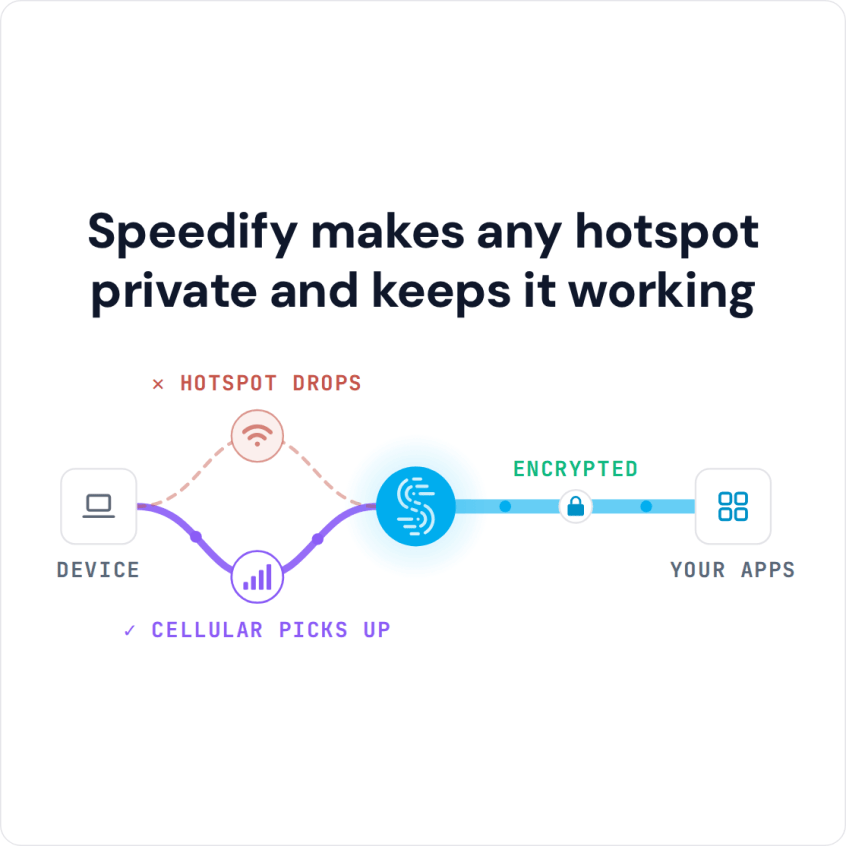
Speedify makes any hotspot private and keeps it working
Stay Private on School Wi-Fi with Speedify in Five Steps
- Download Speedify on the phone or laptop you use at school. Speedify runs on Windows, macOS, iOS, Android and Linux.
- Open Speedify and create a free account (the free tier includes 5 GB per month; Linux needs a paid plan), or sign in.
- On a phone, tap Allow when your phone asks to add a VPN configuration.
- Join the school Wi-Fi and finish its login page if one appears. On a phone, keep 4G/5G cellular turned on so Speedify can use it as a second internet connection.
- Speedify connects to a Speedify server automatically. The school network now sees only an encrypted connection to that server, not your email, messages or the sites you open.
How Safe School Wi-Fi Is: Public Wi-Fi Security Basics
Businesses, schools and public places offer free Wi-Fi to attract customers and to provide a public service. Most of the organizations that offer public Wi-Fi access are not IT or cybersecurity specialists, so Wi-Fi security is rarely the focus. These Wi-Fi hotspots (including the ones at schools and colleges) often skip standard security practices such as:
- Securing the Wi-Fi access either by requiring a password to connect to the Wi-Fi hotspot, or having some sort of login or registration before accessing the Internet
- Having up-to-date firmware on their routers and other networking equipment
- Having security compliant or at least hard to guess admin usernames and passwords
- Doing periodic routine checks to see if the networks have been compromised
School Wi-Fi networks attract snoops and hackers because so many different people use them. Someone on the same network can try to intercept your traffic and capture social media logins, credit card numbers and email passwords. Most sites now use HTTPS, which protects what is on the page, but the network can still see which sites you visit, and older apps or a fake hotspot can expose more.
School Wi-Fi Is Safer with a VPN That Encrypts Your Traffic
When you are connected to the same Wi-Fi network as thousands of other people, any one of them could try to snoop on your traffic. The practical fix for school Wi-Fi security is to use a VPN, which encrypts everything between your device and the VPN server.
Tip: On campus Wi-Fi, turn your VPN on before you open email, banking or social apps.
VPN Speed on College Wi-Fi: Why Standard VPNs Slow Down
Standard VPNs can slow down your web traffic on school Wi-Fi, because every request takes a detour through the VPN server and the encryption adds a little overhead. On an already crowded campus network, that detour can make pages crawl.
Most VPNs also stall or remain inactive after your Internet connection drops, for example while your laptop roams between Wi-Fi access points across campus.
Tip: Choose a VPN that combines internet connections, so the VPN stays fast and stable when one network slows or drops.
Speedify for School Wi-Fi: Encryption Plus a Second Internet Connection
Speedify handles both security and speed. Speedify encrypts your traffic like a VPN and can combine all available Internet connections simultaneously, such as campus Wi-Fi and your phone’s 4G/5G cellular.
Your traffic stays encrypted even on a compromised Wi-Fi network, and Speedify works on networks where you have to go through a captive portal (login page) first. Hackers on the network, your internet provider and the people who run the school network see only an encrypted connection to a Speedify server, which keeps your traffic away from their prying eyes. Speedify keeps no record of the sites you visit and does not sell personal data; it does record connection metadata such as your IP address, device ID, connection time and data used.
Speedify also has auto failover. When Speedify detects that a Wi-Fi signal is weak or spotty, it moves your traffic to the connection that still works, so a class video call or upload keeps going. Once the Wi-Fi recovers, Speedify adds it back automatically.
Speedify Can Help Open Sites Blocked on School Wi-Fi
Because Speedify encrypts all traffic from your device, the school network sees only a connection to a Speedify server, so you can often get past the restrictions the school, workplace or another network puts on sites and apps. Some networks block VPN connections too, and school rules still apply.
Why School Wi-Fi Is Slow and Blocks Sites
School Wi-Fi is shared by hundreds or thousands of students on the same access points, so it slows down when a lecture hall or a dorm is online at once. Schools also filter the network to block sites and apps they do not allow, and some filters block VPN connections as well. Adding your phone’s 4G/5G cellular as a second internet connection gives Speedify extra capacity, so pages keep loading when the campus Wi-Fi is crowded.
Speedify runs on Windows, macOS, Linux, iOS and Android, and a free account includes 5 GB per month (Linux needs a paid plan). Turn Speedify on before you next log in on school Wi-Fi.
Speedify
Get started with Speedify today.
Speedify combines Wi-Fi, 4G/5G cellular, Ethernet, Starlink and satellite into one faster, more reliable internet connection. Free to try: 5 GB a month with a free account. No credit card required.
🚀 Speed
Faster uploads and downloads, because Speedify uses all your internet connections at once.
📶 Stability
If one internet connection drops, Speedify moves your traffic to the others in milliseconds.
🔒 Security
AES-256 encryption on every internet connection, on any network you join.



15M+ downloads worldwide. 75K+ five-star reviews on iOS and Android.