

Speedify Protocol - More Internet Traffic Lanes for Improved Reliability and Unbreakable VPN Connection by Combining Starlink, Wi-Fi, 4G / 5G Cellular and DSL with Speedify
In a continuous effort to provide fast, reliable and secure Internet to everyone, here at Speedify we’re constantly improving our bonding VPN service. In this day and age when remote work, distance learning and live streaming are more important than ever, Speedify delivers an unbreakable VPN connection by intelligently bonding multiple internet sources, ensuring continuous uptime and encrypted protection.
Briefly put, the Speedify protocol makes the secure channel bonding / link aggregation we established years ago better. In the past, Speedify made one connection to the server on each of your internet connections. Now Speedify makes up to 8 connections to the server on each of your internet connections! And the difference can be huge: up to twice the performance versus the old Speedify when using it on Internet connections with very high speeds, high latency or high packet loss. You get better overall latency and bandwidth of the bonded connection.
Why Speedify VPN is unbreakable vs. other VPNs
Most VPNs stop working the moment one of your internet connections has a problem. If your Wi-Fi glitches, or your device briefly switches between 4G / 5G and Starlink, you can suddenly lose your VPN connection.
Speedify is built to prevent that. Instead of relying on just one connection, Speedify can use all your available internet connections at the same time: Wi-Fi, Ethernet, 4G / 5G cellular, even Starlink or other satellite. If one connection slows down or drops, Speedify instantly moves your traffic to another internet source so your VPN stays connected and your online activity isn’t interrupted.
In this video, you’ll see how Speedify keeps your internet connection secure, smooth, and reliable by intelligently spreading your encrypted data across the available connections. The result: an unbreakable VPN tunnel.
Combining multiple internet sources like Wi-Fi, 4G, 5G, Starlink and wired broadband together makes Speedify VPN unbreakable
Speedify combines Wi-Fi, 4G, 5G, Starlink and wired broadband for secure and unbreakable VPN tunnels
No matter how secure your VPN is, if you experience a drop in your Internet connection, either your VPN tunnel will break leaving you unprotected, or you’ll be stuck offline. Speedify is the only VPN that seamlessly combines all of your connections, including Wi-Fi, 4G, 5G, Ethernet, and Starlink, into one unbreakable connection to keep you online and secure.
Speedify will automatically detect any available Internet connections on your device, encrypting and intelligently distributing your online traffic between them for optimal performance. If you need help we have quick start guides available for most common set ups.
Combine personal hotspots for unbreakable and secure uploads and downloads
Speedify's Pair & Share feature enables you to connect to multiple personal hotspots at the same time and wirelessly share LTE, 4G, and 5G cellular connections back and forth between multiple Speedify users on the same local network to create a faster, more reliable connection for everyone.
With Speedify, all of your available internet sources - even shared personal hotspots - are combined inside the secure VPN tunnel with your encrypted traffic intelligently distributed between them, while split tunneling allows blocked sites to bypass. So, if any connection slows down or drops out, the VPN tunnel stays active and the other connections will automatically take over to keep you securely, seamlessly connected.
Use Speedify to combine...
Combine these connections on:



How the Speedify Protocol Works
First of all - TCP (Transmission Control Protocol) is one of the transport protocols used in network and Internet communications. It basically divides the information being sent and received into chunks, adds a TCP header and creates a TCP segment. Then, that TCP segment is being sent over the network, following a path of “hops” until it reaches the destination - read more on how the Internet works in this article.
Warning: technical details ahead!
The way Speedify used to work is it opened one TCP socket over each Internet connection it used - e.g. one TCP socket over Wi-Fi / cellular / wired Ethernet / etc. With the new protocol, Speedify opens up multiple sockets over each connection (for example 8) - 8 over Wi-Fi / cellular / wired Ethernet / etc.
If there’s packet loss on one of the TCP sockets, only the network packets being sent over that socket are delayed, as the TCP protocol will keep trying to send those, while the other sockets can continue sending other packets. This will minimize the negative effects of high latency and packet loss on connection performance, including the cases when you use Speedify with a single Internet connection.
In plain words
If each connection that Speedify uses were to be represented by a one lane road (e.g. Wi-Fi, cellular, Ethernet, etc.) which cars (network packets) use to get to the destination, the new Speedify protocol adds extra lanes, so that cars are distributed over all the lanes available.
When there’s a traffic event on one of the lanes, the cars on the other lanes will keep going without being dependent on the lane that’s stuck. If that lane remains stuck, the cars that have already been sent on it will be rerouted through the other lanes.
Performance Improvements for Speedify’s Protocol
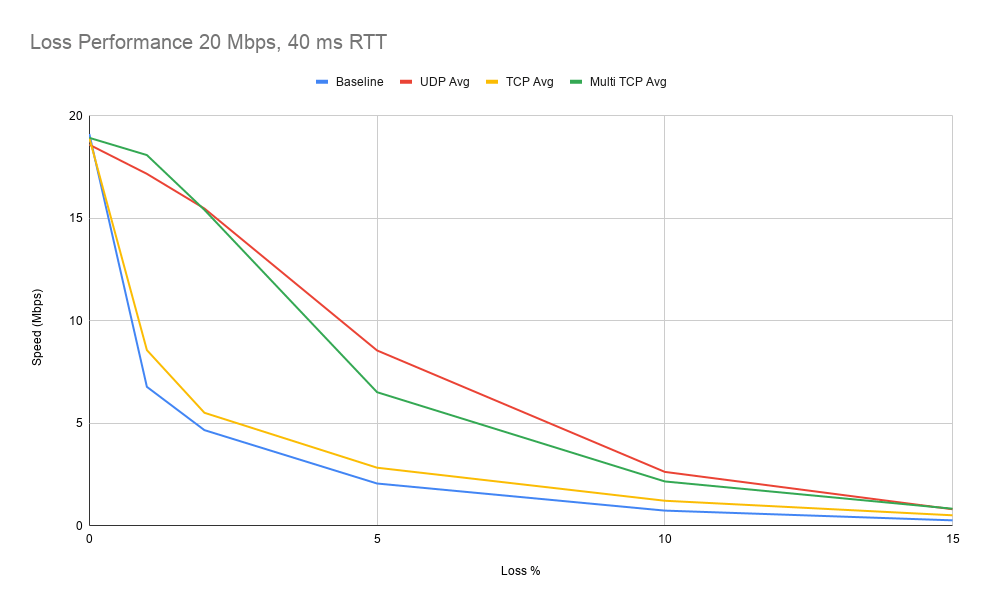
According to the tests we did in the Speedify Testing Lab, the new protocol delivers most improvements for:
- Fast connections, when a single TCP connection is not able to fully utilize those
- Connections with packet loss - especially the wireless ones
- Connections with high latency - e.g. satellite (including Starlink)
- When connecting to servers located far away - e.g. remote workers using connections to other countries.
Here’s a graphic on how high speed is maintained when using the new Speedify protocol vs. not using Speedify:
The New Speedify Protocol using Multiple TCP - Is That Some Sort of Multipath TCP (MPTCP)?
Great question. And the answer is no. The new Speedify protocol works within one single connection, whereas Multipath TCP (MPTCP) works over several connections, similar to the connection aggregation / bonding that Speedify does. MPTCP is more analogous to Speedify as a whole. But here’s more below on MPTCP.
As its name suggests, Multipath TCP refers to sending the data from source to destination through multiple routes (paths). This can be done when you have multiple Internet connections available to apply MPTCP. While running, it’s creating a TCP subflow for each connection it’s putting together and sending data through different paths.

Data is flowing through multiple flows from origin to destination. The TCP header of each segment contains, along with the source and destination IP addresses, a data sequence number, so the receiver will get the data from the multiple subflows in the original order, without any corruption. The protocol also has mechanisms to handle congestion control - what it does when one of the connections becomes slow or unreliable.
Find out more about how MPTCP works in the video below:
Speedify - How It Works and How It’s Different from MPTCP
As opposed to the limited “backup flow” ability of MPTCP, Speedify has a more complex approach to the whole thing, with advanced logic and multiple types of connection priorities. Meaning that it will use the connections being bonded according to the performance and priorities set by the user. Speedify will send as much data as it can on:
- non-metered connections, such as wired Ethernet and Wi-Fi, before sending a lot of data through cellular
- lower latency connections, such as wired (cable, DSL), before wireless (cellular, satellite)
- higher bandwidth connections before slower ones.
Imagine Speedify as an on-call optimization specialist, monitoring the quality of each connection at any time and deciding how much data to send over each one so the overall Internet connectivity is at its best. Plus - it’s all encrypted, so nobody can sniff your Internet traffic.
Here’s a comparison table between MPTCP and Speedify:
|
Feature |
Multipath TCP (MPTCP) |
Speedify |
|
Allows the use of all available connections |
yes |
yes |
|
Failover protection |
yes |
yes |
|
Error correction and packet loss |
yes |
yes |
|
Software-only solution implementation |
Linux, MacOS 10.10+ |
Linux, MacOS, Windows, iOS, Android |
|
Communication security (encryption) |
When running secure protocols over MPTCP (i.e. HTTPS) |
Native |
|
Able to dynamically use other protocols (i.e. UDP) |
no |
yes |
|
Connection priority |
limited |
yes |
|
Cost aware |
no |
yes |
|
Maximizes bandwidth |
yes, limited to the implementation logic |
yes |
|
Solution cost |
depends on type of implementation (dedicated hardware / software-only) and support needed to set up and maintain |
as low as $3 / month |
As you can see, there’s a lot that Speedify has to offer when compared to the existing MPTCP implementations. Make sure to give Speedify a try!
How Speedify Helps You Get Faster, More Reliable Internet
Everything that uses slow, unreliable and wireless Internet connections are the prime beneficiaries of Speedify - from RV travelers and commuters to remote workers and live streamers. Why? Because it caters to their problems and offers an elegant solution.
Inherently wireless connections such as Wi-Fi, mobile data and satellite are prone to coverage issues and high latency. When you are far from the hotspot or cellular tower, the connection is slow and has added lag. Plus, when your device does the handover from Wi-Fi to cellular or between Wi-Fi networks, an Internet drop is expected, while the new connection is established. This affects especially bandwidth-intensive applications, such as live streaming (including video calls) and gaming.
By using all your available connections at once, you are safe from such issues. The apps you’re running won’t even see that something’s up, because Speedify will automatically adjust the data rate it’s sending through each connection.
If you’re not yet familiar with Speedify, learn more by visiting our website. To get started, get Speedify now!


Speed
Stability
Security
Speedify devs love talking tech on YouTube, Tiktok, and Instagram!
Alex Gizis and the Speedify devs discuss and explain technology including Starlink satellites, Wi-Fi 7 routers, Apple networking features, fiber optics, broadband internet, 5G mobile networks, AI, networking protocols, and much more. Follow Speedify on YouTube, TikTok, Instagram, and LinkedIn!
Alex and the Speedify team are always exploring the latest in networking and security technology—like 5G, 6G, WiFi 7, laser and satellite internet—and sharing it in new discussion content across YouTube, TikTok, Instagram, and LinkedIn every week.
Got a tech question? Let's go deeper! Pop into Speedify Office Hours live every Wednesday at 10 AM Eastern. Speedify CEO Alex Gizis and our network engineers are standing by to break down your questions about networks, tech updates, and Speedify features.
